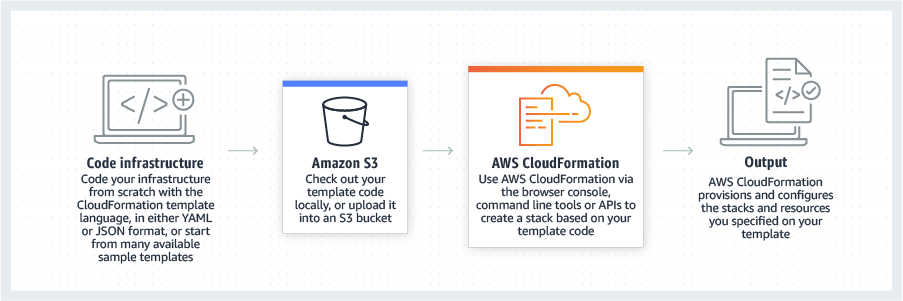
AWS CloudFormation gives developers and systems administrators a way to create and manage a collection of related AWS resources, provisioning and updating them in a predictable fashion. Use AWS CloudFormation’s sample templates or create templates to describe the AWS resources, and any associated dependencies or runtime parameters, required to run an application. Users don’t need to figure out the order for provisioning AWS services or the subtleties of making those dependencies work.…
$0
IBM Power Virtual Server
Score 7.3 out of 10
N/A
IBM presents their Power Systems Virtual Server as a scalable, cost-effective way to run IBM AIX, IBM i and Linux workloads.
N/A
Pricing
AWS CloudFormation
IBM Power Virtual Server
Editions & Modules
Free Tier - 1,000 Handler Operations per Month per Account
$0.00
Handler Operation
$0.0009
per handler operation
No answers on this topic
Offerings
Pricing Offerings
AWS CloudFormation
IBM Power Virtual Server
Free Trial
Yes
No
Free/Freemium Version
Yes
No
Premium Consulting/Integration Services
No
No
Entry-level Setup Fee
No setup fee
Optional
Additional Details
There is no additional charge for using AWS CloudFormation with resource providers in the following namespaces: AWS::*, Alexa::*, and Custom::*. In this case you pay for AWS resources (such as Amazon EC2 instances, Elastic Load Balancing load balancers, etc.) created using AWS CloudFormation as if you created them manually. You only pay for what you use, as you use it; there are no minimum fees and no required upfront commitments.
When you use resource providers with AWS CloudFormation outside the namespaces mentioned above, you incur charges per handler operation. Handler operations are create, update, delete, read, or list actions on a resource.
—
More Pricing Information
Community Pulse
AWS CloudFormation
IBM Power Virtual Server
Features
AWS CloudFormation
IBM Power Virtual Server
Infrastructure-as-a-Service (IaaS)
Comparison of Infrastructure-as-a-Service (IaaS) features of Product A and Product B
Cloning a virtual machine creates a virtual machine that is a copy of the original. The new virtual machine is configured with the Cloning Cloning a virtual machine creates a virtual machine that is a copy of the original. The new virtual machine is configured with the same virtual hardware, installed software, and other properties that were configured for the original virtual machine. For information about persistent memory and PMem storage, see the vSphere Resource Management Guide. For information virtual machine creates a virtual machine that is a copy of the original. The new virtual machine is configured with the same virtual hardware, installed software, and other properties that were configured for the original virtual machine. For information about persistent memory and PMem storage, see the vSphere Resource. Management guide. For information virtual hardware, installed software cloning a virtual machine creates a virtual machine that is a copy of the original. The new virtual machine is configured with the same virtual hardware, installed software, and other properties that were configured for the original virtual machine. For information about persistent memory and PMem storage, see the vSphere Resource Management Guide. For information and other properties that were configured for the original virtual machine. For information about persistent memory and PMem storage, see the vSphere Resource Management Guide. For information.
Due to its reliability, it is well-suited for mission-critical applications. It is also well suited for running multiple applications on a single server and fully utilizing the server's full capacity. However, it is not well suited for servers that require dedicated IO resources.
At the moment we are 100% satisfied with the performance and our support team is well used to the process involved. So unless we have some major issues in adopting, we are sure to be with IBM itself.
It's easy enough to get a shared template & apply it. You don't even have to download-then-upload or copy-and-paste, a publicly-accessible url works.
Diving deeper, it has enough powerful capabilities to make the life of a platform / DevOps engineer bearable.
However, you need equally deep knowledge to troubleshoot issues, when they inevitably pop up. This is the same for all IaC technologies, as they are additional abstraction layers on top of the native API provided by the cloud providers.
I would rate IBM Power Virtual Server’s overall usability as an 8 out of 10. The platform offers a solid interface and intuitive dashboard, making it relatively easy for users with cloud experience to navigate. Its scalability and flexibility are strong points. However, the learning curve for new users can be steep, especially when dealing with complex integrations or configurations. While documentation and support are extensive, some users may find the setup process challenging. Overall, it’s highly functional but could be streamlined further for beginners.
As with most IBM products the ongoing support for IBM Power Virtual Server is solid and consistent. IBM provides a clear roadmap for receiving support of their products. Both voice and online response is offered. It is obvious that IBM has the internal systems and culture to maintain support functions. This starts from the initial support call to the problem analysis and continues through the problem resolution. Documentation and communication are consistent within this process.
Since the product I'm involved is primarily hosted on AWS we use CloudFormation but in some other products where we have hybrid cloud deployments we prefer Terraform which is opensource.
There were different factors which were involved in terms of evaluating IBM as a preferred choice over other offering because of performance and reliability in terms of high performance computing and overall enterprise great feature in terms of critical application which outperforms or maybe beat any time other offerings like AWS system manager data availability is one more in terms of disaster recovery solution and high availability feature the kind of offering IBM provide was way more than in terms of other fujitsu server.
I would rate IBM Cognos Analytics’ scalability as a 9 out of 10. The platform is highly capable of handling large volumes of data and supporting thousands of users with ease. Its architecture is designed for high performance, though it may require fine-tuning for extremely complex data environments to maintain optimal performance.
There have also been 80% fewer application crashes due to a lack of resources that previously ran on the X86 platform.
Administration management has been simplified and staff can dedicate themselves to the development of applications, instead of providing support to users when the applications do not respond efficiently, this made staff 45% more productive.