
AWS CloudFormation vs. DigitalOcean
| Product | Rating | Most Used By | Product Summary | Starting Price |
|---|---|---|---|---|
 AWS CloudFormation | Score8.8 out of 10 | N/A | AWS CloudFormation gives developers and systems administrators a way to create and manage a collection of related AWS resources, provisioning and updating them in a predictable fashion. Use AWS CloudFormation’s sample templates or create templates to describe the AWS resources, and any associated dependencies or runtime parameters, required to run an application. Users don’t need to figure out the order for provisioning AWS services or the subtleties of making those dependencies work.… | $0 |
 DigitalOcean | Score8.9 out of 10 | N/A | DigitalOcean is an infrastructure-as-a-service (IaaS) platform from the company of the same name headquartered in New York. It is known for its support of managed Kubernetes clusters and “droplets” feature. | $5 Starting Price Per Month |
| AWS CloudFormation | DigitalOcean | |||||||||||||||
|---|---|---|---|---|---|---|---|---|---|---|---|---|---|---|---|---|
| Editions & Modules |
|
| ||||||||||||||
| Offerings |
| |||||||||||||||
| Entry-level Setup Fee | No setup fee | No setup fee | ||||||||||||||
| Additional Details | There is no additional charge for using AWS CloudFormation with resource providers in the following namespaces: AWS::*, Alexa::*, and Custom::*. In this case you pay for AWS resources (such as Amazon EC2 instances, Elastic Load Balancing load balancers, etc.) created using AWS CloudFormation as if you created them manually. You only pay for what you use, as you use it; there are no minimum fees and no required upfront commitments. When you use resource providers with AWS CloudFormation outside the namespaces mentioned above, you incur charges per handler operation. Handler operations are create, update, delete, read, or list actions on a resource. | — | ||||||||||||||
| More Pricing Information | ||||||||||||||||
| AWS CloudFormation | DigitalOcean | |
|---|---|---|
| Considered Both Products | No answer on this topic | No answer on this topic |
| Key User Insights | ||
| Would buy again | ||
100% Would buy again 5 Answers | 100% Would buy again 10 Answers | |
| Delivers good value for the price | ||
100% Delivers good value for the price 5 Answers | 100% Delivers good value for the price 10 Answers | |
| Happy with the feature set | ||
80% Happy with the feature set 4 Answers | 100% Happy with the feature set 10 Answers | |
| Lived up to sales and marketing promises | ||
80% Lived up to sales and marketing promises 4 Answers | 100% Lived up to sales and marketing promises 10 Answers | |
| Implementation went as expected | ||
100% Implementation went as expected 5 Answers | 100% Implementation went as expected 10 Answers | |
| AWS CloudFormation | DigitalOcean | |||||||||||||||||||||||||||||||
|---|---|---|---|---|---|---|---|---|---|---|---|---|---|---|---|---|---|---|---|---|---|---|---|---|---|---|---|---|---|---|---|---|
| Infrastructure-as-a-Service (IaaS) |
| |||||||||||||||||||||||||||||||
| AWS CloudFormation | DigitalOcean | |
|---|---|---|
| Small Businesses |  Salt Score6.2 out of 10 | DigitalOcean Droplets Score8.7 out of 10 |
| Medium-sized Companies |  Perforce Puppet Score8.9 out of 10 |  IBM Cloud Bare Metal Servers Score8.7 out of 10 |
| Enterprises | AWS Config Score7 out of 10 |  SAP on IBM Cloud Score9.5 out of 10 |
| All Alternatives | View all alternatives | View all alternatives |
| AWS CloudFormation | DigitalOcean | |
|---|---|---|
| Likelihood to Recommend | 7.6 | 8.2 |
| Likelihood to Renew | - | 9.0 |
| Usability | - | 8.0 |
| Availability | - | 10.0 |
| Performance | - | 9.0 |
| Support Rating | - | 8.8 |
| Product Scalability | - | 10.0 |
| AWS CloudFormation | DigitalOcean | |
|---|---|---|
| Likelihood to Recommend |
|
|
| Pros |
|
|
| Cons |
|
|
| Likelihood to Renew | No answers on this topic |
|
| Usability |
|
|
| Reliability and Availability | No answers on this topic |
|
| Performance | No answers on this topic |
|
| Support Rating | No answers on this topic |
|
| Alternatives Considered |
|
|
| Scalability | No answers on this topic |
|
| Return on Investment |
|
|
| ScreenShots | AWS CloudFormation Screenshots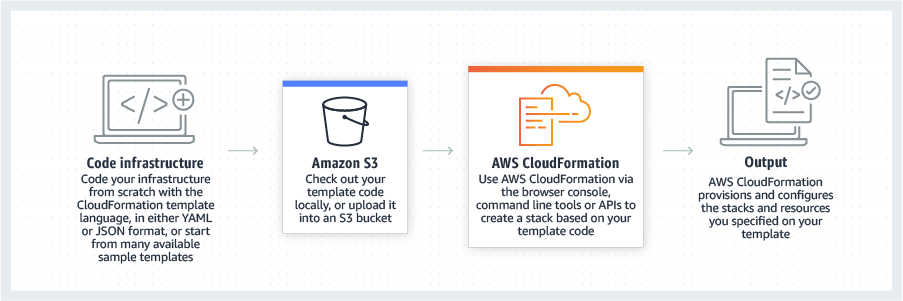    |


