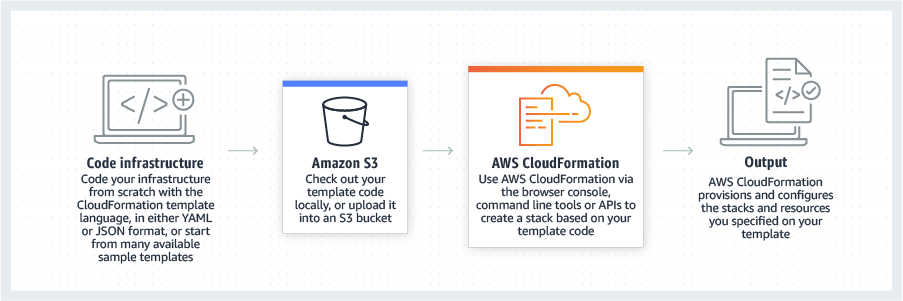
AWS CloudFormation gives developers and systems administrators a way to create and manage a collection of related AWS resources, provisioning and updating them in a predictable fashion. Use AWS CloudFormation’s sample templates or create templates to describe the AWS resources, and any associated dependencies or runtime parameters, required to run an application. Users don’t need to figure out the order for provisioning AWS services or the subtleties of making those dependencies work.…
$0
AWS OpsWorks
Score 4.3 out of 10
N/A
AWS OpsWorks is a configuration management service that provides managed instances of Chef and Puppet.
N/A
Pricing
AWS CloudFormation
AWS OpsWorks
Editions & Modules
Free Tier - 1,000 Handler Operations per Month per Account
$0.00
Handler Operation
$0.0009
per handler operation
No answers on this topic
Offerings
Pricing Offerings
AWS CloudFormation
AWS OpsWorks
Free Trial
Yes
No
Free/Freemium Version
Yes
No
Premium Consulting/Integration Services
No
No
Entry-level Setup Fee
No setup fee
No setup fee
Additional Details
There is no additional charge for using AWS CloudFormation with resource providers in the following namespaces: AWS::*, Alexa::*, and Custom::*. In this case you pay for AWS resources (such as Amazon EC2 instances, Elastic Load Balancing load balancers, etc.) created using AWS CloudFormation as if you created them manually. You only pay for what you use, as you use it; there are no minimum fees and no required upfront commitments.
When you use resource providers with AWS CloudFormation outside the namespaces mentioned above, you incur charges per handler operation. Handler operations are create, update, delete, read, or list actions on a resource.
Cloning a virtual machine creates a virtual machine that is a copy of the original. The new virtual machine is configured with the Cloning Cloning a virtual machine creates a virtual machine that is a copy of the original. The new virtual machine is configured with the same virtual hardware, installed software, and other properties that were configured for the original virtual machine. For information about persistent memory and PMem storage, see the vSphere Resource Management Guide. For information virtual machine creates a virtual machine that is a copy of the original. The new virtual machine is configured with the same virtual hardware, installed software, and other properties that were configured for the original virtual machine. For information about persistent memory and PMem storage, see the vSphere Resource. Management guide. For information virtual hardware, installed software cloning a virtual machine creates a virtual machine that is a copy of the original. The new virtual machine is configured with the same virtual hardware, installed software, and other properties that were configured for the original virtual machine. For information about persistent memory and PMem storage, see the vSphere Resource Management Guide. For information and other properties that were configured for the original virtual machine. For information about persistent memory and PMem storage, see the vSphere Resource Management Guide. For information.
AWS Opsworks is good for linking AWS services and setting up and maintaining webservers using Chef. However, it will become EOL soon so we would not recommend starting new projects using it and instead go for the recommended Systems Manager setup
The interface is quite intuitive and allows you to discover and easily find what you want to do and what other features are within OpsWorks.
Chef integration is pretty seamless and there are a good set of options and operating systems to choose from
It makes things like auto scaling set up, either via load or time, more straight forward and intuitive than what you'd typically see via the EC2 console
It's easy enough to get a shared template & apply it. You don't even have to download-then-upload or copy-and-paste, a publicly-accessible url works.
Diving deeper, it has enough powerful capabilities to make the life of a platform / DevOps engineer bearable.
However, you need equally deep knowledge to troubleshoot issues, when they inevitably pop up. This is the same for all IaC technologies, as they are additional abstraction layers on top of the native API provided by the cloud providers.
Unless you pay for a pricey support package getting support on OpsWorks will be pretty slow. Documentation is also relatively limited and sometimes hard to follow when compared to competitors. Generally, we've been able to get the answers we need from OpsWorks support when we run into problems but don't expect rapid responses.
Since the product I'm involved is primarily hosted on AWS we use CloudFormation but in some other products where we have hybrid cloud deployments we prefer Terraform which is opensource.
OpsWorks isn't really a direct competitor to Terraform/Cloudformation, but it does allow you to do some of the more simple things on offer quite quickly and effectively. Opsworks was used for this reason, along with existing internal knowledge of Chef. Along with some of the other services on offer from AWS, it is good to use as a stepping stone along the way when building your systems - or perhaps it would be entirely suitable for a fairly simple project.
OpsWorks allowed us to access the AWS infrastructure with a considerably lower time investment than we would have otherwise needed when we first implemented it.
Since we've been running with OpsWorks we've experienced very little downtime and it's required relatively little maintenance.
The main downside of using OpsWorks for us is that it has locked us into a very specific infrastructure that doesn't have the flexibility of many of the newer infrastructure management tools, this may lead to a painful migration down the road. We also run a risk of long outage if it ever does introduce breaking changes as the skillset needed to work with the OpsWorks tooling is very specific not widely available in our company.