Auvik vs. SolarWinds Network Topology Mapper

Overview
ProductRatingMost Used ByProduct SummaryStarting Price
Auvik
Score 9.9 out of 10
N/A
Auvik Network Management is a vendor-agnostic cloud-based network monitoring and management solution providing automated network discovery. Auvik requires no service hardware or disruptive maintenance cycles and provides onboarding and training for new and existing users. Auvik delivers visibility and automation to reduce friction for IT teams and allow them to give end users the freedom to work wherever and however they…N/A
SolarWinds Network Topology Mapper
Score 7.1 out of 10
N/A
Network Topology Mapper is Network mapping software from SolarWinds built to automatically plot a network. Leveraging its multi-layer discovery technique, Network Topology Mapper automatically discovers LAN or WAN and produces comprehensive, network diagrams that integrate OSI Layer 2 and Layer 3 topology data (including switchto-switch, switch-to-node, and switch-to-router port connections) which can be exported into Microsoft Office® Visio® or other formats and shared.
$1,570
Per Instance
Pricing
AuvikSolarWinds Network Topology Mapper
Editions & Modules
No answers on this topic
One Time Price
$1,570
Per Instance
Offerings
Pricing Offerings
AuvikSolarWinds Network Topology Mapper
Free Trial
YesYes
Free/Freemium Version
NoNo
Premium Consulting/Integration Services
NoNo
Entry-level Setup FeeNo setup feeNo setup fee
Additional DetailsPricing is calculated per number of switches, routers, firewalls, and controllers. Everything else is monitored for free.
More Pricing Information
Community Pulse
AuvikSolarWinds Network Topology Mapper
Features
AuvikSolarWinds Network Topology Mapper
Network Performance Monitoring
Comparison of Network Performance Monitoring features of Product A and Product B
Auvik
7.9
Ratings
4% below category average
SolarWinds Network Topology Mapper
-
Ratings
Automated network device discovery9.60 Ratings00 Ratings
Network monitoring8.80 Ratings00 Ratings
Baseline threshold calculation7.80 Ratings00 Ratings
Alerts8.60 Ratings00 Ratings
Network capacity planning7.60 Ratings00 Ratings
Packet capture analysis7.00 Ratings00 Ratings
Network mapping8.40 Ratings00 Ratings
Customizable reports5.60 Ratings00 Ratings
Wireless infrastructure monitoring7.40 Ratings00 Ratings
Hardware health monitoring8.20 Ratings00 Ratings
Best Alternatives
AuvikSolarWinds Network Topology Mapper
Small Businesses
NinjaOne
NinjaOne
Score 9.0 out of 10
NinjaOne
NinjaOne
Score 9.0 out of 10
Medium-sized Companies
SolarWinds NetFlow Traffic Analyzer (NTA)
Score 9.0 out of 10
Intermapper
Intermapper
Score 8.4 out of 10
Enterprises
SolarWinds NetFlow Traffic Analyzer (NTA)
Score 9.0 out of 10
Cisco Meraki Dashboard
Score 9.3 out of 10
All AlternativesView all alternativesView all alternatives
User Ratings
AuvikSolarWinds Network Topology Mapper
Likelihood to Recommend
8.3
(0 ratings)
-
(0 ratings)
Likelihood to Renew
9.8
(0 ratings)
-
(0 ratings)
Usability
7.3
(0 ratings)
-
(0 ratings)
Availability
9.1
(0 ratings)
-
(0 ratings)
Performance
8.2
(0 ratings)
-
(0 ratings)
Support Rating
9.7
(0 ratings)
-
(0 ratings)
Product Scalability
9.1
(0 ratings)
-
(0 ratings)
Vendor post-sale
10.0
(0 ratings)
-
(0 ratings)
Vendor pre-sale
10.0
(0 ratings)
-
(0 ratings)
User Testimonials
AuvikSolarWinds Network Topology Mapper
Likelihood to Recommend
Auvik is fantastic for managing multi-site, multi-company networks - very well suited for MSP or consultative technology companies. Navigation is simple and easy between clients and their sites. Auvik is less well suited for managing single sites or single companies - it is really meant to be used at a larger scale.
Read full review
No answers on this topic
Pros
  • Maps out devices to switch ports.
  • Monitors, alerts, and reports on network device and port utilization.
  • Quickly created complete network diagrams.
  • Works well in a co-manage environment enabling teams full but restricted access to specific sites. Integrates well with site specific access in ConnectWise Automate.
Read full review
No answers on this topic
Cons
  • The map is not easy to quickly zoom in and out of or pan around. Usually requires a lot of filter toggling. Keyboard shortcuts for this would be nice.
  • Better global settings that can be pushed to multiple client organizations
  • Security groups/RBAC for user permissions across multiple clients
  • Ability to change the URL
Read full review
No answers on this topic
Likelihood to Renew
Because it's an amazing product.
Read full review
No answers on this topic
Usability
The program can be a bit unwieldy at times, however the majority of information is displayed in a readable and friendly way. The maps and popup information box from the bottom can be harder to use on a smaller screen but on a 1080p+ display tends to work fine.
Read full review
No answers on this topic
Reliability and Availability
We have never had a major outage or impact that was noticeable.
Read full review
No answers on this topic
Performance
Pages can be slow to load on larger sites but tends to be fine for most clients.
Read full review
No answers on this topic
Support Rating
Fast response and knowledgeable. If the technician does not know, they will look for the information and get back to you.
Read full review
No answers on this topic
Alternatives Considered
Auvik's license structure is simple and affordable. Auvik's license is based on total network devices in your network. They charge only for total number of Switches, Routers, firewalls and Wireless controllers in your network. All other devices license would be free of charge
Read full review
No answers on this topic
Scalability
Auvik has worked on sites with 15+ offices connected with VPN's and we have not encountered any issues with the monitoring. On larger sites the map can be a bit cumbersome to read however it can be cleaned up easily with device filters.
Read full review
No answers on this topic
Return on Investment
  • We are at an initial stage of device onboarding and Auvik already provides quick network documentation without having to worry about updating; this is done dynamically.
  • Helpful for MSP in that it uses role-based access control to present customer-focused device management, and simplifying administration for monitoring and alerting, dashboards and reports, and billing.
Read full review
No answers on this topic
ScreenShots

Auvik Screenshots

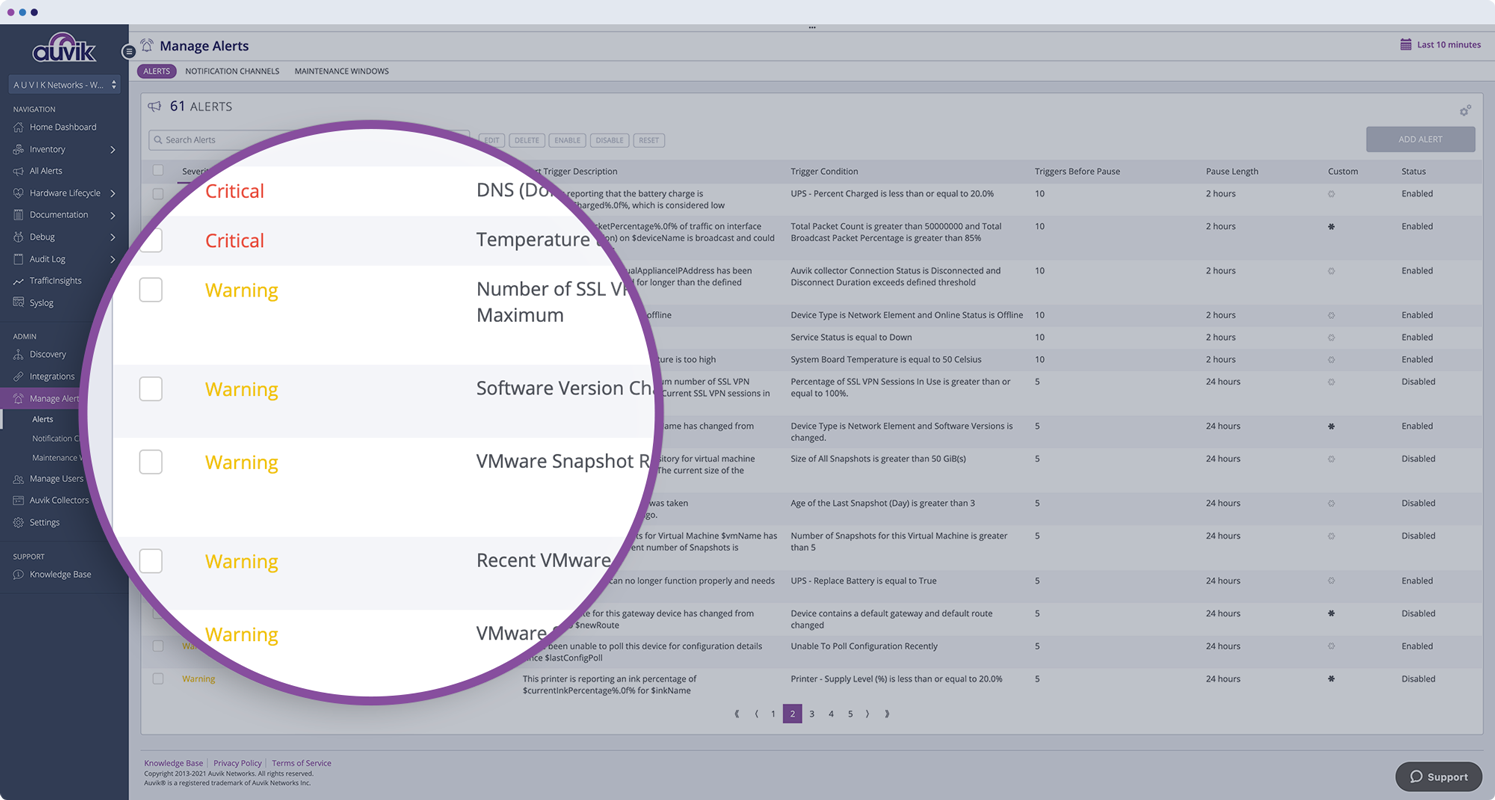
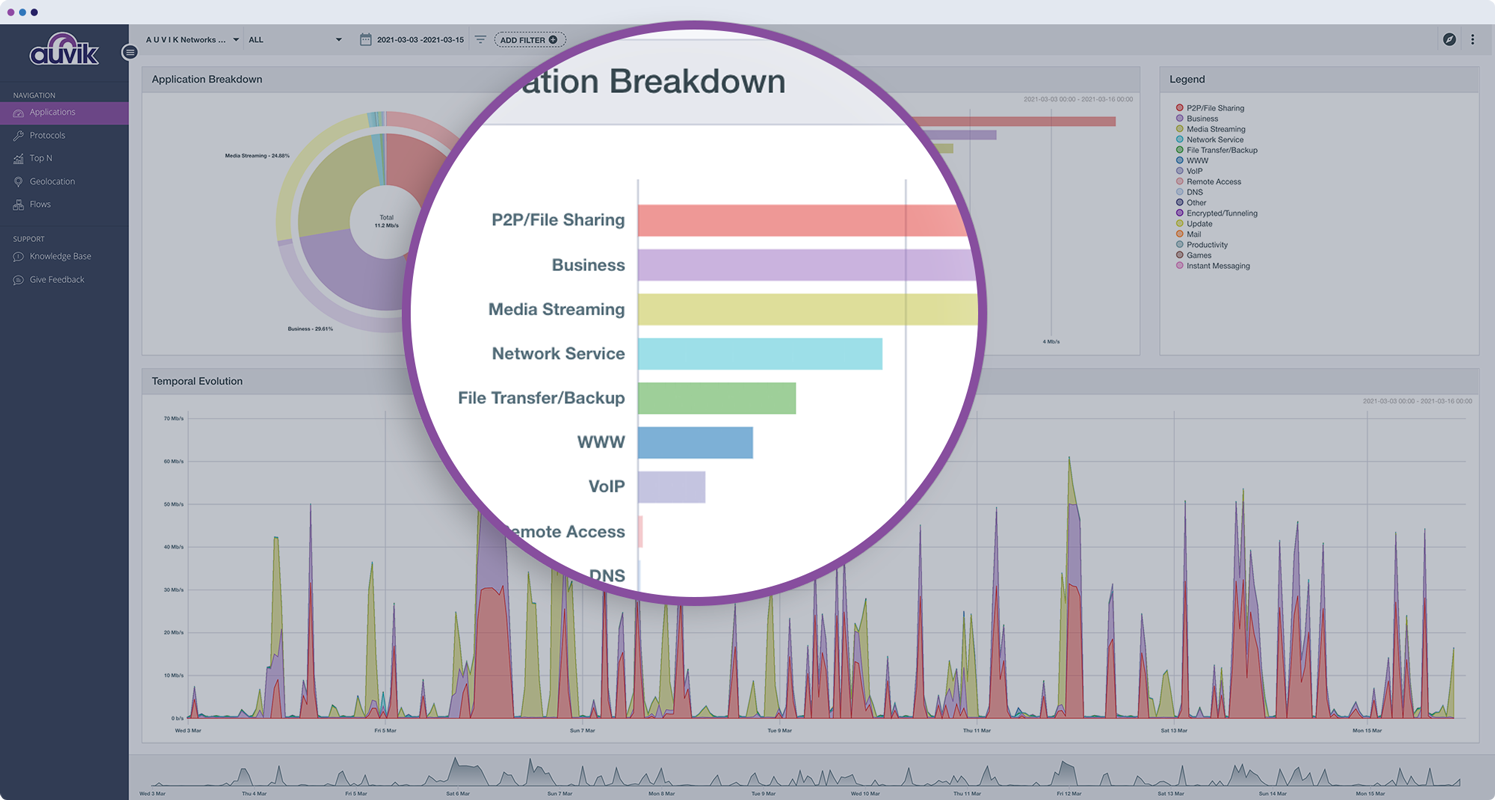
Screenshot of a display of the big network picture used to narrow down possible devices to investigate. Auvik pulls data from sources like CDP, LLDP, and forwarding tables to meticulously model the Layer 1 network diagram. Layers 2 and 3 are built from ARP tables, IP assignments, and VLAN associations to show what’s on the network, where it is, and how it’s connected.Screenshot of Auvik’s automated inventory, which uses network protocols to detect and capture full details for every device on the network including make and model, serial number, IP address, and the physical switchport the device is connected to. If the device is known but not its location, Auvik can find the device and every other device it’s connected to.Screenshot of lifecycle data, pulled from supported devices to show whether they’re on current or expired support contracts, whether there are more up-to-date software versions available, if devices are eligible to receive critical security updates, and if devices are still available for purchase.Screenshot of Auvik's over 50 pre-configured alerts tuned to industry best practices and ranging from informational to emergency. Its pre-configured alerts can be tweaked, added to, and the frequency of how often notifications are sent can be changed.Screenshot of Auvik TrafficInsights, which leverages machine learning and traffic classification to show which applications—like Dropbox, Netflix, or Slack—or protocols are using up the bulk of the network’s bandwidth.Screenshot of Auvik's centralized syslog for all network devices where they can be viewed directly from the device dashboard for more context, to more quickly troubleshoot network issues.

SolarWinds Network Topology Mapper Screenshots

Screenshot of Automatically discover your entire network and create comprehensive, detailed network topology maps.Screenshot of NTM is capable of building loads of useful network maps without having to rescan using network topology mapping software. Save valuable resources, bandwidth, and time.Screenshot of Export network maps to Microsoft Office Visio, PDF, and PNG formats, and also schedule updated map exports to Orion® Network Atlas.Screenshot of Keep your network up to date by automatically detecting new devices and changes to network topology with scheduled network scanning in the network topology tool.Screenshot of Perform multi-level network discovery to produce an integrated OSI Layer 2 and Layer 3 network map that includes detailed device information.Screenshot of Directly address PCI compliance and other regulations that require maintenance of an up-to-date network diagram. SolarWinds network topology software is also FIPS 140-2 compliant.