TrustRadius: an HG Insights company

Save this comparison

Save this comparison

Add Product

Recommended Comparisons

    Overview
    ProductRatingMost Used ByProduct SummaryStarting Price

    AutoCAD Web

    Score8 out of 10
    N/AAutoCAD mobile (formerly AutoCAD 360) is an easy to use drawing and drafting app from Autodesk. It enables users in design, construction, and engineering industries to view, create, mark-up, edit, and share drawings on mobile devices.

    $10

    per month

    build.works

    N/A
    Small Businesses (1-50 employees)
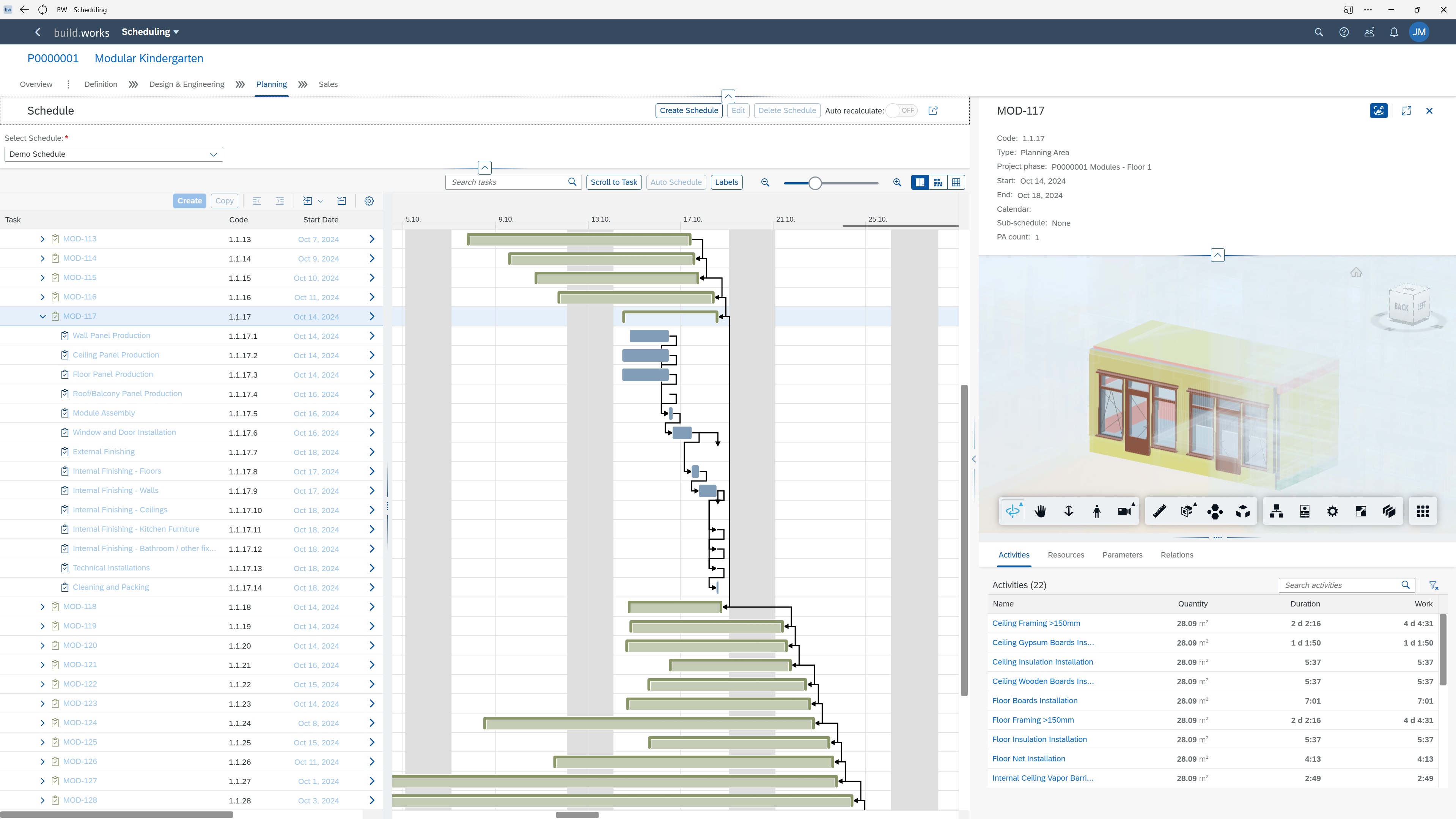
    build.works is a BIM model information based business management software (SaaS) for manufacturing, prefabrication of building elements and on-site construction. The software provides a solution for running business processes. The features of build.works cover the project execution life-cycle - starting from BIM model based take-off and project specifications, providing tools for budgeting and scheduling and finishing with task management and real-time reporting…

    $55

    per month per user

    Pricing
    AutoCAD Webbuild.works
    Editions & Modules
    Premium
    $5.00
    Per User Per Month
    Ultimate
    $15.00
    Per User Per Month
    Worker
    $10
    per month per user
    Define
    $55
    per month per user
    Plan
    $55
    per month per user
    Execute
    $55
    per month per user
    Offerings
    Pricing Offerings
    AutoCAD Webbuild.works
    Free Trial
    NoYes
    Free/Freemium Version
    NoNo
    Premium Consulting/Integration Services
    NoNo
    Entry-level Setup FeeNo setup feeOptional
    Additional Detailsbuild.works is a monthly user-subscription based software as a service (SaaS). Subscriptions are usage and role based allowing flexible pricing for companies of all sizes.
    More Pricing Information
    Features
    AutoCAD Webbuild.works
    Reporting & Analytics
    Comparison of Reporting & Analytics features of AutoCAD Web and build.works
    Feature
    AutoCAD Web
    8.0
    1 Ratings
    5% above category average
    build.works
    -
    Ratings
    Standard reports7.01 Ratings00 Ratings
    Data exportability9.01 Ratings00 Ratings
    Construction Project & Field Management
    Comparison of Construction Project & Field Management features of AutoCAD Web and build.works
    Feature
    AutoCAD Web
    7.6
    8 Ratings
    1% below category average
    build.works
    -
    Ratings
    Plan distribution & viewing9.07 Ratings00 Ratings
    Plan markups & sharing7.08 Ratings00 Ratings
    Issue tracking & punchlists4.15 Ratings00 Ratings
    Photo documentation7.25 Ratings00 Ratings
    Jobsite reports6.03 Ratings00 Ratings
    Document sharing10.07 Ratings00 Ratings
    RFI tools7.83 Ratings00 Ratings
    Collaboration & approvals6.65 Ratings00 Ratings
    As-built drawings9.07 Ratings00 Ratings
    Mobile app10.07 Ratings00 Ratings
    Submittal design and management7.01 Ratings00 Ratings
    Best Alternatives
    AutoCAD Webbuild.works
    Small Businesses
    CMiC Construction Platform
    Score7.2 out of 10
    CMiC Construction Platform
    Score7.2 out of 10
    Medium-sized Companies
    Autodesk Build
    Score8.2 out of 10
    Autodesk Build
    Score8.2 out of 10
    Enterprises
    InEight
    Score8.3 out of 10
    InEight
    Score8.3 out of 10
    All AlternativesView all alternativesView all alternatives
    User Ratings
    AutoCAD Webbuild.works
    Likelihood to Recommend
    8.0
    (10 ratings)
    -
    (0 ratings)
    Likelihood to Renew
    10.0
    (1 ratings)
    -
    (0 ratings)
    User Testimonials
    AutoCAD Webbuild.works
    Likelihood to Recommend
    Autodesk
    AutoCAD 360 has multiple functionalities that adapt to circumstantial conditions. It has a focus on available tools at all times and deserves to be updated to be at the forefront of technological platforms. It is very useful in some aspects of functionality to have access to less dense and capable tools to develop environments and improve visualization.
    Incentivized
    Read full review
    build.works
    No answers on this topic
    Pros
    Autodesk
    • Allows our entire design team to share and review information graphically in one location (cloud-based).
    • Has the capability to fluidly interact with many other Autodesk software products.
    • Being able to use AutoCAD 360 on the iPad is a great feature without having to install the software.
    Incentivized
    Read full review
    build.works
    No answers on this topic
    Cons
    Autodesk
    • It'd be nice to be able to use AutoCAD 360 to leave comments on peoples files, such as being able to annotate a certain part of it and mark it for review, so then its author can look at the note and make necessary changes.
    Incentivized
    Read full review
    build.works
    No answers on this topic
    Likelihood to Renew
    Autodesk
    This is so useful so we would like to keep renewing as Autocad 360 does. In fact we are very optimistic about the tools that come in every renewal because we will then have even more features available.
    Incentivized
    Read full review
    build.works
    No answers on this topic
    Alternatives Considered
    Autodesk
    Although there are lots of alternatives to AutoCAD mobile on the Google play store and the app store, many of these alternatives are not professionally developed and are associated with shady developers. So there might be a privacy or security risk with the usage these alternatives. However, DWG FastView is a worthy competing alternative.
    Incentivized
    Read full review
    build.works
    No answers on this topic
    Return on Investment
    Autodesk
    • ROI is a bit low, because a lot of people are moving to Revit and BIM 360.
    • Not all consultants use CAD so it makes it hard for compatibility.
    Incentivized
    Read full review
    build.works
    No answers on this topic
    ScreenShots

    build.works Screenshots

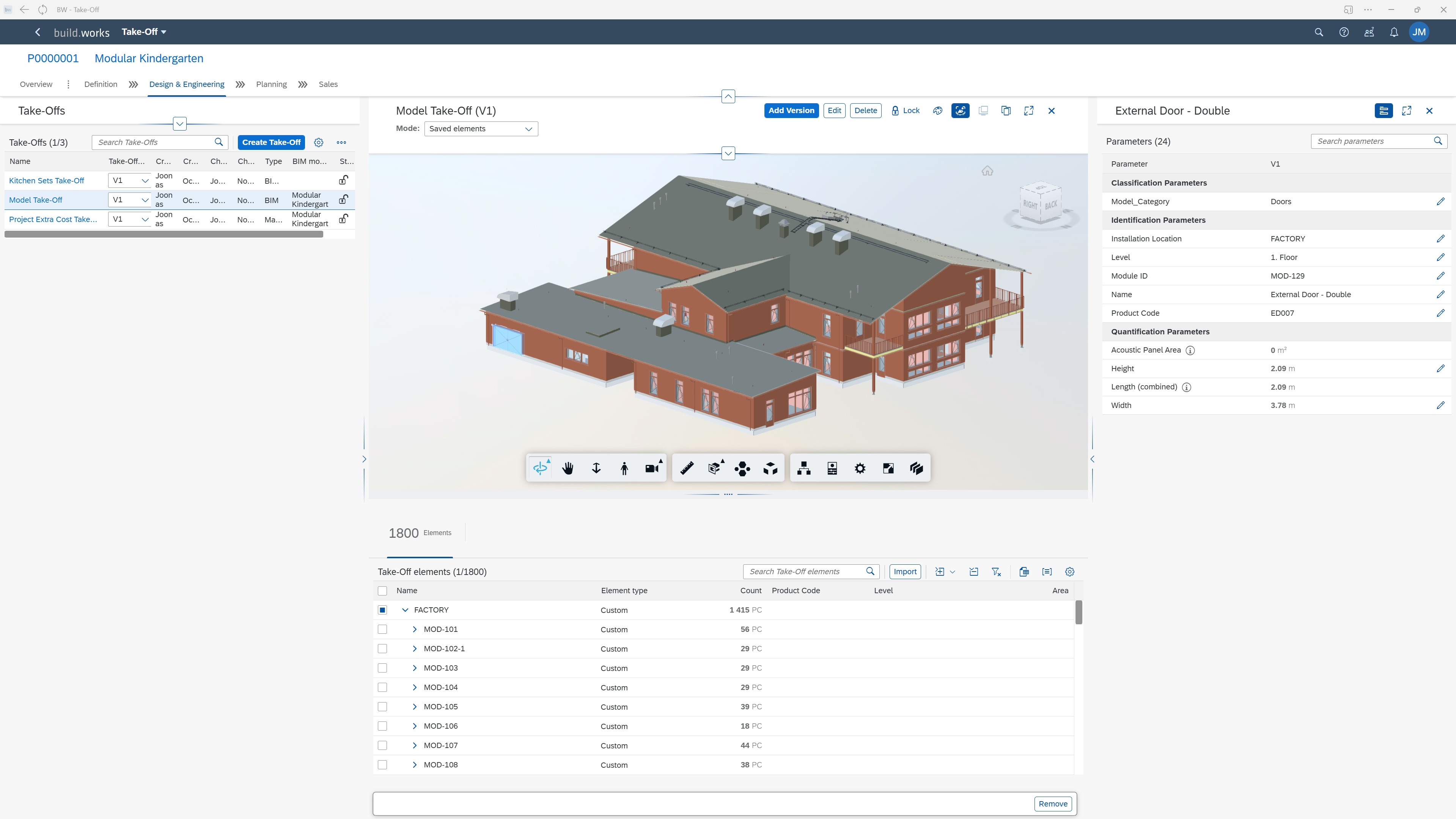
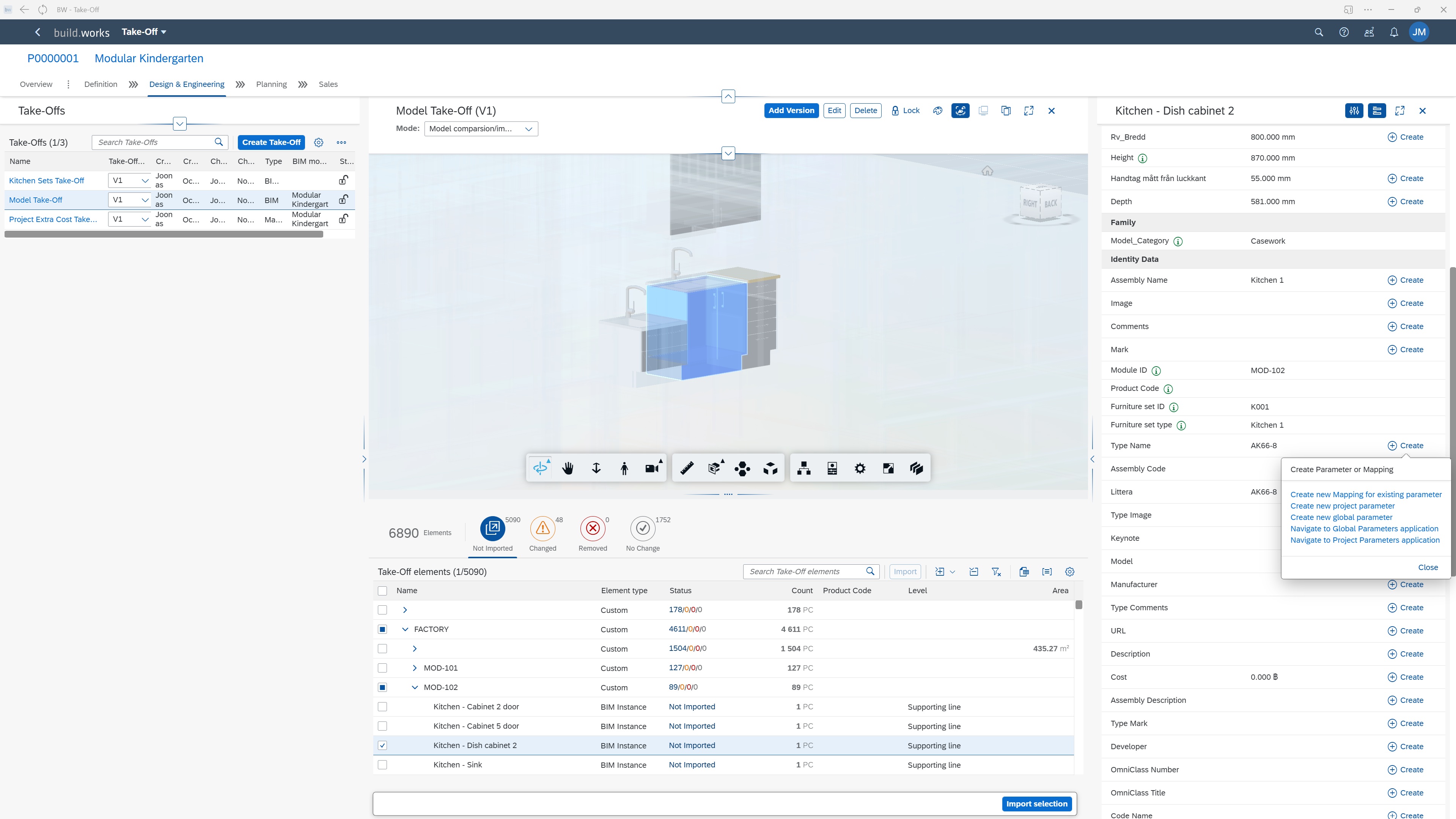
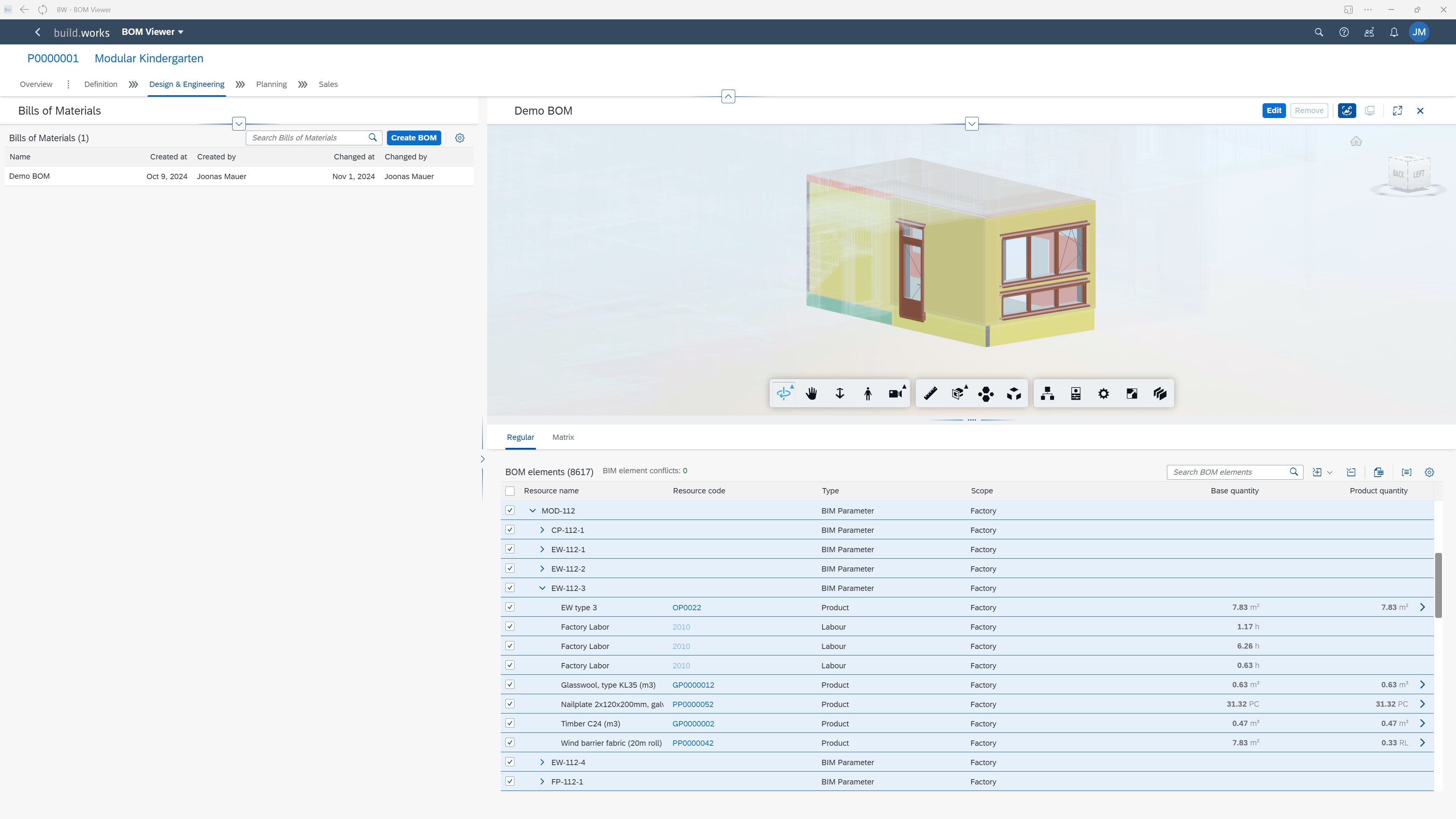
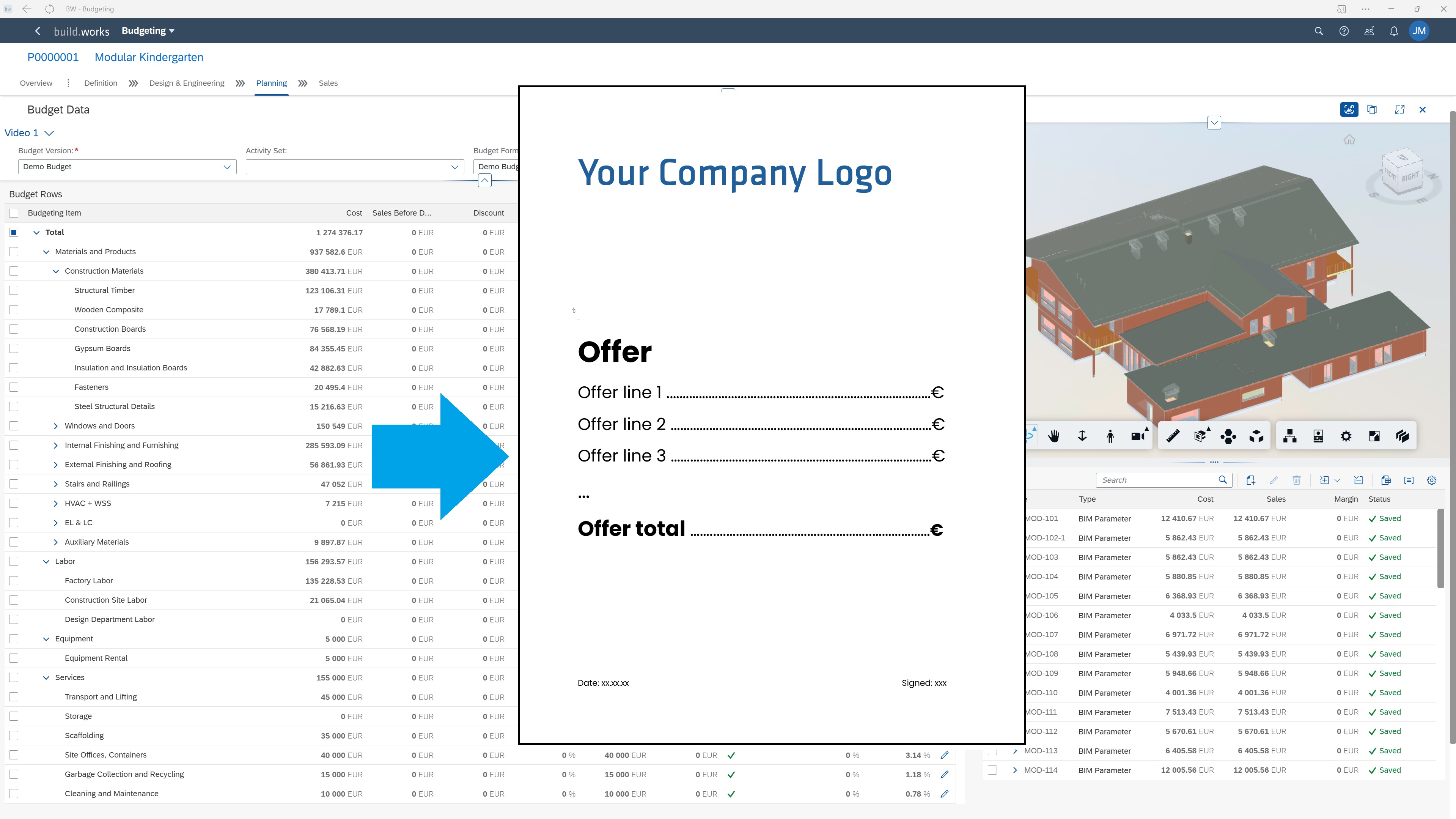
    Screenshot of build.works DEFINE - Create BIM model based Quantity and Information Take-offs.Screenshot of build.works DEFINE - Save and work with model parameters. Use parameter values to structure the project and create a comprehensive BIM information based project specification.Screenshot of build.works DEFINE - Save model elements quantities and link them to specific products to form project specific custom BOMs (materials, labor, equipment, services).Screenshot of build.works PLAN - Compile dynamic budgets for projects based on project BOMs and resource purchasing information. Format the budgets into Quotations in just a few clicks using document templates.Screenshot of build.works PLAN - Estimate project execution capacity requirements and form high level capacity planning schedules for your production or building site.Screenshot of build.works PLAN - Generate dynamic project schedules based on project BOMs and production process templates.