Auth0 vs. Azure Multi-Factor Authentication (Discontinued)

Overview
ProductRatingMost Used ByProduct SummaryStarting Price
Auth0
Score 9.9 out of 10
N/A
Auth0 is an identity management platform for developers and application teams. It gives users a platform to authenticate and authorize, providing secure access to applications, devices, and users. Auth0 aims to provide the simplicity, extensibility, and expertise to scale and protect any application, for any audience. Integrate Auth0 into any app, written in any language, and any framework.
$23
per month
Azure Multi-Factor Authentication (Discontinued)
Score 9.0 out of 10
N/A
Microsoft's Azure Multi-Factor Authentication was an MFA solution acquired with PhoneFactor in 2012. From 2018 it is no longer available as a standalone product. This functionality is now provided by Microsoft Entra ID.N/A
Pricing
Auth0Azure Multi-Factor Authentication (Discontinued)
Editions & Modules
1,000 External Active Users
$23
per month
2,000 External Active Users
$57
per month
5,000 External Active Users
$114
per month
500 External Active Machines
$130
per month
10,000 External Active Users
$228
per month
20,000 External Active Users
$455
per month
50,000 External Active Users
1,138
per month
Over 50,000 External Active Users
Contact for quote
Enterprise
Contact for quote
No answers on this topic
Offerings
Pricing Offerings
Auth0Azure Multi-Factor Authentication (Discontinued)
Free Trial
YesNo
Free/Freemium Version
YesNo
Premium Consulting/Integration Services
NoNo
Entry-level Setup FeeOptionalNo setup fee
Additional Details
More Pricing Information
Community Pulse
Auth0Azure Multi-Factor Authentication (Discontinued)
Features
Auth0Azure Multi-Factor Authentication (Discontinued)
Identity Management
Comparison of Identity Management features of Product A and Product B
Auth0
8.6
Ratings
0% above category average
Azure Multi-Factor Authentication (Discontinued)
-
Ratings
ID-Management Access Control8.20 Ratings00 Ratings
ID Management Single-Sign On (SSO)8.50 Ratings00 Ratings
Multi-Factor Authentication8.50 Ratings00 Ratings
Best Alternatives
Auth0Azure Multi-Factor Authentication (Discontinued)
Small Businesses

No answers on this topic

WatchGuard AuthPoint
Score 9.1 out of 10
Medium-sized Companies
OneLogin by One Identity
Score 9.6 out of 10
Cisco Duo
Cisco Duo
Score 9.5 out of 10
Enterprises
OneLogin by One Identity
Score 9.6 out of 10
Cisco Duo
Cisco Duo
Score 9.5 out of 10
All AlternativesView all alternativesView all alternatives
User Ratings
Auth0Azure Multi-Factor Authentication (Discontinued)
Likelihood to Recommend
7.3
(0 ratings)
8.0
(0 ratings)
Likelihood to Renew
8.2
(0 ratings)
-
(0 ratings)
Usability
5.5
(0 ratings)
-
(0 ratings)
Support Rating
8.2
(0 ratings)
-
(0 ratings)
Configurability
6.4
(0 ratings)
-
(0 ratings)
User Testimonials
Auth0Azure Multi-Factor Authentication (Discontinued)
Likelihood to Recommend
Auth0 is very well suited for situations where a JSON web token can be used for authorizing APIs, websites, and mobile devices. It's especially useful if the JWT validation can happen at a gateway layer. It's especially useful if you only need to verify the user's email address or mobile number as the passwordless login is easy to implement.
Read full review
If your solution falls within their standard use case or you have Office 365 - then it makes total sense. If you need a lot of customization or have a really specific business process that causes you to deviate from the standard flow it usually makes more sense to create a custom solution
Read full review
Pros
  • Overall we had very good experience with Auth0. It supports industry standard language or technology for integration. Very good performance.
  • It's nice to work with Auth0's APIs and they are flexible.
  • The management and configuration dashboard is useful and easy to deal with.
Read full review
  • Ease of use
  • Interoperability
  • Industry standard
Read full review
Cons
  • Auth0 can be somewhat limiting if you want a lot of control over the design of your authentication flow. Custom branding can be done, but it may be limited depending on how you plan to integrate.
  • The Auth0 API documentation has proven confusing at times; a single API endpoint's behaviour will change based on inputs and configured settings (e.g. offline_access). Consequently fields that are advertised as being returned in a response might not be there or have different values if you miss a key detail and it can be difficult to debug when this happens. All information required is available in the documentation but requires some digging.
  • The toggle to switch tenants feels a bit odd, it works, but I've had a few instances where I didn't realize I was on a staging tenant looking for something that was on the production tenant. Not a big deal, just something to watch out for.
Read full review
  • It can be difficult to work with when deviating off the standard use cases
Read full review
Likelihood to Renew
For our purposes, Auth0 is still one of the best valued RBAC platforms in the market.
Read full review
No answers on this topic
Usability
- integration and ease of implementation - great over all product support specially for passkey biometric authentication -Auth0 is very reliable to use their API integration for security
verification. It provides best API to integrate our website and application
with Single Sign In option and two step verification option. Sales and technical teams are always there to provide support
Read full review
No answers on this topic
Support Rating
There isn't a clear method to get a hold of support when trouble arises if you're on their standard plan. You can file a support ticket and they generally are responsive. I've often been able to find similar questions to the questions I've had when it comes to support in their ticket history, however, some have been closed without a satisfactory conclusion for the original poster.
Read full review
No answers on this topic
Alternatives Considered
Auth0 is non-evasive and does not require software download. It is user friendly, seamless, and doesn't require additional actions on the part of the user. IBM Trusteer is none of these things and is based on a technology stack that cannot scale in the same way as Auth0. We believe Auth0 provides a superior solution and is well suited for our own technology stack.
Read full review
Honestly, they are very similar as is much of their offerings. It really comes down to which ecosystem are you already invested in? It doesn't make a lot of sense to try and interop with every cloud vendor - pick one and use them. While there used to be substantial differences in the cloud platforms, they are at basic parity now
Read full review
Return on Investment
  • Development time has been allocated to the more core parts of our business.
  • We are confident in the security of our user's accounts and their data.
  • Auth0's login flows are customizable which means that we don't have to worry about users being confused when logging in/changing their passwords, and we didn't event have to spend that much time configuring this. (Full in-house development for login could take weeks to get right.)
Read full review
  • Overall, it's a really good value compared to building a custom solution that you have to maintain
Read full review
ScreenShots

Auth0 Screenshots

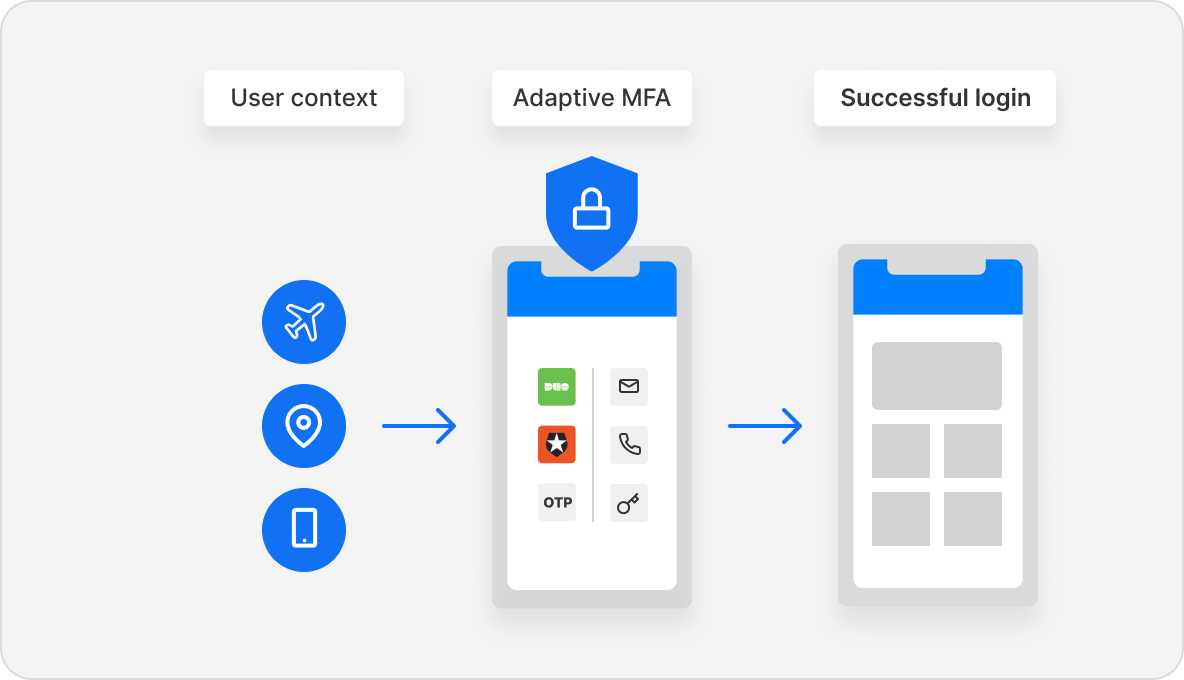
Screenshot of multi-factor authentication with Auth0Screenshot of Auth0's user interface tools. These help administrators manage user identities including password resets, creating and provisioning, blocking and deleting users.Screenshot of a view of the customer's digital experience; this includes smart recommendations based on previous behavior, an experience tailored specifically to their mobile device, and easy discovery of travel options.Screenshot of the Auth0 Identity Access Management platform, built on AWS. It is designed to deliver a universal authentication and authorization as a service for web, mobile and legacy applications.to 7000+ customers worldwide.Screenshot of Auth0’s Adaptive MFA, which is based on various types of behavioral signals, meaning the MFA step is only presented when deemed risky. This preserves the experience for the majority of users, while maintaining a strong security posture.