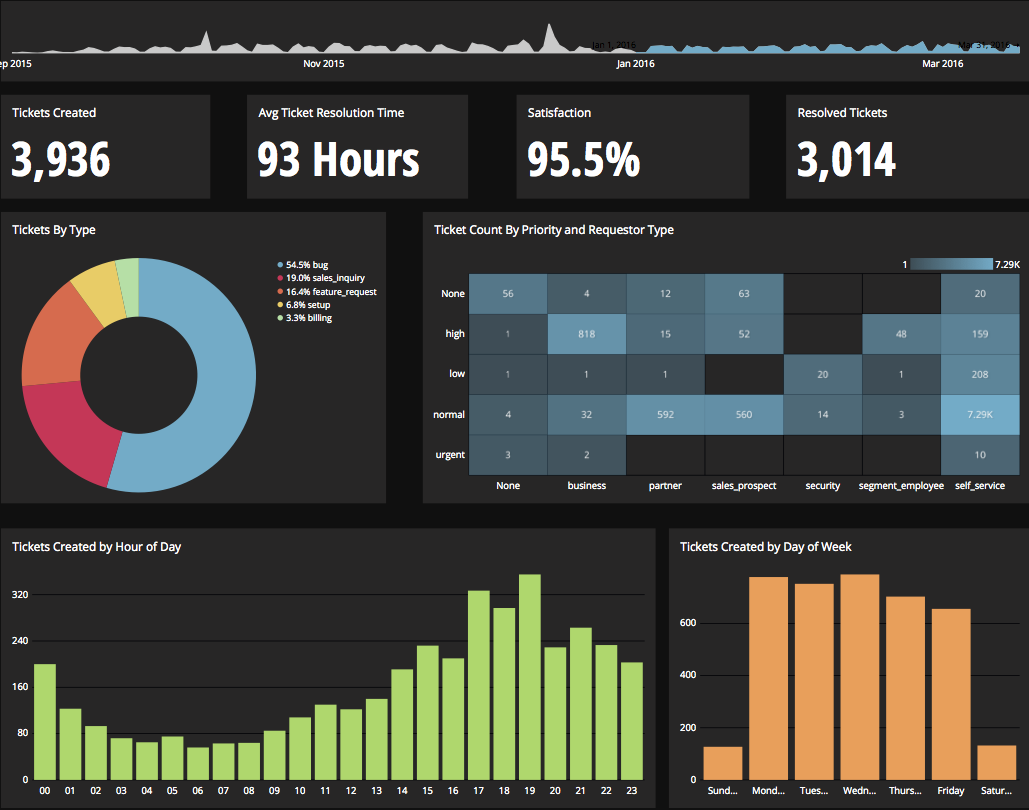
Chartio is a visualization tool designed to enable anyone to explore, transform and visualize data on the fly through a drag-and-drop interface. Chartio was acquired by Atlassian in February 2021 so that it's capabilities could be integrated into the Atlassian product portfolio's capabilities. Chartio is no longer available to new customers, standalone. Existing customers must migrate to alternatives by March 2022, when the service will be retired.
$40
per user/per month
Shiny
Score 8.0 out of 10
N/A
Shiny allows users to create data visualization apps, and is designed to be easy to write with. These apps let users interact with data and analyses with R or Python.
N/A
Pricing
Chartio (discontinued)
Shiny
Editions & Modules
Starter
$40
per user/per month
Professional
$60
per user/per month
Organization
Contact sales team
No answers on this topic
Offerings
Pricing Offerings
Chartio (discontinued)
Shiny
Free Trial
Yes
No
Free/Freemium Version
No
No
Premium Consulting/Integration Services
No
No
Entry-level Setup Fee
No setup fee
No setup fee
Additional Details
—
—
More Pricing Information
Community Pulse
Chartio (discontinued)
Shiny
Features
Chartio (discontinued)
Shiny
BI Standard Reporting
Comparison of BI Standard Reporting features of Product A and Product B
Chartio (discontinued)
6.0
Ratings
33% below category average
Shiny
-
Ratings
Pixel Perfect reports
3.60 Ratings
00 Ratings
Customizable dashboards
7.70 Ratings
00 Ratings
Report Formatting Templates
6.70 Ratings
00 Ratings
Ad-hoc Reporting
Comparison of Ad-hoc Reporting features of Product A and Product B
Chartio (discontinued)
5.7
Ratings
33% below category average
Shiny
-
Ratings
Drill-down analysis
6.90 Ratings
00 Ratings
Formatting capabilities
6.10 Ratings
00 Ratings
Integration with R or other statistical packages
3.10 Ratings
00 Ratings
Report sharing and collaboration
6.50 Ratings
00 Ratings
Report Output and Scheduling
Comparison of Report Output and Scheduling features of Product A and Product B
Chartio (discontinued)
3.4
Ratings
85% below category average
Shiny
-
Ratings
Publish to Web
2.70 Ratings
00 Ratings
Publish to PDF
6.10 Ratings
00 Ratings
Report Versioning
2.00 Ratings
00 Ratings
Report Delivery Scheduling
2.70 Ratings
00 Ratings
Data Discovery and Visualization
Comparison of Data Discovery and Visualization features of Product A and Product B
This product is well suited for end users that don't want to get too in depth with reporting. The interface is simple and the default filter options are sufficient for a general report. Example: Total Sum of Net Sales for all products sold in X State between dates X and X. If the need is for a more complex query, then there is the Custom Query option. This would be something that an administrator would have to police as having users writing their own queries could get really messy really fast. I suppose the key questions to ask would be: Do you need a product that will... display all relevant charts/reports in one consistent place? ... be simple for an end user to navigate? ...be web-based and remotely accessed?
Shiny is very good for developing dashboards or web applications with specific functionalities. But it is not so easy to use to develop from scratch, it is always better to use another tool to have a general idea of what is expected of a dashboard and then develop the most specific functionalities in Shiny. It is much more flexible than other tools and that is why I consider it to be better for most cases, only that it is more complex to develop or has a longer learning curve.
Constantly updating: many of the BI tools we looked at were slow to iterate on their product. This was a main selling point for us.
Ease of Use: We have many users that are new to BIs tools and database management in general. BI software as a whole has a pretty steep learning curve for most people, but Chartio does a good job of making things easier all around.
Database Support: It seems as though every department insists on storing their information using different databases. Chartio had support for everyone one we needed which was very helpful.
It has become a core part of the business in terms of identifying the health of our network. If we grow and there are certain things that might not fit well with Chartio (e.g. we'd want to store snapshots of every single day's dash instead of seeing realtime data), it might make sense to move some of the data analysis tool in-house if resources are available.
I really like using Chartio. I use it on a daily basis for pulling data from different sources and combining data (the explore tab was a great idea for this use). I think I would give it 8/10 because there needs to be more documentation or maybe blog posts about things people are doing with it. I only have my own ideas about what to do /how to graph things. I know there are some articles, but it would be awesome to have a section on the neat dashboards people are building or how they show data in different ways. Another complaint is how much time it takes to load. I know our databases aren't set up precisely for Chartio and I have been creating data stores. But the data stores have so many more limitations that adds a whole new layer of frustration. Love the product, keep up the good work and the fast fixes.
I use self learning materials. Pretty helpful. I find myself having to go back to the "drilldown" instructions though, and have a hard time finding hidden variables on a dashboard, so perhaps there is room for intuitive improvements (or maybe I'm just being lazy)
Again, Chartio provides the best multi-user presentation ability for us. Other tools are great for slicing and dicing the data, but at the end, you still have to spend time trying to find a way to present it. Chartio has that built in.
Whilst dashboarding may be comparable with some of the other products we evaluated. Nothing compared to the analytical capabilities on offer with Shiny. An added advantage was that we had colleagues knowledgeable in R which meant bringing in Shiny and getting to grips with it was a lot more seamless and welcomed by the end users.
Chartio has worked well as our datawarehouse has rapidly expanded, and the usability/performance hasn't seemed to have suffered. What we haven't yet realized is additional savings from additional users. We have some dashboard needs for users who truly just view of a few charts, and the licensing structure hasn't yet been structured in a way that would support that type of approach...having 50 "core" licenses, and then potentially several hundred view only licenses for partners that would use the application infrequently.