
Chartio (discontinued) vs. Grafana
| Product | Rating | Most Used By | Product Summary | Starting Price |
|---|---|---|---|---|
 Chartio (discontinued) | Score7.5 out of 10 | N/A | Chartio is a visualization tool designed to enable anyone to explore, transform and visualize data on the fly through a drag-and-drop interface. Chartio was acquired by Atlassian in February 2021 so that it's capabilities could be integrated into the Atlassian product portfolio's capabilities. Chartio is no longer available to new customers, standalone. Existing customers must migrate to alternatives by March 2022, when the service will be retired. | $40 per user/per month |
 Grafana | Score8.7 out of 10 | N/A | Grafana is a data visualization tool developed by Grafana Labs in New York. It is available open source, managed (Grafana Cloud), or via an enterprise edition with enhanced features. Grafana has pluggable data source model and comes bundled with support for popular time series databases like Graphite. It also has built-in support for cloud monitoring vendors like Amazon Cloudwatch, Microsoft Azure and SQL databases like MySQL. Grafana can combine data from many places into a single dashboard. | $0 |
| Chartio (discontinued) | Grafana | |||||||||||||||
|---|---|---|---|---|---|---|---|---|---|---|---|---|---|---|---|---|
| Editions & Modules |
|
| ||||||||||||||
| Offerings |
| |||||||||||||||
| Entry-level Setup Fee | No setup fee | No setup fee | ||||||||||||||
| Additional Details | — | — | ||||||||||||||
| More Pricing Information | ||||||||||||||||
| Chartio (discontinued) | Grafana | |
|---|---|---|
| Considered Both Products | No answer on this topic | No answer on this topic |
| Key User Insights | ||
| Would buy again | ||
No answers on this topic | 100% Would buy again 6 Answers | |
| Delivers good value for the price | ||
No answers on this topic | 100% Delivers good value for the price 6 Answers | |
| Happy with the feature set | ||
No answers on this topic | 100% Happy with the feature set 6 Answers | |
| Lived up to sales and marketing promises | ||
No answers on this topic | No answers on this topic | |
| Implementation went as expected | ||
No answers on this topic | 100% Implementation went as expected 6 Answers | |
| Chartio (discontinued) | Grafana | |||||||||||||||||||
|---|---|---|---|---|---|---|---|---|---|---|---|---|---|---|---|---|---|---|---|---|
| BI Standard Reporting |
| |||||||||||||||||||
| Ad-hoc Reporting |
| |||||||||||||||||||
| Report Output and Scheduling |
| |||||||||||||||||||
| Data Discovery and Visualization |
| |||||||||||||||||||
| Chartio (discontinued) | Grafana | |
|---|---|---|
| Small Businesses |  Looker Studio Score7.6 out of 10 | Looker Studio Score7.6 out of 10 |
| Medium-sized Companies |  Jet Reports Score9.5 out of 10 | Jet Reports Score9.5 out of 10 |
| Enterprises | Grafana Score8.7 out of 10 |  Kibana Score7.2 out of 10 |
| All Alternatives | View all alternatives | View all alternatives |
| Chartio (discontinued) | Grafana | |
|---|---|---|
| Likelihood to Recommend | 8.0 | 9.0 |
| Likelihood to Renew | 8.0 | - |
| Usability | 7.6 | 10.0 |
| Availability | 8.6 | - |
| Performance | 7.3 | - |
| Online Training | 8.2 | - |
| Implementation Rating | 7.3 | - |
| Data Sharing and Collaboration | 5.0 | - |
| Data Sources | 6.9 | - |
| Product Scalability | 6.8 | - |
| Chartio (discontinued) | Grafana | |
|---|---|---|
| Likelihood to Recommend |
|
|
| Pros |
|
|
| Cons |
|
|
| Likelihood to Renew |
| No answers on this topic |
| Usability |
|
|
| Online Training |
| No answers on this topic |
| Alternatives Considered |
|
|
| Scalability |
| No answers on this topic |
| Return on Investment | No answers on this topic |
|
| ScreenShots | Chartio (discontinued) Screenshots 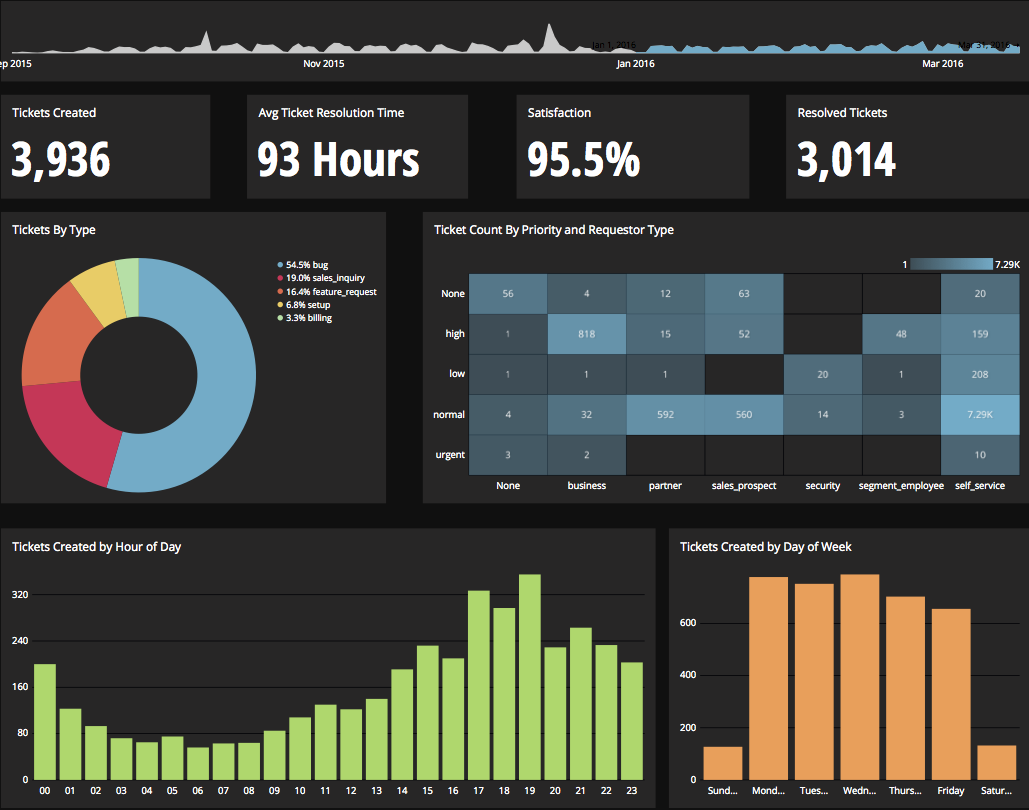     |


