Asana is a web and mobile project management app. With tasks, projects, conversations, and dashboards, Asana lets an entire team know who's doing what by when, enabling workload balancing. Users can also add integrations for GANTT charts, time tracking and more.
$13.49
per month per user
UpKeep Maintenance Management
Score 7.0 out of 10
Small Businesses (1-50 employees)
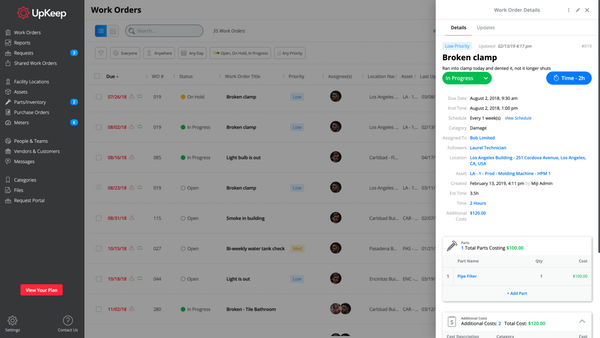
UpKeep allows users to snap a picture of a broken piece of equipment, create a work order, and schedule it for repair - all from a mobile device. UpKeep is designed for facility, property, restaurant, and manufacturing managers looking to improve communication by enabling real-time status updates for their teams. The vendor says it is a modern, intuitive, and customizable CMMS that is proven to expedite workflow processes. Capabilities include: -Add co-workers and easily assign work…
$40
per technician/per month
Pricing
Asana
UpKeep Maintenance Management
Editions & Modules
Starter
$13.49
per month per user
Advanced
$30.49
per month per user
Enterprise
Contact Sales
Personal
Free
Starter
$40
per technician/per month
Professional
$75
per technician/per month
Business Plus
$120
per technician/per month
Enterprise
$180
per technician/per month
Offerings
Pricing Offerings
Asana
UpKeep Maintenance Management
Free Trial
Yes
Yes
Free/Freemium Version
Yes
Yes
Premium Consulting/Integration Services
No
No
Entry-level Setup Fee
Optional
Optional
Additional Details
A discount is offered for annual billing.
—
More Pricing Information
Community Pulse
Asana
UpKeep Maintenance Management
Features
Asana
UpKeep Maintenance Management
Project Management
Comparison of Project Management features of Product A and Product B
Asana
8.2
Ratings
7% above category average
UpKeep Maintenance Management
-
Ratings
Task Management
9.20 Ratings
00 Ratings
Resource Management
8.10 Ratings
00 Ratings
Gantt Charts
8.90 Ratings
00 Ratings
Scheduling
8.50 Ratings
00 Ratings
Workflow Automation
8.80 Ratings
00 Ratings
Team Collaboration
9.10 Ratings
00 Ratings
Support for Agile Methodology
8.50 Ratings
00 Ratings
Support for Waterfall Methodology
8.50 Ratings
00 Ratings
Document Management
7.50 Ratings
00 Ratings
Email integration
7.50 Ratings
00 Ratings
Mobile Access
8.70 Ratings
00 Ratings
Timesheet Tracking
6.10 Ratings
00 Ratings
Change request and Case Management
8.40 Ratings
00 Ratings
Budget and Expense Management
7.20 Ratings
00 Ratings
Professional Services Automation
Comparison of Professional Services Automation features of Product A and Product B
The usability of Asana is broad since it's available in a variety of platforms that are widely used nowadays. I think that it would be great for people who are constantly on the move and switching devices, since it has allowed me to work from my phone, too. I also think that Asana has proven itself to handle a large quantity of work
Very appropriate within our business since It is so easy to use and implement. The software gives the techs more accountability and ownership of jobs, along with the ability to create re-occurring work orders for inspections and checks. I now get accurate data to report against on a weekly basis, and get KPI's to set goals for our team.
Periodic maintenance needs are still a little tricky keeping in the system without flooding the user with too many work orders.
It does not immediately update all the time. For example, closing out work orders and the number of total work orders stays the same until it’s rebooted.
I just can't see us getting it off of Asana any time soon, despite the many headaches it has caused us. We have too much data in there, too much time & training invested into it, too much at stake to move. If we were just starting out today, fresh, I don't know for certain that I would absolutely go the same direction, but I *think* I still would. I just haven't seen anything better yet. Maybe if Podio's support staff hadn't treated me like a worthless nuisance to them, I might feel differently, but the fact is that their task management is simply inferior to Asana's. That can't be denied, and in fact Podio said it themselves: "Tasks are a simple function. They cannot be customized. Tasks in Podio can be used for quick to-do's for you and your team members." In our operation, however, prompt task completion is a big deal; one task can't be completed until another one is done first, and closing the gaps between those tasks is critical in meeting deadlines and servicing our customers. Asana gets us there, the others don't.
It is very user-friendly. Takes a new employee an hour to start figuring out how the system works. That's an important factor. You don't want to encounter the issue where employees need a week to understand how the system works. For example, JIRA, I tried using it for a week and I still don't understand the complicated layout. Asana has a simple interface. Once you see it, you get it type of program.
I think the platform is user-friendly but there have been some issues that colleagues have been complaining about. For example, the program tends to run slow from time to time. Reporting could be better. We could use more fields for categories under parts and assets.
I haven't had to use their support so I can't rate it. The fact that I haven't needed them reflects the ease of use of the product. I would recommend that any new users schedule a complete demo of the product to ensure that they are using it to it's fullest (there's a lot of useful features).
I cannot say enough great things about their customer service. From the start of the purchase, Upkeep was extremely helpful and informative. They have been ongoingly keeping us informed and available to answer any of our questions as they arise. They ongoing learning portal is also helpful when new features and changes happen with the interface.
Asana is a top-tier project management software that helps us organize and track projects from start to finish. It allows us to apply tasks/to-dos to multiple projects without duplication, divide complex projects into smaller tasks, and track project progress. It also helps us organize work on Kanban boards or linear lists. It stands out from the crowd in a big way compared to the competition.
We liked the Hippo CMMS for the mapping feature - you can do an overlay of the building plan and markup the locations - but the barcode feature was not there at the time we reviewed, so there was some automation lost there. UpKeep had the barcode - but lacked the mapping. We preferred the barcode feature. Also - the mobile app for UpKeep was much more mature, and they've since added the sensors (beta) which I don't believe Hippo has yet.
It's a bit too soon to speak of ROI, but being able to track issues over multiple service calls has proven to be useful, especially when it comes to holding workers accountable for their use of the machines.
It's easy to use for those who use it.
It's no harder to submit issues than it is to send an email. If you can send an email, you can submit an issue.