Arcoro is an HR technology company focused on the construction industry, offering solutions to help companies hire, manage and grow their back office, professional and skilled trade workforce.
N/A
Totara LMS
Score 8.2 out of 10
N/A
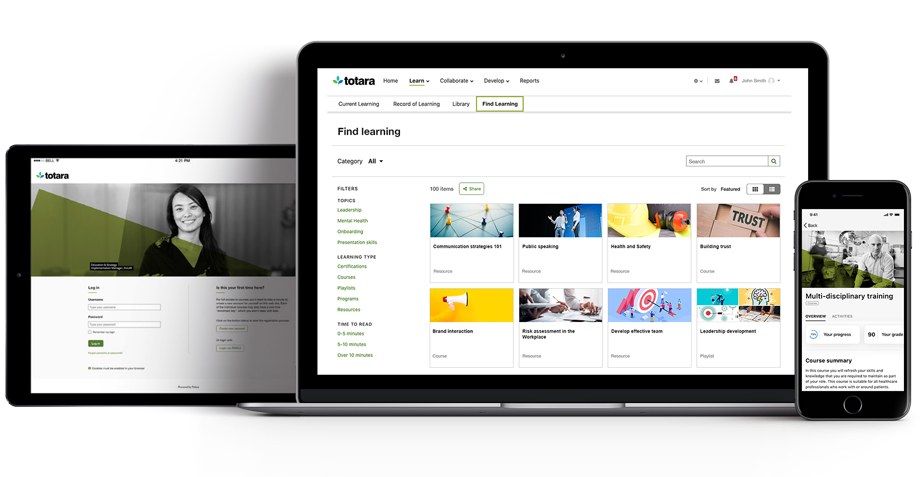
Totara Learning, headquartered in Wellington offers the Totara workforce learning management system with core LMS (Totara Learn) integratable social platform (Totara Social), support for instructor led learning, and cloud storage for learning materials, available on cloud.
For my industry, ExakTime is incredible. The geo fencing, and clock-in locations and job types works incredibly well. I am likely to recommend because I have and I do recommend it constantly to others in my industry. I would say the only reason more people are not trying is it, is because they are of an older generation and using a virtual program can be daunting.
As a real estate services company with properties (& employees) in six states, Totara LMS is well suited for implementing and our employee learning platform to our many team members that work remotely and cannot benefit from regular in-person learning courses. Totara LMS's comprehensive and customizable reporting system also allows us to accurately review and tell the story of employee performance and talent development, while tailoring this reporting to the needs of different internal stakeholders.
I don't have any major problems with Exaktime so I do not see a reason to switch to something else. All the bugs and learning curves have been worked out so move to another company will take too much time of which we do not have. I have become an Exaktime expert and don't trust another software that guarantees geofencing timekeeping.
ExakTime is very intuitive and easy to use in some cases. From an ExakTime Mobile perspective, it is very simple and easy to use. The Clock In/Clock Out screen is intuitive and easy to learn. Similarly, the ExakTime Connect side is very smooth and simple for Time Card Detail viewing and Report usage, but it is sadly lacking in User Experience in Scheduling.
I have had problems outside of normal business hours and I get a return phone call from them pretty quickly. There has only been I think 1 instance that I waited for too long to be able to fix my situation.
Easy to access both local support and support/advice from other Totara LMS users as we keep in regular contact as a part of the totara government users group. Our vendor also keeps in touch with this group and a lot of knowledge is shared. It's easy to access the Totara LMS users academy, and one of my administrators has also set up a local forum where they ask each other questions and share knowledge as well. Our vendor is easy to access via our support plan and we have monthly catch-ups with our account manager where we hear about anything new coming up.
Gave a notice to all employees to come to work 15 min early on the day planned to implement the program. I had Spanish and English signs on how to down load the program and log in I showed them ALL how to log in and out and explained that they are responsible for reporting accurate time. I had them all sign a policy that lunch breaks were mandatory for all employees at least 30 min per day. This ensures safety on the roofs. We had a few people who did not have passwords to the app store and we had a few problems with android phones but most of them were on their way quickly. Most not happy about the change but I hope they see the benefit of it now.
This is the first product like this that we've used. We've been using ExakTime for several years now, and I can't imagine going back to manual entry! I also wouldn't think there's any comparable product on the market that allows as much customization or would be as user friendly as ExakTime
Improved payroll accuracy and employee time breakdown by type of work, greatly reducing the manual data tracking and time spent by employees on such tracking. More time for actual work!
Employees can interact via field notes while on the job, providing revisions to data entered if appropriate. Improves administrator efficiency as well.
Reports significantly improve time tracking, positively effecting job costing recordkeeping and evaluation.