TrustRadius: an HG Insights company

Appsee Mobile App Analytics vs. Flurry Analytics

Save this comparison

Save this comparison

Add Product

Recommended Comparisons

    Overview
    ProductRatingMost Used ByProduct SummaryStarting Price

    Appsee

    Score4.6 out of 10
    N/AAppsee is designed to offer mobile teams visual data on their app's user behavior. The vendor says they supply businesses with the actual "why's" behind their users' behaviors. With Appsee's unique user recordings and touch heat maps, businesses can make better informed decisions regarding their app's user experience and spend less time sifting through mountains of data. Appsee also automatically detects all screens, buttons and user actions within an app without the need to select…N/A

    Flurry Analytics

    Score9 out of 10
    N/AFlurry Analytics, now from Yahoo / Verizon Media is a mobile app analytics provider, boasting over 1 million active apps on the platform -- from start-ups to the Fortune 500. They present their solution as comprehensive, completely free, takes five minutes to integrate, and features an easy-to-use dashboard that anyone in the company can use. Flurry provides insights out-of-the-box including real-time metrics. Users explore usage, engagement, retention, geographic, demographic,…N/A
    Pricing
    AppseeFlurry Analytics
    Editions & Modules
    No answers on this topic
    No answers on this topic
    Offerings
    Pricing Offerings
    AppseeFlurry Analytics
    Free Trial
    YesYes
    Free/Freemium Version
    NoYes
    Premium Consulting/Integration Services
    NoNo
    Entry-level Setup FeeNo setup feeNo setup fee
    Additional Details—Flurry is completely free with no hidden fees. Flurry also offers support for integration, set-up and analysis.
    More Pricing Information
    Best Alternatives
    AppseeFlurry Analytics
    Small Businesses
    Firebase Crashlytics
    Score9.6 out of 10
    Firebase Crashlytics
    Score9.6 out of 10
    Medium-sized Companies
    Firebase Crashlytics
    Score9.6 out of 10
    Firebase Crashlytics
    Score9.6 out of 10
    Enterprises
    Flurry Analytics
    Score9 out of 10
    Firebase Crashlytics
    Score9.6 out of 10
    All AlternativesView all alternativesView all alternatives
    User Ratings
    AppseeFlurry Analytics
    Likelihood to Recommend
    3.3
    (2 ratings)
    9.0
    (6 ratings)
    Likelihood to Renew
    -
    (0 ratings)
    3.7
    (5 ratings)
    Performance
    -
    (0 ratings)
    10.0
    (1 ratings)
    User Testimonials
    AppseeFlurry Analytics
    Likelihood to Recommend
    Appsee
    Appsee was a great choice and addition before their struggle with Apple over user screen recording. Now that that's gone, its insights are rather basic and not worth the price point. This would be a perfect analytics platform for a company looking to increase its user experience, new on-boarding, or going through a redesign to see user activity and reactions, but not anymore.
    Incentivized
    Read full review
    Yahoo!
    I would encourage a colleague to use Flurry Analytics. Incorporating Flurry Analytics in an app is a simple and straightforward task, and will take the average app developer less than 15 minutes to understand and apply. This amount of time is nothing in the grand scheme of the development of the app, and the return on time invested to incorporate it is great. New tracking features can be added at any time.
    Read full review
    Pros
    Appsee
    • User session recordings of individual users
    • Touch heatmaps and unresponsive gestures
    Read full review
    Yahoo!
    • Flurry can track in-depth metrics across your app. This allows us to see every type of interaction our app users are performing.
    Read full review
    Cons
    Appsee
    • The user screen recording was quickly shut down on Apple devices after about a week of us using Appsee. Now it's just basic boxes which aren't nearly as helpful or insightful in bettering our user experience. If we would have known this would happen, or that Appsee didn't have that feature, we wouldn't have gone with them.
    • No integration with Branch (the world's best and probably biggest attribution platform).
    Incentivized
    Read full review
    Yahoo!
    • There is no option to choose a timezone which will allow me to compare their data over other systems in other time zones.
    • Could be nice to have more reporting screening options.
    Incentivized
    Read full review
    Likelihood to Renew
    Appsee
    No answers on this topic
    Yahoo!
    Good user acquisition tracking
    Sdk integration is super easy for both iOS and Android
    Need it
    Need to support more customized dashboards / reporting (example - set up a dashboard specifically to see users engaging with a new feature recently launched)
    Read full review
    Alternatives Considered
    Appsee
    Appsee set itself apart from competitors with the user screen recording, but since that is no longer a good feature on iOS, it makes Appsee's competitive advantage obsolete. Its data analytics, funnels, and crash reporting are relatively basic or haven't lead to any breakthroughs. I would stay away from Appsee, save your money, and go for a platform like Mixpanel if possible, which has analytics, attribution, and engagement for the same if not cheaper price.
    Incentivized
    Read full review
    Yahoo!
    For my uses, Flurry is free which makes it way more attractive than the other platforms even on a very big number of monthly events. It also have set reports which are exactly the reports that a marketing person needs without any need of spending a developer time to create them for you, or holding an in-house BI person that works on creating reports.
    Incentivized
    Read full review
    Return on Investment
    Appsee
    • Better conversion rates
    • Less bugs/crashes
    • Better user retention
    Read full review
    Yahoo!
    • Tracking the number of times a user taps a help button can help to improve the app design. Perhaps the app is not as intuitive as first thought, and improvements based upon where in the help feature a user taps will lead to improvements in the app design to make it more intuitive.
    • Tracking the number of times certain app features are used, or the amount of time spent within a given activity in the app can help to streamline an app - improve upon features that are used more frequently while eliminating less popular activities.
    • Tracking time spent within an app can give an idea as to how popular the app is.
    Read full review
    ScreenShots

    Appsee Screenshots

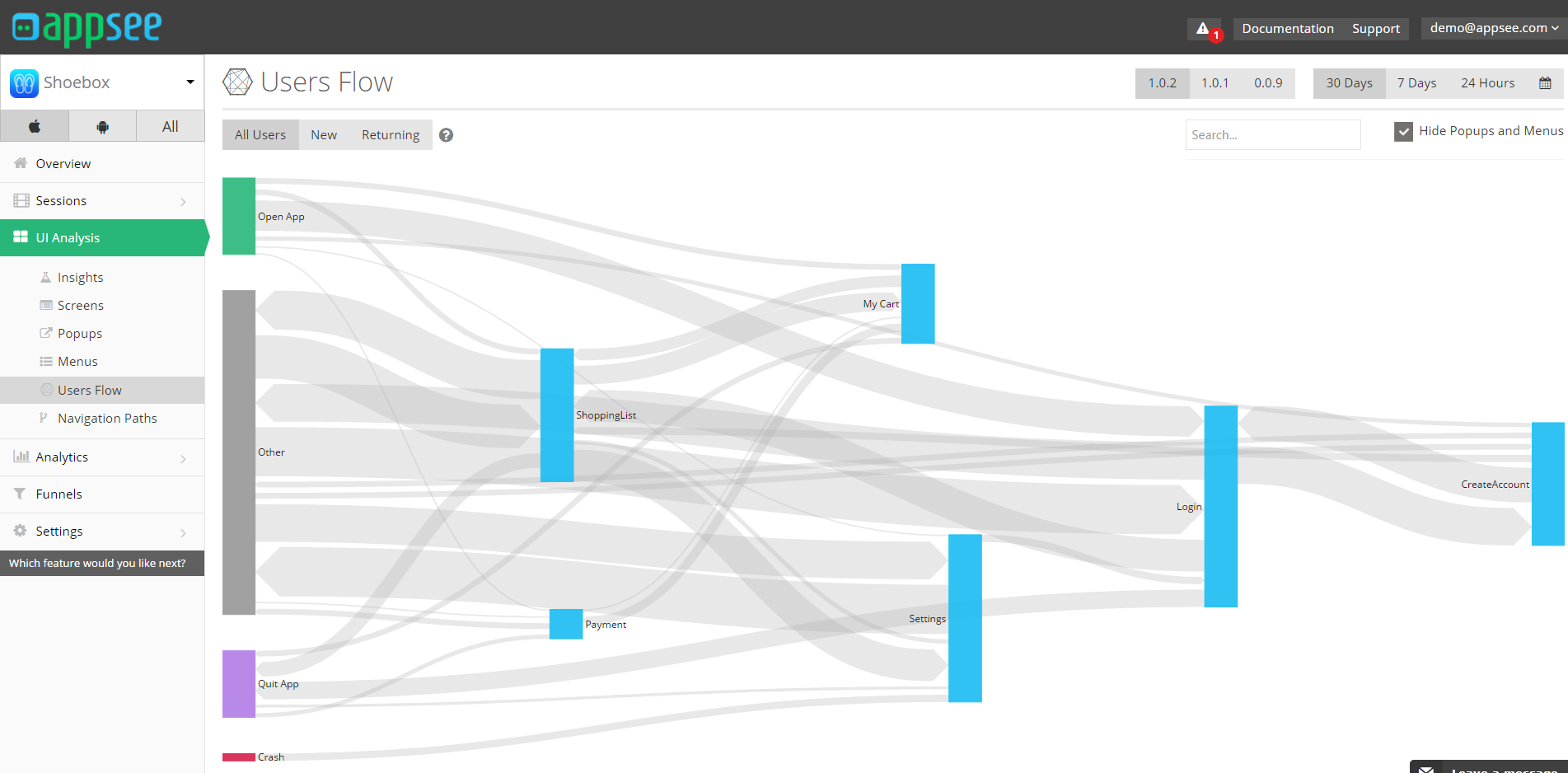
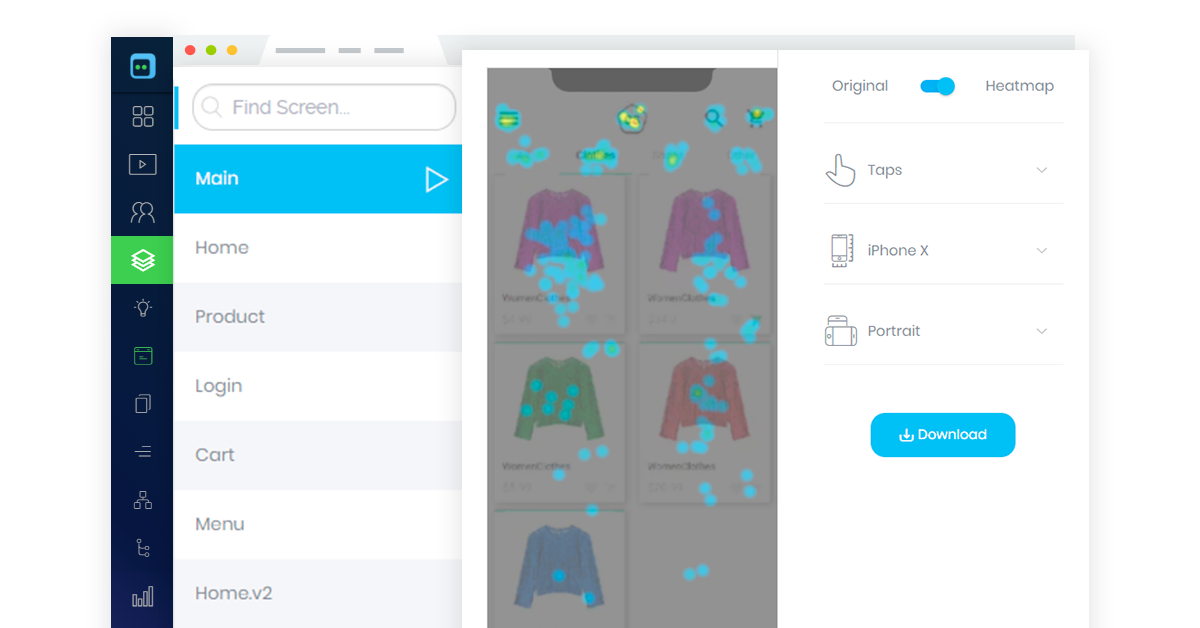
    Screenshot of Touch HeatmapsScreenshot of User Session RecordingsScreenshot of Users FlowsScreenshot of Appsee HeatmapsScreenshot of Appsee User RecordingsScreenshot of Appsee User Query Builder