Keynote, from Apple is a presentation software with tools and effects, designed to make it easy to create memorable presentations, and comes included with most Apple devices. Use Apple Pencil on an iPad to create diagrams or illustrations that bring slides to life. With its real‑time collaboration features, teams can work together, whether they’re on Mac, iPad, iPhone, or using a PC.
N/A
Reveal Trial Director
Score 7.0 out of 10
N/A
A solution to streamline pre-trial, trial, mediation, and other litigation-related presentations. Users can also Share the case and collaborate with colleagues, outside counsel, expert witnesses, and other key stakeholders on a centrally stored case.
Well Suited: Setting up in-person presentations for clients. The transitions are nicely integrated, the master template easily adjusted, and the file size relatively small for ease in download and emailing as a leave behind. Less Appropriate: Clients often feel that EVERYTHING needs to be set up as a slide deck. However, it is key to listen to the client's needs to first determine the final output. What was initially predetermined to be a slide deck may often be more effective as an email, brochure, or flyer. Keynote does what it is intended to, well, but that doesn't mean that it should ALWAYS be the end product format.
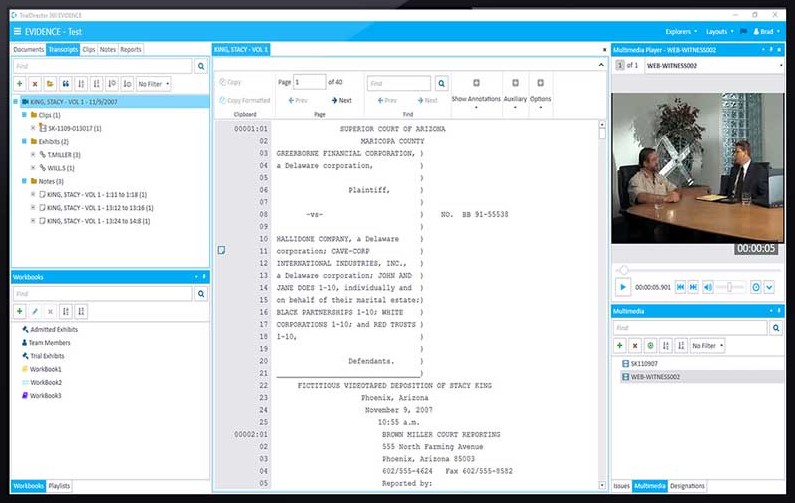
This trial presentation software is very well suited for trial, depositions and mediations. The software organizes exhibits and allows for synchronized deposition transcripts to be viewed simultaneously. It allows the attorney to tell the complete story of the case by quickly putting together productions, discovery and any additional documentation needed to build a case.
The way you adjust timings for builds and transitions was a bit counterintuitive for me. Once I got the hang of it, it was fine. The timings don't work the same as they do in PowerPoint. So if you are a PowerPoint user, that may be something you have to adjust to when you switch to Keynote.
I feel that adding images can be clunky when working with image placeholders. Apple Keynote forces you to use the Photo app to replace image placeholders.
It is already included with my Macbook and the design functionality is pretty advanced so I can upload my custom brand fonts and it is easy to create templates where you can drag and drop different images while keeping overall alignment and placement the same
Apple Keynote is incredibly user-friendly and largely intuitive. In the rare areas that Apple Keynote is not intuitive, there is a robust online community of fellow Apple Keynote users that can answer most questions I have about the program. I would encourage any of my coworkers - and anyone else in my same line of work - to adopt Apple Keynote because of its user-friendliness.
If you want to create presentations more often, Prezi and Canva or not even options, both of tools take a lot of time. So the real competitor for Apple Keynote is Microsoft Powerpoint. For me, Powerpoint is so feature-filled that makes it a little complex. On the other hand, Apple Keynote is a very simple and elegant, and easy-to-use tool.
I have used TrialPad in the past and found it very user friendly and easy to use. However, functionality is limited as to what you can do or how the data can be manipulated once uploaded to TrialPad. TrialDirector 360 by Ipro gives the user a full array of tools and functionality and in some ways is easier to navigate and control in presentation mode.
Improved efficiency since my presentations are quick to update
Improved efficacy since the UI makes creating attractive presentations easy to create
There have been a few occasions when I need to convert my files to PowerPoint when using virtual conference platforms since Keynote is not as ubiquitous