Apple iCloud vs. vBoxxCloud

Overview
ProductRatingMost Used ByProduct SummaryStarting Price
Apple iCloud
Score 8.5 out of 10
N/A
Apple iCloud is a document management software offering from Apple. It includes features such as access to music, photos, calendars, contacts, and documents, and it is built into every new iOS device.
$0.99
per month
vBoxxCloud
Score 8.2 out of 10
Small Businesses (1-50 employees)
vBoxxCloud is a business solution for managing company files.The extensive online dashboard allows users to see who has access to which folders. Users can see who is connected with their Cloud and can even remove specific folders on systems or devices by adjusting the rights online. Users can also set up shared folders and control how and from which device they can be accessed. Users can easily access shared documents through the sync tool or web browser. Admins can keep track of all…
$2
Pricing
Apple iCloudvBoxxCloud
Editions & Modules
50GB
$0.99
per month
200GB
$2.99
per month
2TB
$9.99
per month
25 GB
$2.00
User
$7.50
Offerings
Pricing Offerings
Apple iCloudvBoxxCloud
Free Trial
NoYes
Free/Freemium Version
NoNo
Premium Consulting/Integration Services
NoNo
Entry-level Setup FeeNo setup feeNo setup fee
Additional DetailsUser: The pricing is flexible, you can choose freely the amount of users and storage packs. The more users your order, bigger the discount, click here to customize your order. Storage: You can choose as many storage packs as you would like. You can assign it to one user through vBoxxCloud policies or share it among all the users. Discount: We support educational and non-profit organizations with special discounts. Contact us to learn about our special prices.
More Pricing Information
Community Pulse
Apple iCloudvBoxxCloud
Features
Apple iCloudvBoxxCloud
File Sharing & Management
Comparison of File Sharing & Management features of Product A and Product B
Apple iCloud
8.4
77 Ratings
0% below category average
vBoxxCloud
8.0
1 Ratings
5% below category average
Versioning8.753 Ratings00 Ratings
Video files9.373 Ratings8.21 Ratings
Audio files9.370 Ratings8.21 Ratings
Document collaboration7.166 Ratings8.21 Ratings
Access control7.764 Ratings8.21 Ratings
File search8.569 Ratings7.31 Ratings
Device sync8.576 Ratings8.21 Ratings
Cloud Storage Security & Administration
Comparison of Cloud Storage Security & Administration features of Product A and Product B
Apple iCloud
7.5
73 Ratings
15% below category average
vBoxxCloud
7.3
1 Ratings
17% below category average
User and role management6.957 Ratings7.31 Ratings
File organization8.269 Ratings7.31 Ratings
Device management7.370 Ratings7.31 Ratings
Cloud Storage Platform
Comparison of Cloud Storage Platform features of Product A and Product B
Apple iCloud
7.1
77 Ratings
18% below category average
vBoxxCloud
8.2
1 Ratings
4% below category average
Performance7.277 Ratings8.21 Ratings
Reliability8.177 Ratings8.21 Ratings
Storage Reports6.160 Ratings8.21 Ratings
User Ratings
Apple iCloudvBoxxCloud
Likelihood to Recommend
9.1
(77 ratings)
8.2
(1 ratings)
Likelihood to Renew
10.0
(4 ratings)
-
(0 ratings)
Usability
8.5
(23 ratings)
-
(0 ratings)
Performance
8.2
(12 ratings)
-
(0 ratings)
Support Rating
7.5
(20 ratings)
8.2
(1 ratings)
User Testimonials
Apple iCloudvBoxxCloud
Likelihood to Recommend
Apple
Our growing organization uses about 95% Apple hardware. The Apple iCloud functionality across our organization ensures interfaces and synchronization that makes information workflow seamless. The cost structure and limited AI functionality keeps us dependent on products like Microsoft and Google and unable to put all of our cloud "eggs" into the Apple basket.
Read full review
vBoxx B.V.
See advantages and disadvantages [below].
Read full review
Pros
Apple
  • Syncing files, appointments, Notes and contacts. If I'm away from home, and set an appointment using my phone, that appointment automatically updates real time to my home laptop and vice-versa.
  • It stores files (e.g photos) nicely
  • Once it's set up, it's fairly easy to use.
Read full review
vBoxx B.V.
  • Service. You can mail, chat and call them and they always make time for the questions.
  • Their servers are located in the Netherlands.
  • Administrator interface
  • Reports
Read full review
Cons
Apple
  • Customization - iCloud is great at the stuff it does well. But it lacks features that some competitors (in Google Drive or Dropbox) do really well. API support for third-party apps is really great for some other people.
  • Remote use - Managing or accessing information from iCloud while not on one of your logged-in apple devices can sometimes be an issue. From a work computer for example. It doable, but the experience is much less user-friendly.
  • Ability to edit documents on the cloud similar to google docs or some other competitors
Read full review
vBoxx B.V.
  • To use vBoxx you have an interface as administrator. To add a user, you have to use another interface.
  • When you are accessing your files via the web (not via the sync folder on your laptop, pc or tablet), you have to download and upload the file, you can't change it without downloading it. Unless I don't know [how to do] it.
Read full review
Likelihood to Renew
Apple
It's so seamless that I can't imagine another product doing a better job synchronizing all of my devices. I simply do not think about it at all. Everything happens behind the scenes and I'm confident that Apple keeps my data safe and secure. I'm a happy customer as far as this is concerned. I have not had a bad experience with this service.
Read full review
vBoxx B.V.
No answers on this topic
Usability
Apple
While it may be great to use with other Apple products, I find it's an absolutist-style workflow to be debilitating and to lead to many problems. When you sign into the cloud, it completely takes over your device in many ways that you don't notice at first until there is a problem.
Read full review
vBoxx B.V.
No answers on this topic
Performance
Apple
Occasionally, large files that haven't yet been synced require a few minutes to pull down but I've rarely noticed delays. It does a good job of keeping data cached on my local machines while updating them with changes from other machines transparently.
Read full review
vBoxx B.V.
No answers on this topic
Support Rating
Apple
Apple customer service is fantastic. iCloud is built with Apple in mind and its design is extremely intuitive and user-friendly. Additionally, whenever our team has encountered issues, the speed of Apple support has been more than timely in addressing our issues and solving our request. We have encountered relatively few issues in my time with the platform and this only improves our overall score for those who keep the platform stable.
Read full review
vBoxx B.V.
Never expected to receive this kind of service as a small company.
Read full review
Alternatives Considered
Apple
Google Drive is similar to Apple iCloud, but since I prefer Apple products and have operated within the Apple ecosystem for many years, I use iCloud. Some clients who don't use Apple share documents with me in Google Drive so I have experience with the product, but I prefer iCloud. I do think photos syncing is superior in iCloud.
Read full review
vBoxx B.V.
Not used but evaluated: Dropbox (not secure enough + American servers) Google (not secure enough + American servers) OneDrive (not secure enough + American servers) Tresorit (is secure and has European servers) VBoxx won because of the availability by mail, chat and phone. That is the only thing that counts during emergencies.
Read full review
Return on Investment
Apple
  • Apple's iCloud service can run very slow in countries where they aren't very focussed, like India.
  • Apple did not back up videos over the cloud for a long time and needed manual sync. You will see similar issues like not allowing mobile data for some tasks.
Read full review
vBoxx B.V.
  • Too soon to say
Read full review
ScreenShots

vBoxxCloud Screenshots

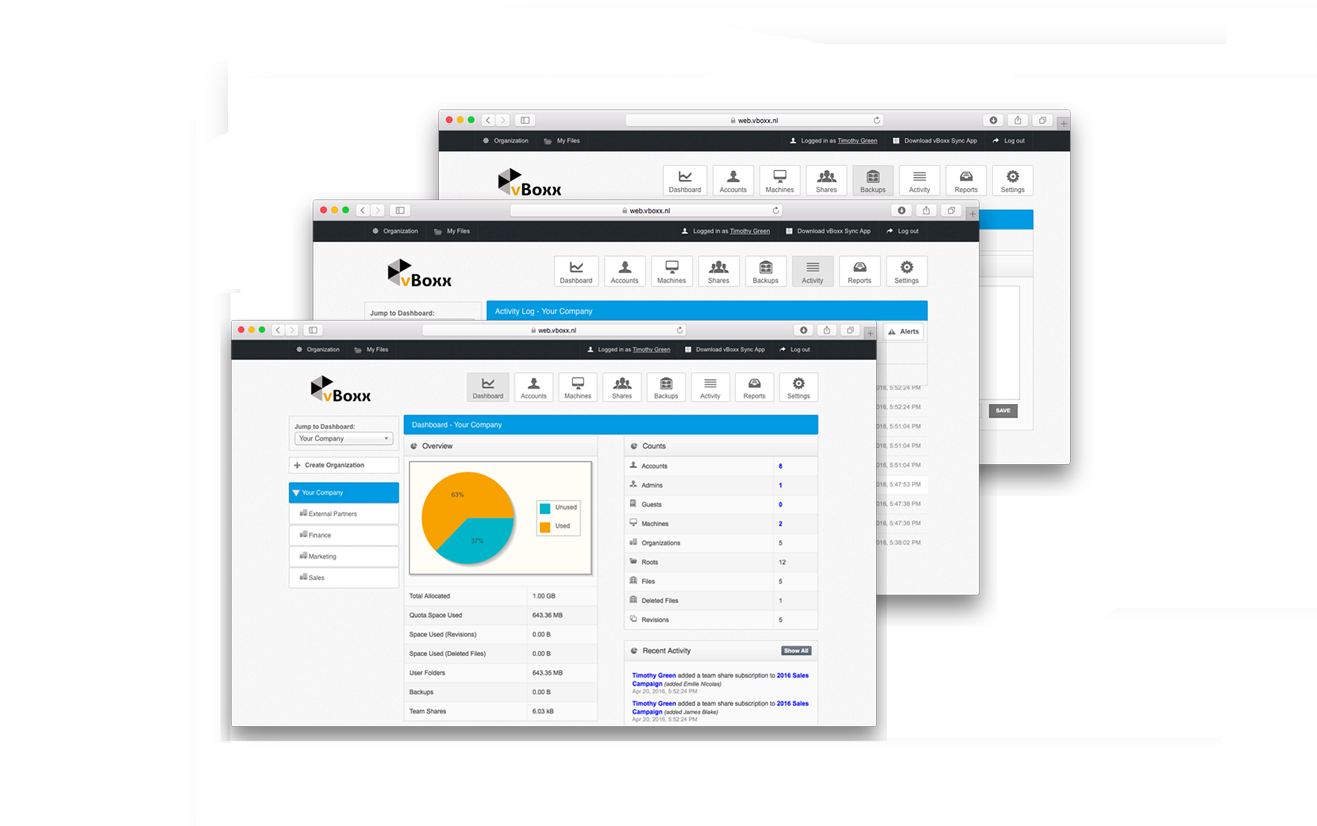
Screenshot of vBoxxCloud is the business solution for managing your company files.The extensive online dashboard allows you to see who has access to which folders. You can see who is connected with your Cloud and you can even remove specific folders on systems or devices if you adjust the rights online.Screenshot of Each user in vBoxxCloud is part of an organization. For each organization you have access to a clear dashboard, you can set different user policies and you can manage the machines. You can define any number of administrators who can access and change these functionalities. And if you have different departments, projects or teams with different needs, you just create a sub-organization with its own users, shares, policies, branding and more.Screenshot of Screenshot of The Sync Tool synchronizes all files between the cloud and your devices, making all data available even offline. If you connect later, your changes will be synchronized automatically.