Appian is a low-code development and business process management platform. It features drag-and-drop design for app building, automated work processes, unified data management, and cloud-based deployment.
$0
Bonita Platform
Score8.1 out of 10
N/A
Bonita is an open-source business process and workflow management platform created by the French National Institute for Research in Computer Science. It is available as a free community edition or as a commercial subscription product.
N/A
Pricing
Appian
Bonita Platform
Editions & Modules
Appian Community Edition
$0
Application - Input-Only
$2
per month per user
Application - Infrequent
$9
per month per user
Application - Standard
$75
per month per user
Platform
Custom Quote Priced per user with unlimited apps.
minimum 100 users, no maximum
Unlimited
Custom Quote Priced per development with unlimited apps.
unlimited
Platform
Custom Quote Priced per user with unlimited apps.
Minimum 100, no maximum
Unlimited
Custom Quote Priced per development with unlimited apps.
Unlimited
No answers on this topic
Offerings
Pricing Offerings
Appian
Bonita Platform
Free Trial
Yes
No
Free/Freemium Version
Yes
Yes
Premium Consulting/Integration Services
Yes
Yes
Entry-level Setup Fee
No setup fee
No setup fee
Additional Details
—
—
More Pricing Information
Community Pulse
Appian
Bonita Platform
Considered Both Products
Appian
No answer on this topic
Bonitasoft
Verified User
Chose Bonita Platform
Bonita has a community version, open-source, so it´s easy to test the benefits of process automation for any enterprise. Bonita Platform is also very near to Java architecture, so the learning curve for developers is not difficult, and they only need to understand how processes …
A de minimis incentive was given to thank the reviewer for their time. The incentive was not used to bias or drive a particular response, nor was the incentive contingent on a positive endorsement. More Info
A de minimis incentive was given to thank the reviewer for their time. The incentive was not used to bias or drive a particular response, nor was the incentive contingent on a positive endorsement. TR verified that a representative sample of customers was invited. More Info
Appian works great for automating manual processes and integrating multiple systems through its toolset. It gives great flexibility for establishing rules for approvals, routings, escalations, and the like. Because of the low code toolset, it's very easy to deploy and make changes as needed as processes evolve and as the organization learns to utilize the system better. Minimal maintenance is required to support the applications build on the platform. Some of the automated testing integration with tools like Jenkins is limited so that may be an issue for some.
A de minimis incentive was given to thank the reviewer for their time. The incentive was not used to bias or drive a particular response, nor was the incentive contingent on a positive endorsement. More Info
Well suited for low code/no code applications centered around approval flows. It has built-in task management for users to see their pending actions, comments, statuses, etc. It has a very nice design for process flows. Less appropriate may be for generic type applications with complex screens and logic within those screens that need a lot of data to process.
A de minimis incentive was given to thank the reviewer for their time. The incentive was not used to bias or drive a particular response, nor was the incentive contingent on a positive endorsement. More Info
Allows at a glance workflow documentation which assists in the need we have for information readiation.
Drag and drop interface for workflow development greatly speeds our apps time to market.
Using the advanced features of Appian, we are able to create working sites in a fraction of the time it would take to do so using "traditional" development.
A de minimis incentive was given to thank the reviewer for their time. The incentive was not used to bias or drive a particular response, nor was the incentive contingent on a positive endorsement. TR verified that a representative sample of customers was invited. More Info
Bonita seems particularly suited for processes requiring a great deal of human interaction. Its user model allows you to control access to business processes in a fine-grained way. This allows for business processes to move smoothly between users and services as the process advances.
The definition and usage of custom forms from the latest version of Bonita seems particularly powerful. It allows for a thorough customization of the look-and-feel and does not require complex developments.
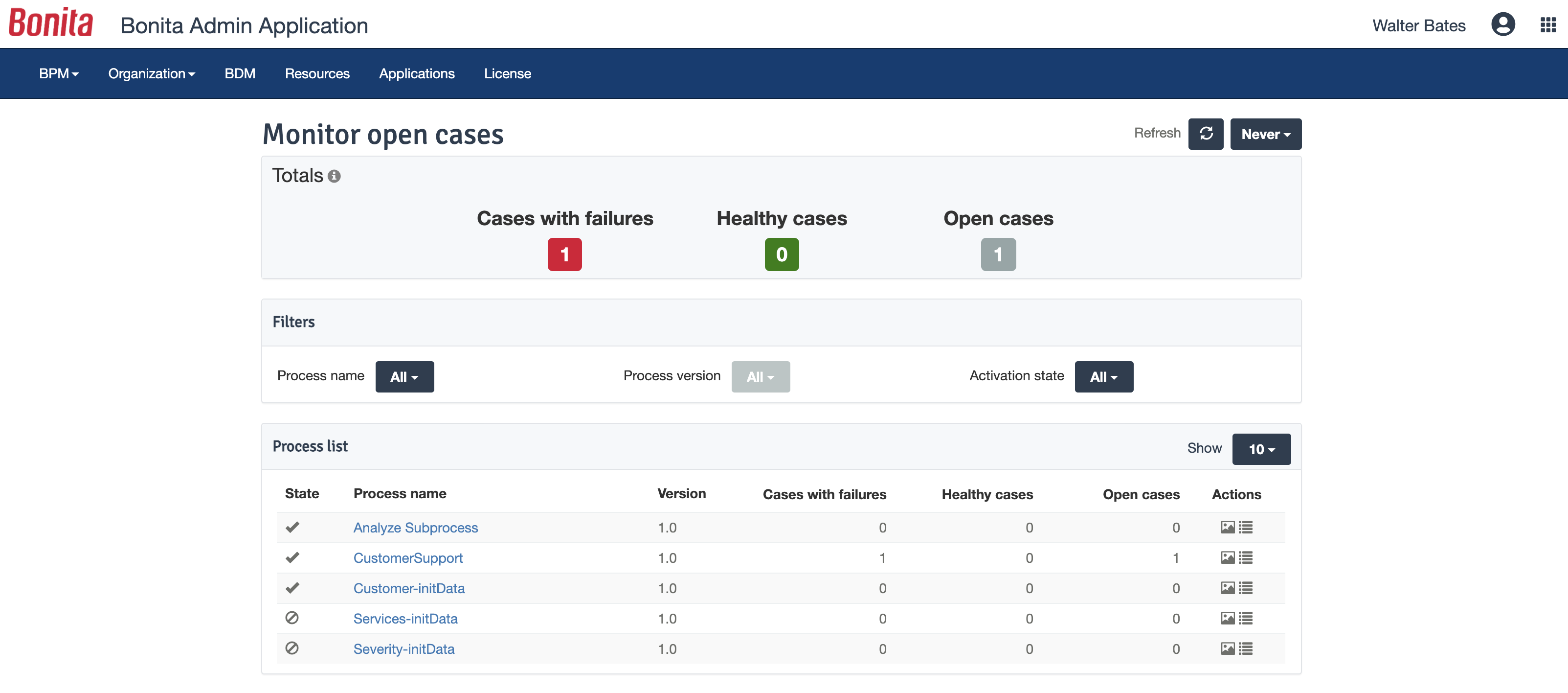
The web interface and administration section have greatly improved in the latest versions. Installation and configuration of processes has become more flexible and more structured. The administration section gives a good view on failed processes, allowing to analyse problems in an efficient way.
A de minimis incentive was given to thank the reviewer for their time. The incentive was not used to bias or drive a particular response, nor was the incentive contingent on a positive endorsement. TR verified that a representative sample of customers was invited. More Info
Search issues when type ahead and database search are used in the same field.
Buttons implementation where user is require[d] to click on the button description - if clicks on the button outside that text - button will not work.
Problems with using certain off-the-shelf performance tools like WebLoad or Neoload. That is because of different dynamic variables being used internally in Appian - which these tools are unable to correlate. We are still investigating using other tools like Jmeter to overcome dynamic correlation problem for performance testing.
A de minimis incentive was given to thank the reviewer for their time. The incentive was not used to bias or drive a particular response, nor was the incentive contingent on a positive endorsement. TR verified that a representative sample of customers was invited. More Info
There is a learning curve beyond the boot camps that needs to be addressed with more structured curriculum.
The full stack technologies are industry standard, but these [are] challenging to learn and could use a learning path and orientation. There's probably opportunity for third-parties here to help with learning and adoption.
A de minimis incentive was given to thank the reviewer for their time. The incentive was not used to bias or drive a particular response, nor was the incentive contingent on a positive endorsement. More Info
We recently renewed our license with Appian. We are convinced that its flexibility, relative ease of use, the support they provide, there mobile advancements and their general willingness and desire to see us succeed all contributed to our reason to renew our agreement with Appian
A de minimis incentive was given to thank the reviewer for their time. The incentive was not used to bias or drive a particular response, nor was the incentive contingent on a positive endorsement. TR verified that a representative sample of customers was invited. More Info
Appian is a low code environment, because of this, a very good visual interface is required. Appian is providing a feature-rich dashboard [that] we can use for building the dashboards and other interfaces. Appian also provides patches and releases to enhance these features. A developer can start off development just by going through a basic course from the Appian learning community.
A de minimis incentive was given to thank the reviewer for their time. The incentive was not used to bias or drive a particular response, nor was the incentive contingent on a positive endorsement. TR verified that a representative sample of customers was invited. More Info
Bonita Platform has allowed us to develop GUI relatively fast using its UI Designer while being able to seamlessly integrate our business logic in Java in a BPMN2 process diagram. It gives a nice productivity boost but still requires programming know-how to be able to deliver the final solution to your business problems.
A de minimis incentive was given to thank the reviewer for their time. The incentive was not used to bias or drive a particular response, nor was the incentive contingent on a positive endorsement. More Info
Engine itself is efficient enough for most cases I dealt with. It can also be extended by clustering. I have done performance tests with JMeter and only managed to induce the crash of... JMeter. If there are efficiency issues they usually concern bad design/implementation of created apps or bottlenecks in integrated systems. Although I have met two cases with efficiency loss.
1. Java 7 related PermGen saturation caused by big number of installed apps (there is no jar dependency reusal between apps option).
2. Big number of waiting event handlers in processes stresses the database.
A de minimis incentive was given to thank the reviewer for their time. The incentive was not used to bias or drive a particular response, nor was the incentive contingent on a positive endorsement. TR verified that a representative sample of customers was invited. More Info
Appian is one of the leading low code business automation platforms that support RPA, decision rules, case management, workflow automation, and machine learning all in a single bundle. But it is also harder to implement and replace the traditional business process.
A de minimis incentive was given to thank the reviewer for their time. The incentive was not used to bias or drive a particular response, nor was the incentive contingent on a positive endorsement. TR verified that a representative sample of customers was invited. More Info
A de minimis incentive was given to thank the reviewer for their time. The incentive was not used to bias or drive a particular response, nor was the incentive contingent on a positive endorsement. More Info
As analyst I participated in a developer boot camp. At times it was hard to keep up but most of the time it made sense. Trainer took the time to explain and slowed pace down to answer questions etc.
A de minimis incentive was given to thank the reviewer for their time. The incentive was not used to bias or drive a particular response, nor was the incentive contingent on a positive endorsement. TR verified that a representative sample of customers was invited. More Info
A de minimis incentive was given to thank the reviewer for their time. The incentive was not used to bias or drive a particular response, nor was the incentive contingent on a positive endorsement. TR verified that a representative sample of customers was invited. More Info
A de minimis incentive was given to thank the reviewer for their time. The incentive was not used to bias or drive a particular response, nor was the incentive contingent on a positive endorsement. TR verified that a representative sample of customers was invited. More Info
A de minimis incentive was given to thank the reviewer for their time. The incentive was not used to bias or drive a particular response, nor was the incentive contingent on a positive endorsement. TR verified that a representative sample of customers was invited. More Info
Appian has enormously transformed and keeps on updating the product every quarter to meet the latest needs of the world with new innovations & technologies being integrated within the platform. What gives more pleasure than a product that keeps on continuous[ly] improv[ing]?
A de minimis incentive was given to thank the reviewer for their time. The incentive was not used to bias or drive a particular response, nor was the incentive contingent on a positive endorsement. TR verified that a representative sample of customers was invited. More Info
A de minimis incentive was given to thank the reviewer for their time. The incentive was not used to bias or drive a particular response, nor was the incentive contingent on a positive endorsement. More Info
Respect of BPMN standard over the long term. Good enhancements by Bonitasoft for new use cases, for example the introduction of a real form editor even if it has been technically difficult to manage. Once done though, we have far greater possibility of human interaction.
A de minimis incentive was given to thank the reviewer for their time. The incentive was not used to bias or drive a particular response, nor was the incentive contingent on a positive endorsement. TR verified that a representative sample of customers was invited. More Info
I believe it has negatively impacted our release dates. There may have been a misunderstanding as to the learning curve, even though it is "low code."
The look and feel of the applications created using Appian have uniformity and it's easier to have "reuse" between applications.
There is less developer control when it comes to features. I think this mainly has to do with the amount of plugins available. I would think there should be many more available plugins. But again, our use case is probably different than most others.
A de minimis incentive was given to thank the reviewer for their time. The incentive was not used to bias or drive a particular response, nor was the incentive contingent on a positive endorsement. TR verified that a representative sample of customers was invited. More Info
A de minimis incentive was given to thank the reviewer for their time. The incentive was not used to bias or drive a particular response, nor was the incentive contingent on a positive endorsement. More Info