App Press vs. ProcessMaker

Overview
ProductRatingMost Used ByProduct SummaryStarting Price
App Press
Score 4.0 out of 10
Mid-Size Companies (51-1,000 employees)
App Press is a mobile app platform that allows users to create apps without coding. Unlike other low or no code platforms, App Press does not rely on stock templates for app creation. The vendor says this is designed to give users a greater amount of freedom when designing and publishing mobile apps. The platform can be used to create nearly any type of app (other than complex games). The App Press mobile development platform can be used to create apps for both iOS and Android phones and…
$0
Month
ProcessMaker
Score 9.0 out of 10
N/A
ProcessMaker is a process automation platform that helps organizations optimize and scale their business operations. By combining workflow automation, AI-driven decision-making, and advanced analytics, ProcessMaker empowers businesses to streamline complex processes, improve efficiency, and enhance customer experiences.N/A
Pricing
App PressProcessMaker
Editions & Modules
Build
$0
Month
Designer
$75
Month
Small Business
$275
Month
No answers on this topic
Offerings
Pricing Offerings
App PressProcessMaker
Free Trial
NoYes
Free/Freemium Version
YesNo
Premium Consulting/Integration Services
NoNo
Entry-level Setup FeeNo setup feeNo setup fee
Additional DetailsThe Enterprise plans are priced according to the user's specific needs. The vendor also offers a full suite of app design and development services, with pricing starting at a one-time fee of $1,500 for a simple app prototype that will not be deployed to app stores (useful in the case of seeking additional funding for full app development, or to gather feedback from stakeholders before fully committing to developing an app).
More Pricing Information
Community Pulse
App PressProcessMaker
Features
App PressProcessMaker
Reporting & Analytics
Comparison of Reporting & Analytics features of Product A and Product B
App Press
-
Ratings
ProcessMaker
9.3
Ratings
14% above category average
Dashboards00 Ratings10.00 Ratings
Standard reports00 Ratings9.00 Ratings
Custom reports00 Ratings9.00 Ratings
Process Engine
Comparison of Process Engine features of Product A and Product B
App Press
-
Ratings
ProcessMaker
9.2
Ratings
25% above category average
Process designer00 Ratings10.00 Ratings
Process simulation00 Ratings10.00 Ratings
Business rules engine00 Ratings8.00 Ratings
SOA support00 Ratings9.00 Ratings
Process player00 Ratings9.00 Ratings
Form builder00 Ratings9.70 Ratings
Model execution00 Ratings9.00 Ratings
Best Alternatives
App PressProcessMaker
Small Businesses
Swiftify
Swiftify
Score 9.0 out of 10
CMW Platform
CMW Platform
Score 8.9 out of 10
Medium-sized Companies
Swiftify
Swiftify
Score 9.0 out of 10
Quixy
Quixy
Score 9.9 out of 10
Enterprises
Swiftify
Swiftify
Score 9.0 out of 10
CMW Platform
CMW Platform
Score 8.9 out of 10
All AlternativesView all alternativesView all alternatives
User Ratings
App PressProcessMaker
Likelihood to Recommend
-
(0 ratings)
9.0
(0 ratings)
User Testimonials
App PressProcessMaker
Likelihood to Recommend
No answers on this topic
I loved it. You will not get an easier interface. You can develop workflow processes in a simple way, one which allows anyone to understand what you are trying to accomplish; however, you will get into some issues if your employees are scared of coding (when you get to the advanced features). For some, this will never be an issue as the knowledge you need is very basic. But for the school I was working with, it would have stopped them cold
Read full review
Pros
No answers on this topic
  • Connecting activities across applications which are not part of the core landscape (e.g. Excel, MS Teams)
  • Being able to identify activities being performed such as typing into a form, reading content on pages, or navigating between pages in an application.
  • Identify copy / paste events, including the source system / application being copied from and the target.
Read full review
Cons
No answers on this topic
  • Complications when you get to the more advanced pieces. When trialing, I found that the more advanced a process got, the more complicated it got for me in coding. When you begin using the more advanced features, you will find that you need to have a basic knowledge of coding - otherwise you won't go any further. This was my sole issue. Unfortunately, it was one that would have brought the school to a grinding halt if they were to ever get more complicated than they were.
Read full review
Usability
No answers on this topic
I gave this overall rating for ProcessMaker due to its overall flexibility, design and ease of use for most. Examples of this from us include it being an excellent and trustworthy tool for automating processes, the abilities and capabilities for real-time process tracking and the web-based accessibility and implementation which allows for easy access and management of the tool.
Read full review
Alternatives Considered
No answers on this topic
Based on our experience, the agent for ProcessMaker Task Mining is more robust than for either of the competing products. However Celonis is has a significantly more mature user interface, and UiPath has a significantly more configurable interface.
Read full review
Scalability
No answers on this topic
I gave this rating for the adaptability and growth for Processmaker for its many capabilities for support and flexibility. These include ease of integration with many other systems, its open source version for its extended customization and capabilities of the tool and its low-code / no-code capabilities to be able to easily design and automate processes with minimal or no-code.
Read full review
Return on Investment
No answers on this topic
  • I'm using Communication edition to introduce BPMN in my organization. I can build the first process in a short time, make my boss more confident with my job.
  • But, with ProcessMaker, we need more time to design code to handle the process, and without PHP/Javascript Programmer, it seems hard to work with more and more processes online.
  • However, IE Browser is not well supported, somewhat let the user confuse.
Read full review
ScreenShots

App Press Screenshots

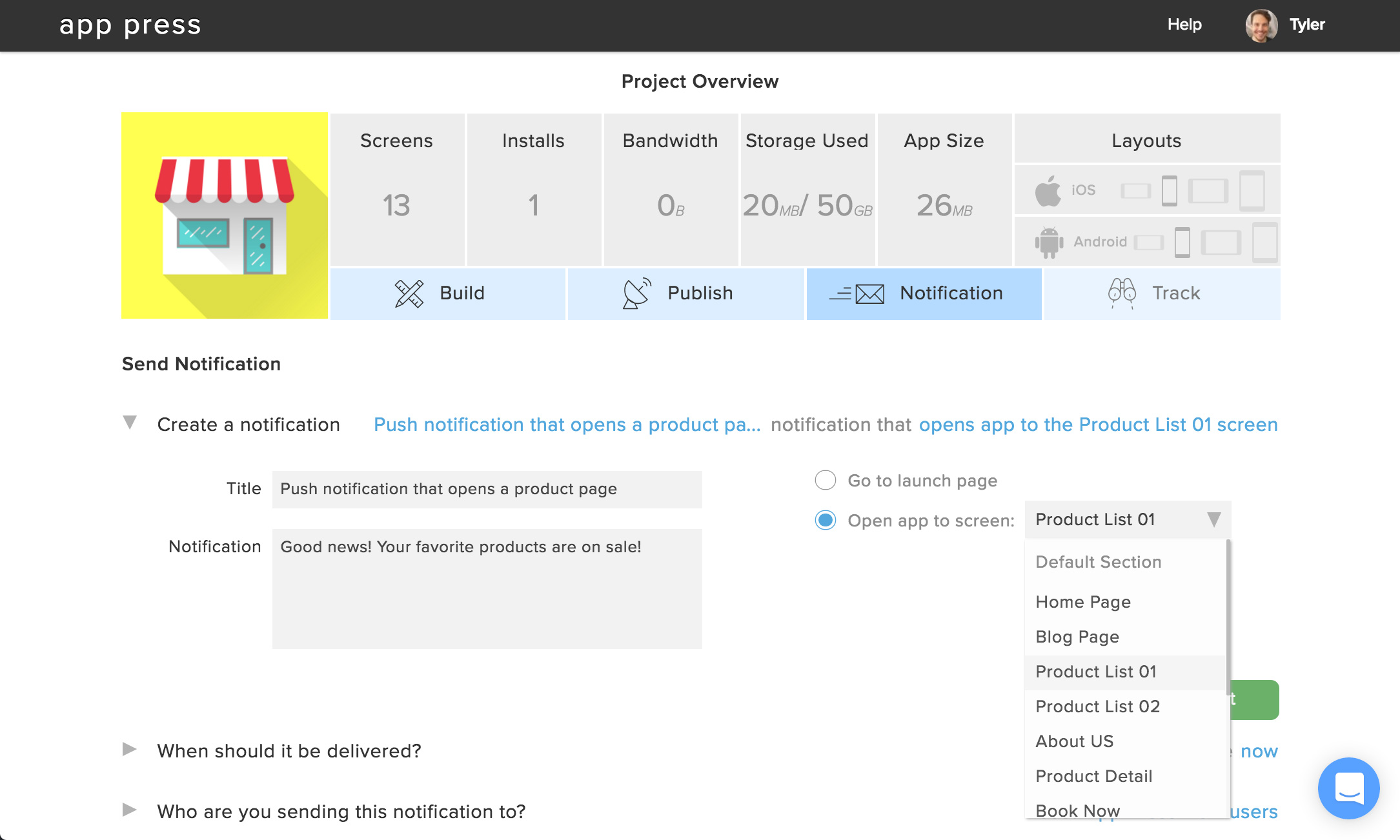
Screenshot of This is an overview of the App Press dashboard, used to create and edit app screens.Screenshot of Here's a sample push notification, set up to deliver visitors to a specific screen in the app when they receive and open the notification.Screenshot of This is the App Press studio, where you'll design screens in your app by uploading assets, embedding HTML or websites, creating touch-enabled areas, and more.Screenshot of App Press Now, available for both iOS and Android phones and tablets, allows you to instantly preview changes made to your app in the studio editor.