Answerbase vs. Zoho Desk

Overview
ProductRatingMost Used ByProduct SummaryStarting Price
Answerbase
Score 10.0 out of 10
Mid-Size Companies (51-1,000 employees)
Answerbase is a knowledge management platform for customer support and e-commerce, allowing users to ask questions, receive quality answers, and browse content and articles to meet their demand for information about your products and services. Each system comes with administration and moderation tools that are designed to help companies customize, manage and grow an engaging platform. According to the vendor, advanced features like moderation, user group management, actionable content insights,…
$49
per month
Zoho Desk
Score 7.7 out of 10
N/A
Zoho Support is a Saas help desk / ticketing system aimed at SMBs. I competes most often with Zendesk, and Desk.com.
$0
Pricing
AnswerbaseZoho Desk
Editions & Modules
Basic
$49
per month
Professional
$149
per month
Business
$399
per month
Enterprise
Quote
per year
Free
$0
Express
$9
per month per user
Standard
$20
per month per user
Professional
$35
per month per user
Enterprise
$50
per month per user
Offerings
Pricing Offerings
AnswerbaseZoho Desk
Free Trial
YesYes
Free/Freemium Version
NoYes
Premium Consulting/Integration Services
NoNo
Entry-level Setup FeeNo setup feeRequired
Additional DetailsAnswerbase Enterprise allows for 100% custom adaptations and developments to take whatever ideas, new functionalities or integration requirements you may have and make them a reality. Our knowledgeable team will manage setup, integration, and provide web-based education and training to make sure your team has all the tools and information they need to successfully manage and grow your site. Therefore, we organize a quote on a per customer basis only for customers interested in an Enterprise implementation.A discount is offered for yearly billing.
More Pricing Information
Community Pulse
AnswerbaseZoho Desk
Features
AnswerbaseZoho Desk
Incident and problem management
Comparison of Incident and problem management features of Product A and Product B
Answerbase
-
Ratings
Zoho Desk
8.6
Ratings
7% above category average
Organize and prioritize service tickets00 Ratings8.90 Ratings
Expert directory00 Ratings7.90 Ratings
Subscription-based notifications00 Ratings7.90 Ratings
ITSM collaboration and documentation00 Ratings10.00 Ratings
Ticket creation and submission00 Ratings8.50 Ratings
Ticket response00 Ratings8.50 Ratings
Self Help Community
Comparison of Self Help Community features of Product A and Product B
Answerbase
-
Ratings
Zoho Desk
8.9
Ratings
13% above category average
External knowledge base00 Ratings8.90 Ratings
Internal knowledge base00 Ratings8.90 Ratings
Multi-Channel Help
Comparison of Multi-Channel Help features of Product A and Product B
Answerbase
-
Ratings
Zoho Desk
7.4
Ratings
5% below category average
Customer portal00 Ratings8.00 Ratings
Social integration00 Ratings6.00 Ratings
Email support00 Ratings6.60 Ratings
Help Desk CRM integration00 Ratings8.90 Ratings
Best Alternatives
AnswerbaseZoho Desk
Small Businesses
Front
Front
Score 7.2 out of 10
Agiloft Service Desk (discontinued)
Score 9.0 out of 10
Medium-sized Companies
Guru
Guru
Score 9.5 out of 10
Agiloft Service Desk (discontinued)
Score 9.0 out of 10
Enterprises
Guru
Guru
Score 9.5 out of 10
SysAid
SysAid
Score 9.1 out of 10
All AlternativesView all alternativesView all alternatives
User Ratings
AnswerbaseZoho Desk
Likelihood to Recommend
10.0
(0 ratings)
7.8
(0 ratings)
Usability
-
(0 ratings)
9.4
(0 ratings)
Support Rating
-
(0 ratings)
8.7
(0 ratings)
User Testimonials
AnswerbaseZoho Desk
Likelihood to Recommend
We implemented a Q&A board since we felt this would be the best way to create high quality content for our team when discussing the next sales strategy process. Really aids customers who have purchased a product from our company to navigate any problems they experience as they can seamlessly check the community question board Increases networking opportunities
Read full review
Zoho Desk is a great customer service tool. It is very easy to track the ability to receive tickets and send responses in Zoho Desk. There are lots of options for customization. The knowledge base feature is very extensive and powerful. It makes creating internal and external FAQs easy.
Read full review
Pros
  • Increases your team to collaborate with each other as you are available to post questions that more people can answer to express and opinion or idea
  • Browse existing community pages to see if your question has been answered
  • Allows you to share relevant documents with specific staff
  • Excellent customer service support team that are always on hand to help
Read full review
  • Report features give the all insights of the customer team and customer support which enables us to make changes according to it.
  • The best thing about Zoho Desk is that it has a very beautiful and fully designed dashboard.
  • I have been using this software for a very long time in my organization, it is very easy to use with having the interface created on a very advanced module.
  • It is completely a feature rich platform.
Read full review
Cons
  • Onboarding checklist would be a great addition as setting up can be complicated
Read full review
  • When utilizing as a ticketing system, it would be nice to have a better way to monitor when something is due. It's just a little cumbersome.
  • Search Functionality - The search functionality could use a tweak or two. Too many times I am unable to find tickets. This would also be very helpful for the "Recycle Bin" when you just need to find that ticket you accidentally deleted (we are all human!). :)
Read full review
Usability
No answers on this topic
Zoho Desk on operational capacity is the most effective help desk we have come across, as it is suitable for businesses of all forms and shapes, from large to small. Again, Zoho Desk captures the attention of all clients, and on time, offers solutions to their demands without failing. Lastly, Zoho Desk requires no extra skill to execute the program.
Read full review
Support Rating
No answers on this topic
Their support is excellent. They are always available to answer all your queries and doubts. Be it a call or email or even live chat. You will always get a prompt response from their customer support executives. They are very much familiar with the product and all its functionality. Sometimes you get stuck and don’t know what to do. They are always there for your questions
Read full review
Alternatives Considered
Just from a personal viewpoint, I feel that the ease of use with Answerbase is amazing and with first class customer service support team, that could not be more friendlier and helpful. The decision was easy and they designed specific requirements that met our needs. It has really complemented our workforce and saved time.
Read full review
Zoho Desk is easily a winner for trouble ticket handling as Bitrix24 was not offering any dedicated trouble ticketing tool and we had no option but to use the Tasks section of Bitrix24 to handle our existing customers. Also Bitrix24 neither did have any dedicated mobile application for on the go usage which Zoho Desk has easily handled with applications for both Android and IOS devices.
Read full review
Return on Investment
  • Increased collaboration in the workplace
  • Saved time on staff asking the same questions
  • Provides customers a 'live' community to liaise with
Read full review
  • By running reports based on ticket, we can see how much time is spent on each customer and can manage these customers better based on what we see are there issues
  • We can also run reports based on the types of queries customers are coming in with which allows us to develop our product based on actual customers needs as a whole.
  • Automatic reporting once set up saves many man hours as new customers can be added automatically if required, and it saves having to build these reports monthly or possibly weekly
Read full review
ScreenShots

Answerbase Screenshots

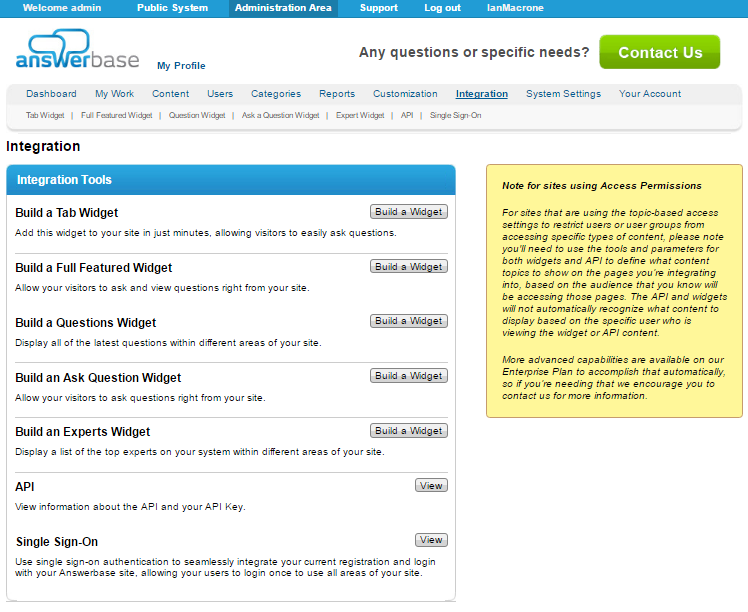
Screenshot of Each customer has access to an Admin Site where they can access the tools they need to effectively manage all of your content, users and access.Screenshot of The public interface comes with a standard template. Customers are encouraged to customize the look and feel, so that it is accomplishes their goals and accurately reflects their brand.Screenshot of Each admin and moderator has access to a “My Work” area where they can see their content assignments.Screenshot of Admins and moderators have advanced tools for moderation to control each piece of content from one area.Screenshot of Admins can have full control over customization to accomplish any look and feel they want.Screenshot of Widget builders and API’s empower you to accomplish even the most sophisticated integrations or even build your own Answerbase-powered Q&A applications.

Zoho Desk Screenshots

Screenshot of Log and monitor phone conversations, convert them into new tickets, or attach them to existing ones. Convert social media interactions and live chat into tickets at the click of a button.Screenshot of Bring a Help Center directly into a website to strengthen self-service. Chat with Zia, an AI-powered conversation assistant. Customers can chat with Zia right from a mobile app or website. Zia processes their questions and suggests appropriate solutions from the Knowledge Base.Screenshot of With advanced process automation, internal processes can be setup within the help desk, implement them automatically, and make sure that all processes are followed precisely.Screenshot of Instant responses for instant happiness. Respond to customers the minute they reach out with Zoho Desk's embeddable chat widget. Customers can get in touch with agents instantly, right from the Help Center, so agents can respond and help them find answers faster.Screenshot of Monitor a team's performance, customize and schedule reports. Custom dashboards can be created.Screenshot of Zia brings together predictions across anomalies, sentiment, trending ticket tags, and more into a common dashboard for decision-makers to consume. They can drill down further into the details from the same dashboard to investigate further.