AnalyticsCreator vs. Skyvia

Overview
ProductRatingMost Used ByProduct SummaryStarting Price
AnalyticsCreator
Score 0.0 out of 10
N/A
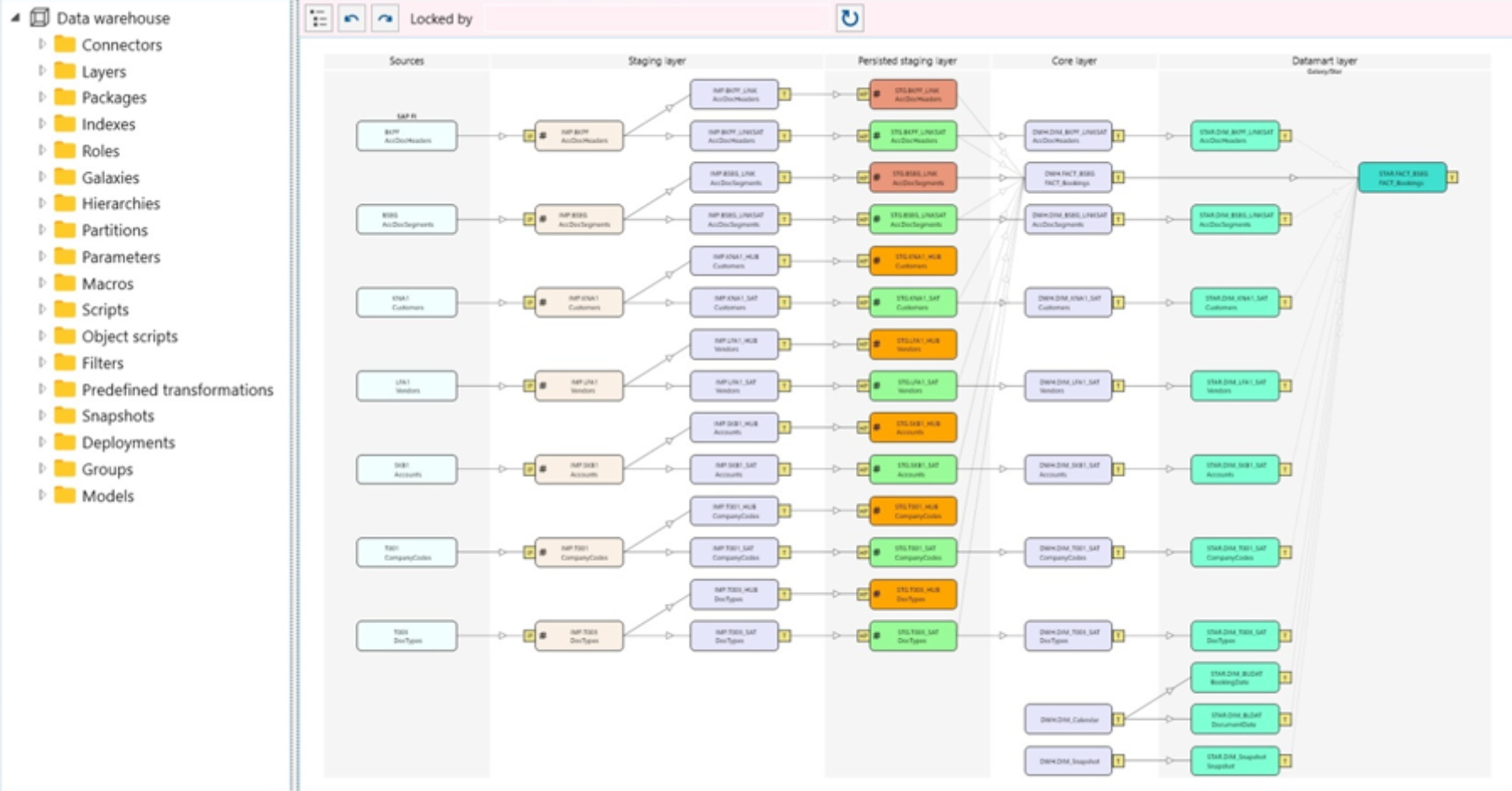
AnalyticsCreator automates design, development, deployment, and change processes, to enable teams to manage data for analytical needs. AnalyticsCreator's prototyping empowers business to showcase results faster and generate code for data management through a connected analytical frontend, such as Power BI. Whether on Azure SQL DB, Azure data warehouse, or on-premises MS SQL, AnalyticsCreator provides a tool for streamlined data management.N/A
Skyvia
Score 9.9 out of 10
Mid-Size Companies (51-1,000 employees)
Skyvia is a no-code cloud data integration platform for ETL, ELT, Reverse ETL, data migration, one-way and bi-directional data sync, workflow automation, and real-time connectivity. Benefits of Using Skyvia: • Cost efficiency: With flexible pricing plans for each product, Skyvia suites for businesses of any size. • Flexibility: Skyvia provides adaptable, no-code integration tools for both basic and advanced business…
$99
per month
Pricing
AnalyticsCreatorSkyvia
Editions & Modules
No answers on this topic
Basic
$99
per month
Standard
$199
per month
Professional
$249
per month
Offerings
Pricing Offerings
AnalyticsCreatorSkyvia
Free Trial
YesYes
Free/Freemium Version
NoYes
Premium Consulting/Integration Services
NoNo
Entry-level Setup FeeNo setup feeNo setup fee
Additional Details20% discount for annual pricing.
More Pricing Information
Community Pulse
AnalyticsCreatorSkyvia
Features
AnalyticsCreatorSkyvia
Data Source Connection
Comparison of Data Source Connection features of Product A and Product B
AnalyticsCreator
-
Ratings
Skyvia
9.9
19 Ratings
17% above category average
Connect to traditional data sources00 Ratings9.919 Ratings
Data Transformations
Comparison of Data Transformations features of Product A and Product B
AnalyticsCreator
-
Ratings
Skyvia
9.0
16 Ratings
10% above category average
Simple transformations00 Ratings9.016 Ratings
Data Modeling
Comparison of Data Modeling features of Product A and Product B
AnalyticsCreator
-
Ratings
Skyvia
9.5
15 Ratings
18% above category average
Data model creation00 Ratings9.112 Ratings
Business rules and workflow00 Ratings9.913 Ratings
Best Alternatives
AnalyticsCreatorSkyvia
Small Businesses
Skyvia
Skyvia
Score 9.9 out of 10
InterSystems IRIS
InterSystems IRIS
Score 7.7 out of 10
Medium-sized Companies
IBM InfoSphere Information Server
Score 8.0 out of 10
IBM InfoSphere Information Server
Score 8.0 out of 10
Enterprises
IBM InfoSphere Information Server
Score 8.0 out of 10
IBM InfoSphere Information Server
Score 8.0 out of 10
All AlternativesView all alternativesView all alternatives
User Ratings
AnalyticsCreatorSkyvia
Likelihood to Recommend
-
(0 ratings)
9.9
(20 ratings)
Support Rating
-
(0 ratings)
9.9
(4 ratings)
User Testimonials
AnalyticsCreatorSkyvia
Likelihood to Recommend
AnalyticsCreator Solutions GmbH
No answers on this topic
Devart
1. It can be connected to slack for companies that uses that system. 2. Also can be connected to Google Drive to share information from spreadsheets and csv data. 3. It works efficiently with WordPress websites which are the most used platform for web development. 4. It connects ORACLE's databases with different systems online and that's very useful.
Read full review
Pros
AnalyticsCreator Solutions GmbH
No answers on this topic
Devart
  • Skyvia is good at scheduled bidirectional data integration to/from multiple sources
  • The mapping is done automatically which saves a lot of time
  • I like that all connectors are included in the price, so I don't have to pay for using some new ones additionally
Read full review
Cons
AnalyticsCreator Solutions GmbH
No answers on this topic
Devart
  • Increased ability for asymmetric process window changes.
  • Continue to integrate into new applications with the same quality.
  • Add some automation options in the tree.
Read full review
Usability
AnalyticsCreator Solutions GmbH
No answers on this topic
Devart
Because as a developer and programmer is very easy to work with and provides many options to very complex problems. It provides guides for integration that are very useful and makes us save a lot of money and time on integrations. Also Skyvia is constantly adding more data systems on their lists for us to provide as web managers.
Read full review
Support Rating
AnalyticsCreator Solutions GmbH
No answers on this topic
Devart
I think guys have a really good support team, and even from different time zones we managed to get worthy support.
Read full review
Alternatives Considered
AnalyticsCreator Solutions GmbH
No answers on this topic
Devart
Compared to similar user-friendly data integration systems like Integrate.io, Stitch, or Azure, Skyvia still wins in the number of connectors and pricing policy. Skyvia is a tool for companies like ours, starving for simple but, at the same time, robust and cost-effective data transfer solutions. It doesn't require additional knowledge for implementation and usage because it's no code. We'd recommend Skyvia as the best solution for non-technical staff.
Read full review
Return on Investment
AnalyticsCreator Solutions GmbH
No answers on this topic
Devart
  • The core of our business lies in analyzing data from various sources, and while ETL itself is not our primary focus, it is a necessary process to achieve our goals. Thanks to Skyvia, we are able to streamline the ETL process at a reasonable price, allowing us to dedicate our efforts to data analysis without the burden of ETL complexities.
Read full review
ScreenShots

AnalyticsCreator Screenshots

Screenshot of AnalyticsCreator data sourcesScreenshot of AnalyticsCreator data environmentScreenshot of AnalyticsCreator DACPAC & SSIS packages.Screenshot of AnalyticsCreator data lineageScreenshot of AnalyticsCreator DWH wizardScreenshot of AnalyticsCreator source data

Skyvia Screenshots

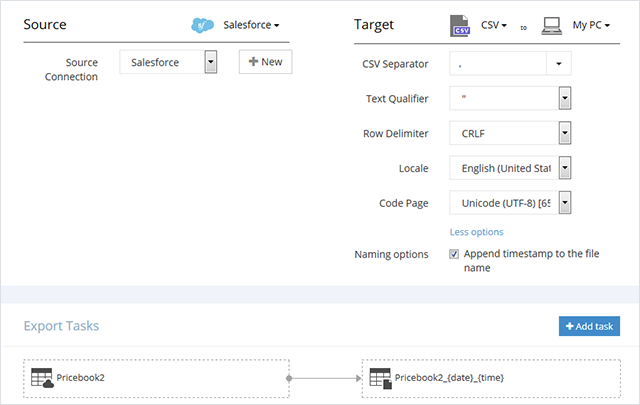
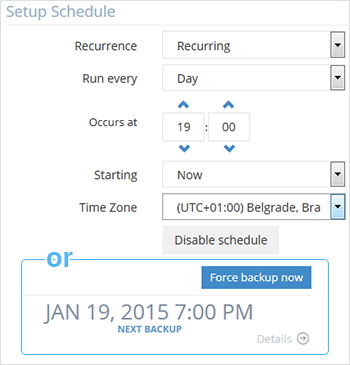
Screenshot of ExportScreenshot of QueryScreenshot of Backup ScheduleScreenshot of Integration