Database Administrator in Information Technology at EDII Software Solutions LLP (Information Technology & Services, 51-200 employees)
Chose Amazon RDS
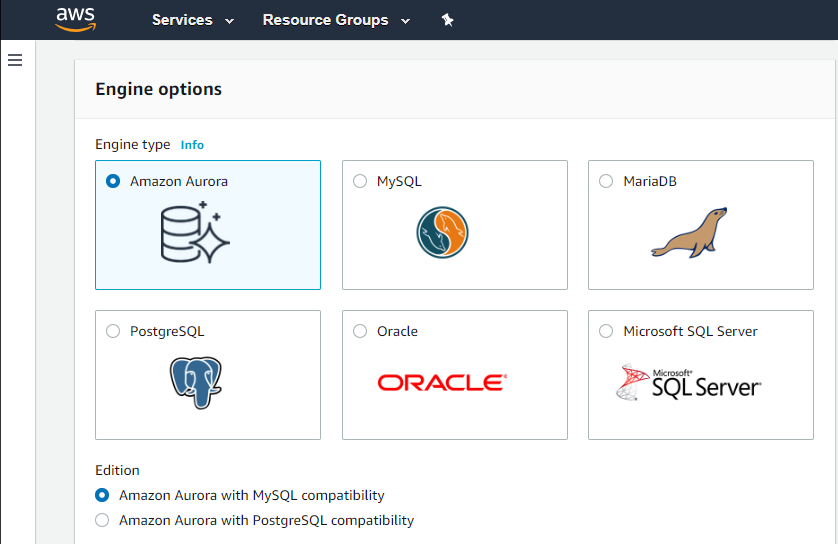
Amazon RDS supports a wider range of database engines, including MySQL,
PostgreSQL, Oracle, Microsoft SQL Server, and Amazon Aurora (MySQL and
PostgreSQL-compatible) than Google Cloud SQL. When compared to Google Cloud SQL, AWS provides a larger global footprint with …
A de minimis incentive was given to thank the reviewer for their time. The incentive was not used to bias or drive a particular response, nor was the incentive contingent on a positive endorsement. More Info
Verified User
Chose Amazon RDS
RDS support more relational database engines. RDS gives us option to choose type of machine in which database will be hosted which Google Cloud SQL not. Security-wise RDS enforce by default to set password which Google Cloud SQL doesn't. Also we can attack security group to …
A de minimis incentive was given to thank the reviewer for their time. The incentive was not used to bias or drive a particular response, nor was the incentive contingent on a positive endorsement. More Info
Verified User
Chose Amazon RDS
Amazon Relational Database Service (RDS) stands out among similar products due to its seamless integration with other AWS services, automated backups, and multi-AZ deployments for high availability. Its support for various database engines, such as MySQL, PostgreSQL, and …
A de minimis incentive was given to thank the reviewer for their time. The incentive was not used to bias or drive a particular response, nor was the incentive contingent on a positive endorsement. More Info
Verified User
Chose Amazon RDS
There are a lot of factor we took into consideration the most important ones are: Ease of use and setup - Compared to other similar options Amazon RDS is very easy to setup just clicking few options and its ready for POC and for production very easy and flexible Terraform …
A de minimis incentive was given to thank the reviewer for their time. The incentive was not used to bias or drive a particular response, nor was the incentive contingent on a positive endorsement. More Info
Verified User
Chose Amazon RDS
RDS seems to be the best cross-section between cost, availability, deployment and throughput.
A de minimis incentive was given to thank the reviewer for their time. The incentive was not used to bias or drive a particular response, nor was the incentive contingent on a positive endorsement. TR verified that a representative sample of customers was invited. More Info
Cloud Engineer in Information Technology at Searce (Information Technology & Services, 501-1000 employees)
Chose Amazon RDS
1: If your company is already deeply involved in the AWS ecosystem, such as AWS Lambda, Amazon S3, or Amazon Redshift, leveraging Amazon RDS might result in a more seamless integration of services. AWS offers a broad set of cloud services, which makes it easier to design and …
A de minimis incentive was given to thank the reviewer for their time. The incentive was not used to bias or drive a particular response, nor was the incentive contingent on a positive endorsement. TR verified that a representative sample of customers was invited. More Info
Verified User
Chose Amazon RDS
Amazon RDS excels with its widely adopted and mature ecosystem, supporting various database engines. While Azure SQL Database offers a tiered pricing structure and automatic patching, and Cloud SQL provides straightforward pricing and easy scaling, Amazon RDS's extensive …
A de minimis incentive was given to thank the reviewer for their time. The incentive was not used to bias or drive a particular response, nor was the incentive contingent on a positive endorsement. TR verified that a representative sample of customers was invited. More Info
Verified User
Chose Amazon RDS
Earlier we were using the Azure Ecosystem but we faced some issues in DevOps side so we decided to migrate towards some other reliable infra so we migrated all our engines, RDS and other services to Amazon Relational Database Service (RDS) and from that time we are using this. …
A de minimis incentive was given to thank the reviewer for their time. The incentive was not used to bias or drive a particular response, nor was the incentive contingent on a positive endorsement. TR verified that a representative sample of customers was invited. More Info
Co-Founder & CTO in Research & Development at GIDE.AI (Internet, 11-50 employees)
Chose Amazon RDS
AWS RDS provides multiple Engines as compared to Google SQL AWS RDS provides more than 5 read replicas which a Google SQL does not AWS RDS is a cheaper option than Redshift for smaller datasets. Redshift is a Dataware house and must be used for super large datasets only …
A de minimis incentive was given to thank the reviewer for their time. The incentive was not used to bias or drive a particular response, nor was the incentive contingent on a positive endorsement. TR verified that a representative sample of customers was invited. More Info
Associate Project Manager in Information Technology at Spanidea Systems (Information Technology & Services, 501-1000 employees)
Chose Amazon RDS
In my opinion, Amazon Relational Database Service (RDS) has provided better services in terms of Scalability and data Security as compared to its competitor. It helped us to manage our data using RDS server more efficiently and effectively. The high Availability helped us to …
A de minimis incentive was given to thank the reviewer for their time. The incentive was not used to bias or drive a particular response, nor was the incentive contingent on a positive endorsement. TR verified that a representative sample of customers was invited. More Info
Verified User
Chose Amazon RDS
At first GCP was considered, but it not very intuitive to use and maintain. We then wanted to run MySQL instances on EC2, which would have been a little cost effective but having limited man power and hassle of patching, scaling and backup led us to select more managed service.
A de minimis incentive was given to thank the reviewer for their time. The incentive was not used to bias or drive a particular response, nor was the incentive contingent on a positive endorsement. TR verified that a representative sample of customers was invited. More Info
Software Developer in Engineering at ezDI (Health, Wellness and Fitness, 201-500 employees)
Chose Amazon RDS
As a POC, we had worked with Azure and GCP's databases as well. One problem with Azure is that it seems slow in supporting new versions of MySQL. With GCP Cloud SQL, the security configuration for the database was not as intuitive as in AWS. The UI in both Azure and GCP was …
A de minimis incentive was given to thank the reviewer for their time. The incentive was not used to bias or drive a particular response, nor was the incentive contingent on a positive endorsement. More Info
Verified User
Chose Amazon RDS
Very similar. In our isolated usage, we saw mild performance advantage in GCP, but AWS RDS is cheaper and has more built-in.
A de minimis incentive was given to thank the reviewer for their time. The incentive was not used to bias or drive a particular response, nor was the incentive contingent on a positive endorsement. More Info
Tech Co-Founder in Corporate at Infofree.com (Computer Software, 1-10 employees)
Chose Amazon RDS
It's hard to identify how Amazon RDS stacks up against the databases they support, because to install and use a relational database in a production environment you need a Database Administrator to help install, configure and manage. Amazon RDS keeps the details simple enough …
A de minimis incentive was given to thank the reviewer for their time. The incentive was not used to bias or drive a particular response, nor was the incentive contingent on a positive endorsement. More Info
Google
Verified User
Chose Google Cloud SQL
Google Cloud SQL ended up being less expensive, have a greater support team and offer a much better interface
A de minimis incentive was given to thank the reviewer for their time. The incentive was not used to bias or drive a particular response, nor was the incentive contingent on a positive endorsement. More Info
Senior Backend developer in Engineering at zaamo (Retail, 11-50 employees)
Chose Google Cloud SQL
Setting up or migrating Google Cloud SQL is easy as compared to AWS. It has a good monitoring and logging mechanism and a good user interface which makes it easy to navigate.It also has a pay as you go pricing which makes it easier to reduce cost. Google Cloud SQL offers …
A de minimis incentive was given to thank the reviewer for their time. The incentive was not used to bias or drive a particular response, nor was the incentive contingent on a positive endorsement. More Info
Verified User
Chose Google Cloud SQL
Actually Google Cloud SQL is similar to them, the difference is which engine each supports e.g. there's no managed Oracle DB in Google Cloud SQL but as long as you don't need Oracle, Google Cloud SQL should suffice and give you great user experience and performance. You also …
A de minimis incentive was given to thank the reviewer for their time. The incentive was not used to bias or drive a particular response, nor was the incentive contingent on a positive endorsement. TR verified that a representative sample of customers was invited. More Info
Co-Founder & CTO in Research & Development at GIDE.AI (Internet, 11-50 employees)
Chose Google Cloud SQL
- AWS RDS and Aurora is a just a notch above Google Cloud SQL as it provide boost in performance when required - Google Cloud SQL Mysql Engine is Cloud based and better than native Mysql as it provides management of the server out of box - Compared to a MongoDB it has a low …
A de minimis incentive was given to thank the reviewer for their time. The incentive was not used to bias or drive a particular response, nor was the incentive contingent on a positive endorsement. TR verified that a representative sample of customers was invited. More Info
IT Operations and Support Specialist in Information Technology at AZEREX LLC. (Information Technology & Services, 1-10 employees)
Chose Google Cloud SQL
Easier learning, simple features and settings with a very user-friendly application environment and flexible prices make Google Cloud [SQL] a pioneering option over competitors
A de minimis incentive was given to thank the reviewer for their time. The incentive was not used to bias or drive a particular response, nor was the incentive contingent on a positive endorsement. More Info
Verified User
Chose Google Cloud SQL
Google Cloud SQL is just as good as the other guys. We were already invested in GCP, which made the choice very easy. We did not want to start fresh in AWS or Azure. We used our existing GCP setup and just added Cloud SQL. It's unfortunate that companies continue to send people …
A de minimis incentive was given to thank the reviewer for their time. The incentive was not used to bias or drive a particular response, nor was the incentive contingent on a positive endorsement. More Info
Director of Technology in Information Technology at Global Brigades, Inc. (Philanthropy, 51-200 employees)
Chose Google Cloud SQL
Google Cloud SQL is very similar to other cloud provider options. AWS and DigitalOcean are direct competitors, While Azure is focusing on their own products. At cloud provider level, it's a matter of choosing the provider, and this product will not play a significant role on …
A de minimis incentive was given to thank the reviewer for their time. The incentive was not used to bias or drive a particular response, nor was the incentive contingent on a positive endorsement. More Info
Verified User
Chose Google Cloud SQL
Kind of similar features provided against RDS. Used this because of transactional db
A de minimis incentive was given to thank the reviewer for their time. The incentive was not used to bias or drive a particular response, nor was the incentive contingent on a positive endorsement. More Info
Verified User
Chose Google Cloud SQL
Google's solution for database is, at least for our team, easier to implement and maintain than Amazon's offer.
A de minimis incentive was given to thank the reviewer for their time. The incentive was not used to bias or drive a particular response, nor was the incentive contingent on a positive endorsement. TR verified that a representative sample of customers was invited. More Info
If your application needs a relational data store and uses other AWS services, AWS RDS is a no-brainer. It offers all the traditional database features, makes it a snap to set up, creates cross-region replication, has advanced security, built-in monitoring, and much more at a very good price. You can also set up streaming to a data lake using various other AWS services on your RDS.
A de minimis incentive was given to thank the reviewer for their time. The incentive was not used to bias or drive a particular response, nor was the incentive contingent on a positive endorsement. More Info
Does what it promises well, for instance, as a sidecar for the main enterprise data warehouse. However, I would not recommend using it as the main data warehouse, particularly due to the heavy business logic, as other dedicated tools are more suitable for ensuring scalable operations in terms of change management and multi-developer adjustments.
A de minimis incentive was given to thank the reviewer for their time. The incentive was not used to bias or drive a particular response, nor was the incentive contingent on a positive endorsement. More Info
Automated Database Management: We use it for streamlining routine tasks like software patching and database backups.
Scalability on Demand: we use it to handle traffic spikes, scaling both vertically and horizontally.
Database Engine Compatibility: It works amazingly with multiple database engines used by different departments within our organization including MySQL, PostgreSQL, SQL Server, and Oracle.
Monitoring: It covers our extensive monitoring and logging, and also has great compatibility with Amazon CloudWatch
A de minimis incentive was given to thank the reviewer for their time. The incentive was not used to bias or drive a particular response, nor was the incentive contingent on a positive endorsement. TR verified that a representative sample of customers was invited. More Info
A de minimis incentive was given to thank the reviewer for their time. The incentive was not used to bias or drive a particular response, nor was the incentive contingent on a positive endorsement. More Info
It is a little difficult to configure and connect to an RDS instance. The integration with ECS can be made more seamless.
Exploring features within RDS is not very easy and intuitive. Either a human friendly documentation should be added or the User Interface be made intuitive so that people can explore and find features on their own.
There should be tools to analyze cost and minimize it according to the usage.
A de minimis incentive was given to thank the reviewer for their time. The incentive was not used to bias or drive a particular response, nor was the incentive contingent on a positive endorsement. TR verified that a representative sample of customers was invited. More Info
We do renew our use of Amazon Relational Database Service. We don't have any problems faced with RDS in place. RDS has taken away lot of overhead of hosting database, managing the database and keeping a team just to manage database. Even the backup, security and recovery another overhead that has been taken away by RDS. So, we will keep on using RDS.
A de minimis incentive was given to thank the reviewer for their time. The incentive was not used to bias or drive a particular response, nor was the incentive contingent on a positive endorsement. More Info
A de minimis incentive was given to thank the reviewer for their time. The incentive was not used to bias or drive a particular response, nor was the incentive contingent on a positive endorsement. More Info
I've been using AWS Relational Database Services in several projects in different environments and from the AWS products, maybe this one together to EC2 are my favourite. They deliver what they promise. Reliable, fast, easy and with a fair price (in comparison to commercial products which have obscure license agreements).
A de minimis incentive was given to thank the reviewer for their time. The incentive was not used to bias or drive a particular response, nor was the incentive contingent on a positive endorsement. More Info
As with other cloud tools, users must learn a new terminology to navigate the various tools and configurations, and understand Google Cloud's configuration structure to perform even the most basic operations. So the learning curve is quite steep, but after a few months, it gets easier to maintain.
A de minimis incentive was given to thank the reviewer for their time. The incentive was not used to bias or drive a particular response, nor was the incentive contingent on a positive endorsement. TR verified that a representative sample of customers was invited. More Info
I have only had good experiences in working with AWS support. I will admit that my experience comes from the benefit of having a premium tier of support but even working with free-tier accounts I have not had problems getting help with AWS products when needed. And most often, the docs do a pretty good job of explaining how to operate a service so a quick spin through the docs has been useful in solving problems.
A de minimis incentive was given to thank the reviewer for their time. The incentive was not used to bias or drive a particular response, nor was the incentive contingent on a positive endorsement. More Info
GCP support in general requires a support agreement. For small organizations like us, this is not affordable or reasonable. It would help if Google had a support mechanism for smaller organizations. It was a steep learning curve for us because this was our first entry into the cloud database world. Better documentation also would have helped.
A de minimis incentive was given to thank the reviewer for their time. The incentive was not used to bias or drive a particular response, nor was the incentive contingent on a positive endorsement. More Info
A de minimis incentive was given to thank the reviewer for their time. The incentive was not used to bias or drive a particular response, nor was the incentive contingent on a positive endorsement. TR verified that a representative sample of customers was invited. More Info
Amazon Relational Database Service (RDS) stands out among similar products due to its seamless integration with other AWS services, automated backups, and multi-AZ deployments for high availability. Its support for various database engines, such as MySQL, PostgreSQL, and Oracle, provides flexibility. Additionally, RDS offers managed security features, including encryption and IAM integration, enhancing data protection. The pay-as-you-go pricing model makes it cost-effective. Overall, Amazon RDS excels in ease of use, scalability, and a comprehensive feature set, making it a top choice for organizations seeking a reliable and scalable managed relational database service in the cloud.
Unlike other products, Google Cloud SQL has very flexible features that allow it to be selected for a free trial account so that the product can be analyzed and tested before purchasing it. Integration capabilities with most of the web services tools are easier regarding Google Cloud SQL with its nature and support.
A de minimis incentive was given to thank the reviewer for their time. The incentive was not used to bias or drive a particular response, nor was the incentive contingent on a positive endorsement. TR verified that a representative sample of customers was invited. More Info
A de minimis incentive was given to thank the reviewer for their time. The incentive was not used to bias or drive a particular response, nor was the incentive contingent on a positive endorsement. More Info
With managed database system, it has given us near 100% data availability
It has also improved web layer experience with faster processing and authentication using database fields
Google Cloud SQL also gels up well with Google Analytics and other analytics systems for us to join up different data points and process them for deeper dives and analysis
A de minimis incentive was given to thank the reviewer for their time. The incentive was not used to bias or drive a particular response, nor was the incentive contingent on a positive endorsement. More Info