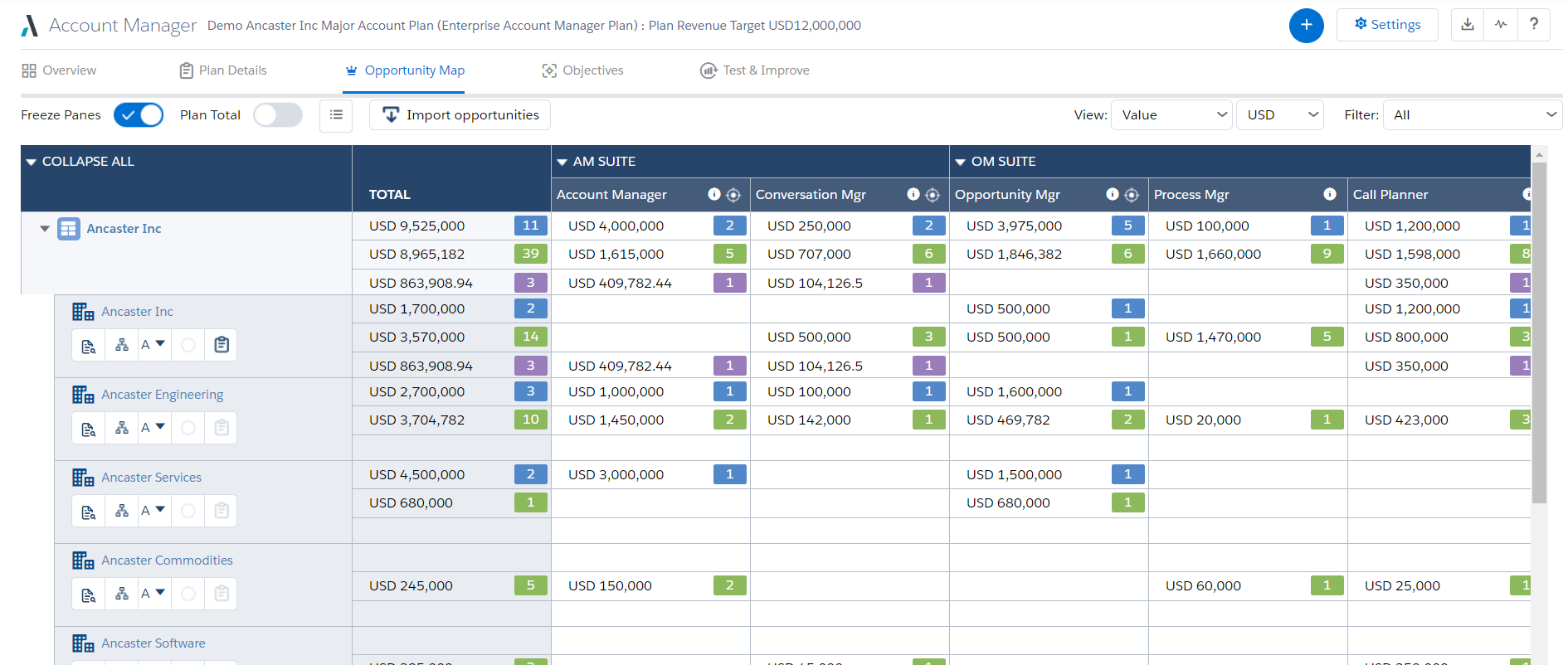
Altify’s suite of Salesforce native solutions guide and coach sellers to identify and map key relationships, uncover business insights, align sales processes to buying processes, qualify, manage and execute deals, and grow wallet share in accounts.
N/A
ClearSlide
Score6.3 out of 10
N/A
ClearSlide enables sales and marketing teams to find content, communicate it whether in-person, on the phone or through email, and get insights into how customers engage, with the goal of helping sales and marketing teams make every interaction count and create amazing customer experiences. ClearSlide is a system of engagement for sales, marketing & services teams. For managers and leaders, ClearSlide provides engagement dashboards to improve deal visibility, coaching, and stronger…
Altify is very well suited for customer relationship mapping and for use on very large, long term and complex deals. Altify is created and represented as an enterprise-level tool, but even some of its functions are too overbuilt for enterprise level sales activities. Altify is a tool best utilized only for the top level of complex deals within an organization. Features such as customer relationship mapping do have use and benefit for mid to large level deals and is arguably the most valuable tool in the Altify suite. After nearly a year using Altify, my recommendation on its use would be to enable account plans, account management, opportunity management, and sales process manager only to the top strategic account reps in the organization, realizing that they are probably best used purely out of the box as any customizations create other complications. For the rest of the sales teams, the customer relationship mapping feature is the one tool reps would gain the most value out of.
A de minimis incentive was given to thank the reviewer for their time. The incentive was not used to bias or drive a particular response, nor was the incentive contingent on a positive endorsement. More Info
Clearslide makes it easy to share files with anyone via a single link. It simplifies the process of document sharing in the new "work from home" age we have now and allows multiple parties to view the same document, either simultaneously or separately. It is less appropriate for sensitive information, as the link can easily be shared between parties or forwarded on, so there is no gatekeeping.
A de minimis incentive was given to thank the reviewer for their time. The incentive was not used to bias or drive a particular response, nor was the incentive contingent on a positive endorsement. More Info
A de minimis incentive was given to thank the reviewer for their time. The incentive was not used to bias or drive a particular response, nor was the incentive contingent on a positive endorsement. More Info
Analytics: for sales, especially when selling virtually, it can be difficult to know if your customers are engaged with the presentation. Clearslide will give you reports that indicate how long customers were viewing what you were presenting, if/when you lost them, and at what place in your presentation you lost them. It can also show you how long potential customers spent reviewing follow-up materials you've sent them.
Screenshare: the screenshare functionality, when using Google Chrome, is very seamless, and the customer can take over the screenshare without needing any downloads or plug-ins.
Presenting: It's quite easy to present material with Clearslide, and to move between materials that you are presenting.
A de minimis incentive was given to thank the reviewer for their time. The incentive was not used to bias or drive a particular response, nor was the incentive contingent on a positive endorsement. More Info
Sales Process Manager: The Altify Sales Process manager's biggest drawback is the lack of usability for the end user. Altify has an out of the box sales process or a custom one can be created based on the company sales process. The drawback is that unless the sales process includes very few items, it can be more cumbersome than helpful. The Rep walks through the Sales Process by selection whether they have "Completed" are "In Progress" or have "Not Completed" the sales process activities at each stage of the opportunity. Altify saves after each selection so there is considerable downtime as the user waits for their selection to be recorded before they can answer the next question. Altify has an option to automatically advance the Salesforce opportunity Sales Stage once a certain % or mandatory steps in the sales process are completed, however this is not entirely useful as it does not advance until the set % or mandatory marked processes within a Sales Stage are completed AS WELL as at least one process from the next sales stage. This becomes very confusing and cumbersome for the users. In most cases, the sales process manager becomes more of a micromanagement tool with managers requiring all items to be marked completed and the Users merely marking items to satisfy that requirement without getting the intended benefit of the guided selling experience.
Account Plans: Account Plans can be grouped in both "does well" and "does poorly" for the Altify Suite. I will outline the bad in this portion of the review. Altify Account Plans do have some ability for customization, however the standard out of the box options are incredibly overbuilt. Filling out all of the information within the Account Plan can consume 40+ man hours for a single Account. While some of this information can be useful and important to note, other portions become more cumbersome than useful. The Completeness and Scorecard portions of the use a number of calculations. These calculations are explained at the bottom of the page but from a user perspective are very confusing and not straightforward. Most users that begin using account plans quickly abandon them because of the difficulty in setting them up correctly and the minimal insights that are gleaned out of the work put into them. One place for the greatest opportunity to improve account plans is in the objectives section, there the user can set objectives and activities (tasks) to meet them. The tasks must be manually selected to create an actual task in Salesforce and this cannot be assigned out to other SF Users. This portion of the Account plan would be improved if it could be used as a holistic account management platform to manage tasks across all the opportunities and potential opportunities, with an ability to assign them out to others in Salesforce within the account team.
Altify Max Insights: Altify max insights is intended to provide coaching advice at the opportunity level. This feature is tied into the opportunity manager. The drawback to this feature is that the insight mainly pertains to whether or not a user filled out all the steps in the opportunity manager: the sales process, the opportunity assessment, strategy, and the customer relationship map. The insights are far less action-oriented and more of a reminder to use the tool components. This tool just doesn't hold value, especially as it is an add on product.
Lack of Customization - While Altify does allow customization of some of their products and components, Altify has a ton of limitations. One of the most frustrating aspects is that all of the processes happen from their "black box" which is the dealmaker opportunity objects that Altify creates. This is essentially a shadow copy of the opportunities within Salesforce that then push changes to the actual opportunity. There is no way to tap into this shadow opportunity to either run custom processes or to even surface the Altify insights in a BI tool such as Einstein. This means that a lot of the use and functionality that Altify does do well cannot be leveraged for company insights or user end improvements.
A de minimis incentive was given to thank the reviewer for their time. The incentive was not used to bias or drive a particular response, nor was the incentive contingent on a positive endorsement. More Info
Call quality with CS has always been an issue in my two (2) years of experience with the platform. CS upgraded their phone provider in winter 2018, but the call quality has only been marginally improved from my perspective. Also, with the switch to a new phone provider, users are required to use a new conference line, access number, and a leader pin. The leader pin is new and adds an extra step to setting up a conference line, which seems unnecessary.
Content curation is probably my biggest issue with CS. With previous experience in a sales enablement company, I've seen how content can be curated to map to the seller's specific stage in a deal cycle, which is what most companies want. CS does not have this functionality from my perspective, and if it does, then overall curation capabilities are weak. Rather than curating content to match a seller's current point in a sales process, CS relies on surfacing content that is most popular or recently added. There is a search feature, which works well if you know what the collateral is called, but it is not scanning the content of documents to find what is most relevant. I equate the content feature of CS to a search that you would do in your computer's "Download" folder or even in Dropbox. If your company is smaller and only needs to surface a few pieces of collateral, then CS will work fine. If your organization is larger with large amounts of specific collateral, then I would look elsewhere.
The CS plugins for Outlook, Gmail, or your web browser are great ideas but executed poorly. The integrations have caused a lot of headaches for colleagues and me since their release. They have caused our email to close unexpectedly, content to not be linked properly, or emails to not be tracked. The idea for these integrations was to reduce the amount of time a seller has to jump between windows, which is awesome, but the integrations are full of glitches. One of the biggest glitches I've seen is how CS, Grammarly, and Outlook all work together. CS is always the component of those three that causes everything to freeze or crash. In short, the integrations are a great idea but executed poorly at this time.
A de minimis incentive was given to thank the reviewer for their time. The incentive was not used to bias or drive a particular response, nor was the incentive contingent on a positive endorsement. More Info
ClearSlide is embedded in our culture and in our organization. The sales and marketing teams use ClearSlide on a daily basis to share information and presentations as well as communicate "what is working." Our leadership uses the analytics to provide improved feedback and coaching regarding bottlenecks our representatives are experiencing.
A de minimis incentive was given to thank the reviewer for their time. The incentive was not used to bias or drive a particular response, nor was the incentive contingent on a positive endorsement. More Info
Its easy to use from a presenter's perspective. Its web based so anyone who can navigate Facebook can open a live pitch or shared file. This makes it easy to give live demos, share files, and share screens with out downloading any software or installing java patches
A de minimis incentive was given to thank the reviewer for their time. The incentive was not used to bias or drive a particular response, nor was the incentive contingent on a positive endorsement. More Info
I was mostly involved in the implementation process and syncing ClearSlide with Salesforce, and I would say the support was mostly average. It took a few times to get everything scheduled, and a lot of the process was left up to me. I was reading through the documents that they supplied. It wasn't complicated, but more direct support would have been appreciated.
A de minimis incentive was given to thank the reviewer for their time. The incentive was not used to bias or drive a particular response, nor was the incentive contingent on a positive endorsement. More Info
While Skuid is not a match to what Altify does in terms of capabilities, Skuid did allow us to natively create the functions that we needed within the business in a way that was more useful than the Altify tools out of the box functionality. Altify does not offer anything for a more "light touch" opportunity, which is its greatest drawback. With Skuid we were able to create our own solution for these lighter touch opportunities
A de minimis incentive was given to thank the reviewer for their time. The incentive was not used to bias or drive a particular response, nor was the incentive contingent on a positive endorsement. More Info
ClearSlide stacks up to be as good as any of the aforementioned tools. We selected Clearslide because of its ease of use and implementation. It did not take our team too long to get acclimated with how ClearSlide works and how they would be using it, allowing them to generate more meetings and more revenue.
A de minimis incentive was given to thank the reviewer for their time. The incentive was not used to bias or drive a particular response, nor was the incentive contingent on a positive endorsement. More Info
This product ROCKS!!!! ClearSlide shortened my sales cycle by over 50% by enabling to jump right into a LIVE demo on an initial client call so I don't have to waste time scheduling a demo at later date. People are busy and finding a time to schedule a call can take days or weeks
A de minimis incentive was given to thank the reviewer for their time. The incentive was not used to bias or drive a particular response, nor was the incentive contingent on a positive endorsement. More Info
A de minimis incentive was given to thank the reviewer for their time. The incentive was not used to bias or drive a particular response, nor was the incentive contingent on a positive endorsement. More Info