TrustRadius: an HG Insights company

Save this comparison

Save this comparison

Add Product

Recommended Comparisons

    Overview
    ProductRatingMost Used ByProduct SummaryStarting Price

    AllProWebTools

    Score8 out of 10
    Small Businesses (1-50 employees)
    AllProWebTools aims to offer a single platform for managing and growing a small business. Capabilities range from employee management and website SEO all the way to marketing and marketing analytics. Specific features include: customer tracking, order process tracking, newsletters, drip campaigns, order management, easy shopping cart processes, certified experts for support, real time system editing for websites and email blasts. The…

    $10

    per installation

    Salesflare

    Score6 out of 10
    Small Businesses (1-50 employees)
    Salesflare headquartered in Antwerp offers their small business intelligent CRM, providing automated event tracking and related features designed to aid the operations of SMBs.

    $39

    per month per user

    Pricing
    AllProWebToolsSalesflare
    Editions & Modules
    Base + Website Hosting
    $10
    per installation
    Growth
    $39
    per month per user
    Pro
    $64
    per month per user
    Enterprise
    $124
    per month per user
    Offerings
    Pricing Offerings
    AllProWebToolsSalesflare
    Free Trial
    YesYes
    Free/Freemium Version
    NoNo
    Premium Consulting/Integration Services
    YesYes
    Entry-level Setup Fee$195 per installationNo setup fee
    Additional DetailsStarting price of $10/month for unlimited user accounts. Provides website hosting, task manager, blogging, password manager, office chat, and the WorkFlow Timeline. Setup fee covers up to 10 hours of personal training and data import from other software programs.Discount available for annual billing.
    More Pricing Information
    Community Pulse
    AllProWebToolsSalesflare
    Considered Both Products
    AllProWebTools
    No answer on this topic
    Salesflare
    No answer on this topic
    Key User Insights
    Would buy again
    No answers on this topic
    100%
    Would buy again
    13 Answers
    Delivers good value for the price
    No answers on this topic
    100%
    Delivers good value for the price
    13 Answers
    Happy with the feature set
    No answers on this topic
    100%
    Happy with the feature set
    13 Answers
    Lived up to sales and marketing promises
    No answers on this topic
    100%
    Lived up to sales and marketing promises
    13 Answers
    Implementation went as expected
    No answers on this topic
    92%
    Implementation went as expected
    12 Answers
    Features
    AllProWebToolsSalesflare
    Sales Force Automation
    Comparison of Sales Force Automation features of AllProWebTools and Salesflare
    Feature
    AllProWebTools
    9.1
    1 Ratings
    17% above category average
    Salesflare
    8.1
    11 Ratings
    5% above category average
    Customer data management / contact management9.11 Ratings8.811 Ratings
    Workflow management9.11 Ratings8.711 Ratings
    Quote & order management9.11 Ratings6.12 Ratings
    Territory management00 Ratings5.12 Ratings
    Opportunity management00 Ratings8.011 Ratings
    Integration with email client (e.g., Outlook or Gmail)00 Ratings9.011 Ratings
    Contract management00 Ratings10.01 Ratings
    Interaction tracking00 Ratings8.811 Ratings
    Channel / partner relationship management00 Ratings8.27 Ratings
    Marketing Automation
    Comparison of Marketing Automation features of AllProWebTools and Salesflare
    Feature
    AllProWebTools
    9.1
    1 Ratings
    18% above category average
    Salesflare
    8.7
    10 Ratings
    14% above category average
    Lead management9.11 Ratings8.710 Ratings
    Email marketing9.11 Ratings8.89 Ratings
    CRM Project Management
    Comparison of CRM Project Management features of AllProWebTools and Salesflare
    Feature
    AllProWebTools
    9.1
    1 Ratings
    18% above category average
    Salesflare
    8.0
    11 Ratings
    5% above category average
    Task management9.11 Ratings8.011 Ratings
    Billing and invoicing management9.11 Ratings8.01 Ratings
    Reporting00 Ratings8.011 Ratings
    Customization
    Comparison of Customization features of AllProWebTools and Salesflare
    Feature
    AllProWebTools
    9.1
    1 Ratings
    19% above category average
    Salesflare
    8.7
    10 Ratings
    15% above category average
    Custom fields9.11 Ratings8.110 Ratings
    Custom objects00 Ratings10.02 Ratings
    API for custom integration00 Ratings8.110 Ratings
    Platform
    Comparison of Platform features of AllProWebTools and Salesflare
    Feature
    AllProWebTools
    4.5
    1 Ratings
    48% below category average
    Salesflare
    8.9
    11 Ratings
    19% above category average
    Mobile access4.51 Ratings8.911 Ratings
    Customer Service & Support
    Comparison of Customer Service & Support features of AllProWebTools and Salesflare
    Feature
    AllProWebTools
    -
    Ratings
    Salesflare
    8.3
    1 Ratings
    10% above category average
    Case management00 Ratings9.01 Ratings
    Call center management00 Ratings7.01 Ratings
    Help desk management00 Ratings9.01 Ratings
    CRM Reporting & Analytics
    Comparison of CRM Reporting & Analytics features of AllProWebTools and Salesflare
    Feature
    AllProWebTools
    -
    Ratings
    Salesflare
    8.2
    11 Ratings
    8% above category average
    Forecasting00 Ratings7.99 Ratings
    Pipeline visualization00 Ratings9.011 Ratings
    Customizable reports00 Ratings7.810 Ratings
    Security
    Comparison of Security features of AllProWebTools and Salesflare
    Feature
    AllProWebTools
    -
    Ratings
    Salesflare
    8.1
    10 Ratings
    3% below category average
    Single sign-on capability00 Ratings8.17 Ratings
    Role-based user permissions00 Ratings8.010 Ratings
    Social CRM
    Comparison of Social CRM features of AllProWebTools and Salesflare
    Feature
    AllProWebTools
    -
    Ratings
    Salesflare
    8.5
    8 Ratings
    15% above category average
    Social data00 Ratings8.88 Ratings
    Social engagement00 Ratings8.18 Ratings
    Integrations with 3rd-party Software
    Comparison of Integrations with 3rd-party Software features of AllProWebTools and Salesflare
    Feature
    AllProWebTools
    -
    Ratings
    Salesflare
    8.9
    8 Ratings
    19% above category average
    Marketing automation00 Ratings8.88 Ratings
    Compensation management00 Ratings9.01 Ratings
    Best Alternatives
    AllProWebToolsSalesflare
    Small Businesses
    Salesflare
    Score6 out of 10
    Salesmate
    Score10 out of 10
    Medium-sized Companies
    Zendesk Sell
    Score8.8 out of 10
    Zendesk Sell
    Score8.8 out of 10
    Enterprises
    Daylite
    Score7.6 out of 10
    Daylite
    Score7.6 out of 10
    All AlternativesView all alternativesView all alternatives
    User Ratings
    AllProWebToolsSalesflare
    Likelihood to Recommend
    9.1
    (1 ratings)
    9.0
    (11 ratings)
    Usability
    -
    (0 ratings)
    9.0
    (9 ratings)
    Support Rating
    -
    (0 ratings)
    9.0
    (9 ratings)
    User Testimonials
    AllProWebToolsSalesflare
    Likelihood to Recommend
    AllProWebTools
    It works very well for my cooking business.
    Read full review
    Salesflare
    In my opinion, Salesflare is an excellent CRM for small businesses. It includes everything a small business needs to manage leads, deals, and contacts in one convenient location. When a client needs more information or something done, I can quickly record it in their account—perfect for B2B SaaS and small businesses selling B2B in general.
    Read full review
    Pros
    AllProWebTools
    • The CRM holds all of my contacts and it is already integrated with all of my other tools.
    • The Email Management system is already integrated with all of my other tools. This means that I do not have to download CSVs and upload them to a separate email program everytime I want to send out an email blast.
    • I can take payments in the same system that has my email marketing and CRM. This means that I can create tags and send different email campaigns depending on if I have received payment or not.
    • The website hosting means that I can use the same software to update my blog and gallery of food pictures.
    • I can sell tickets to my cooking classes from the same software that manages everything else that I do in my business.
    • I use the task manager that is built in to remind me of things I need to do. I really like that it is tied into my CRM so I can tag tasks to specific clients.
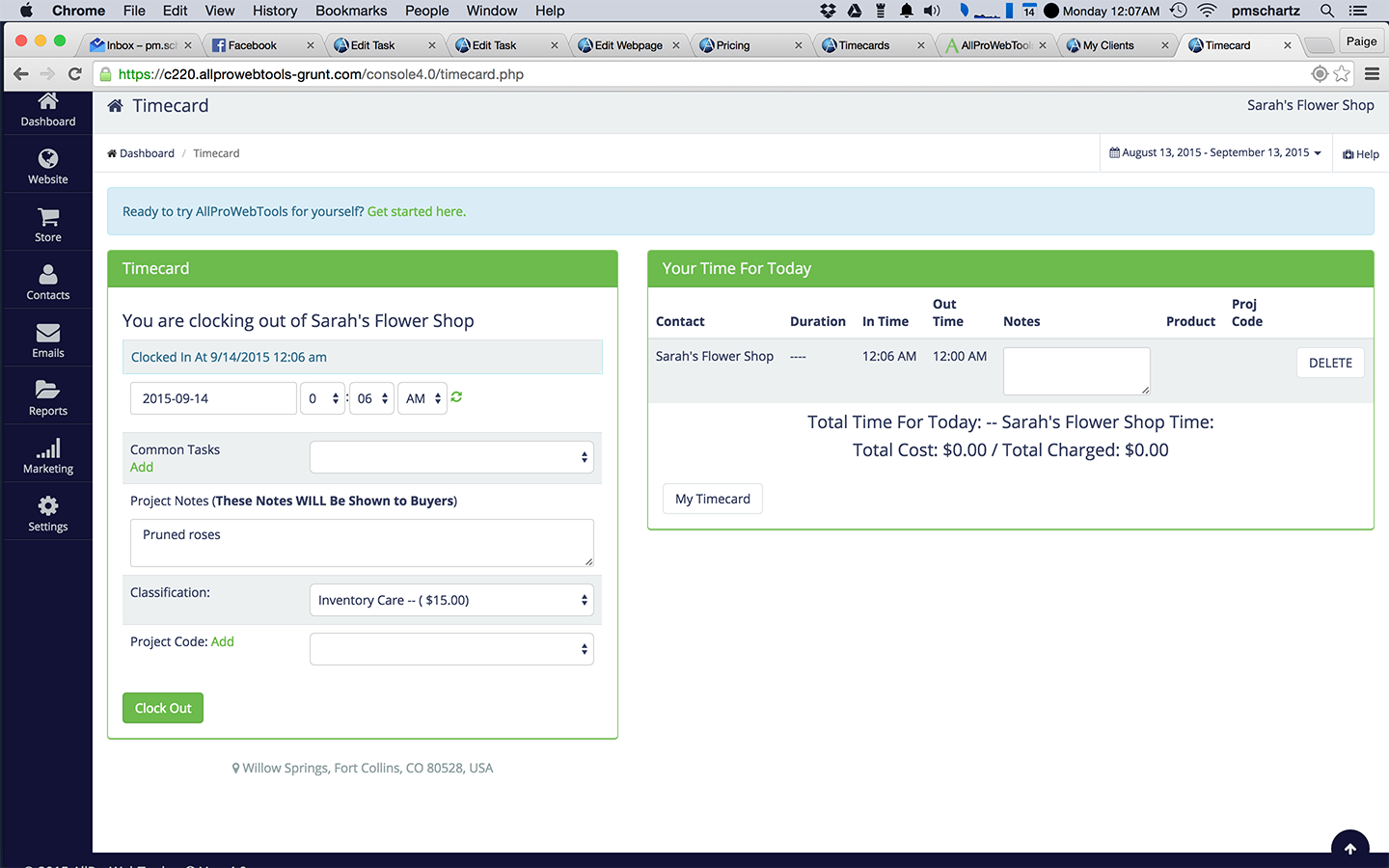
    • The built in timecard system allows me to "clock in" to whatever client that I am working on so that my time and hourly rate are automatically calculated for me. My invoices are sent automatically on the first of each month.
    Read full review
    Salesflare
    • Zero learning curve, one-minute setup and dead easy to integrate with complementary tools.
    • Powerful data automation features so everything you do has maximum bottom-line impact.
    • Stellar customer support: response is quick and the team really goes out of their way to solve your specific problems. Up to setting up custom solutions for you.
    Read full review
    Cons
    AllProWebTools
    • QuickBooks Integration
    • More email templates
    • They do not have an app
    Read full review
    Salesflare
    • It works wonderfully as a CRM for freelancers, consultants and small teams but feels like it would become more difficult to integrate with larger teams
    • Sometimes have issues with email syncing with missing emails or having to reconnect my email to Salesflare
    • Emails are sent from the app using their own servers, I would prefer to send via my own email system (Gsuite) for better delivery
    Incentivized
    Read full review
    Usability
    AllProWebTools
    No answers on this topic
    Salesflare
    The pipeline, which is the core of the platform, is very clear and full of features. On top of that Salesflare added automations, integrations, plugins and emails. You can easily get your leads there from any platform and nurture your leads until you get the deal done. I think any business can benefit from using this sales CRM.
    Read full review
    Support Rating
    AllProWebTools
    No answers on this topic
    Salesflare
    Hit them on Chat support, and you are gonna get a response within a few minutes (if not in a few hours, during weekends) But they are gonna keep following with you till they make sure that your query has been resolved. Keep it up!
    Read full review
    Alternatives Considered
    AllProWebTools
    I used to use Microsoft Excel to organize my business - but it got pretty crazy pretty fast.
    Read full review
    Salesflare
    Salesflare does its own thing compared to the others I've tried. It's unique even though it shares many of the main features a CRM should have. Salesforce Lightning is amazing and feature-packed but can often get overwhelming depending on your use case. I never experience any slight lag or load times with Salesflare. Lightning can sometimes hang depending on your browser etc.
    Incentivized
    Read full review
    Return on Investment
    AllProWebTools
    • It just makes it easier for me to track what is going on in my business.
    • I like having everything in one place, instead of a bunch of different programs.
    Read full review
    Salesflare
    • As a start up, Salesflare was perfect for me. It was easy to get up and running; easy for me to import my contacts, and easy to earn the features.
    • I like the price point - lots of features for a reasonable price.
    Read full review
    ScreenShots

    AllProWebTools Screenshots

    Screenshot of CRM viewScreenshot of B2B Lead AquisitionScreenshot of Google Calendar Appointment IntegrationScreenshot of Internal Office ChatScreenshot of Time Card Tracking

    Salesflare Screenshots

    Screenshot of the visual, drag-and-drop sales pipeline used to track leads.Screenshot of the centralized dashboard to visualize conversations with leads.Screenshot of an example of the sales reporting.Screenshot of where to send email sequences or automated email campaigns from within a CRM.Screenshot of how a connected CRM can be used from within an email inbox, to stop switching tabs.Screenshot of where to add and track leads straight from LinkedIn, with a built-in email finder.