AllProWebTools vs. Oracle CRM On Demand

Overview
ProductRatingMost Used ByProduct SummaryStarting Price
AllProWebTools
Score 8.0 out of 10
Small Businesses (1-50 employees)
AllProWebTools aims to offer a single platform for managing and growing a small business. Capabilities range from employee management and website SEO all the way to marketing and marketing analytics. Specific features include: customer tracking, order process tracking, newsletters, drip campaigns, order management, easy shopping cart processes, certified experts for support, real time system editing for websites and email blasts. The…
$10
per installation
Oracle CRM On Demand
Score 9.0 out of 10
N/A
The basis of this offering is the Market2Lead product that Oracle acquired in 2010. It has now been fully integrated with Oracle's On Demand CRM product and is a full-featured marketing automation product with features from lead management and nurturing, to measuring marketing ROI.N/A
Pricing
AllProWebToolsOracle CRM On Demand
Editions & Modules
Base + Website Hosting
$10
per installation
No answers on this topic
Offerings
Pricing Offerings
AllProWebToolsOracle CRM On Demand
Free Trial
YesNo
Free/Freemium Version
NoNo
Premium Consulting/Integration Services
NoNo
Entry-level Setup Fee$195 per installationNo setup fee
Additional DetailsStarting price of $10/month for unlimited user accounts. Provides website hosting, task manager, blogging, password manager, office chat, and the WorkFlow Timeline. Setup fee covers up to 10 hours of personal training and data import from other software programs.
More Pricing Information
Community Pulse
AllProWebToolsOracle CRM On Demand
Features
AllProWebToolsOracle CRM On Demand
Sales Force Automation
Comparison of Sales Force Automation features of Product A and Product B
AllProWebTools
9.1
Ratings
17% above category average
Oracle CRM On Demand
8.9
Ratings
14% above category average
Customer data management / contact management9.10 Ratings8.00 Ratings
Workflow management9.10 Ratings9.00 Ratings
Quote & order management9.10 Ratings10.00 Ratings
Territory management00 Ratings8.00 Ratings
Opportunity management00 Ratings8.00 Ratings
Integration with email client (e.g., Outlook or Gmail)00 Ratings9.00 Ratings
Contract management00 Ratings9.00 Ratings
Interaction tracking00 Ratings9.00 Ratings
Channel / partner relationship management00 Ratings10.00 Ratings
Marketing Automation
Comparison of Marketing Automation features of Product A and Product B
AllProWebTools
9.1
Ratings
18% above category average
Oracle CRM On Demand
8.5
Ratings
11% above category average
Lead management9.10 Ratings8.00 Ratings
Email marketing9.10 Ratings9.00 Ratings
CRM Project Management
Comparison of CRM Project Management features of Product A and Product B
AllProWebTools
9.1
Ratings
18% above category average
Oracle CRM On Demand
9.0
Ratings
17% above category average
Task management9.10 Ratings9.00 Ratings
Billing and invoicing management9.10 Ratings9.00 Ratings
Reporting00 Ratings9.00 Ratings
Customization
Comparison of Customization features of Product A and Product B
AllProWebTools
9.1
Ratings
19% above category average
Oracle CRM On Demand
8.7
Ratings
15% above category average
Custom fields9.10 Ratings9.00 Ratings
Custom objects00 Ratings9.00 Ratings
Scripting environment00 Ratings7.80 Ratings
API for custom integration00 Ratings9.00 Ratings
Platform
Comparison of Platform features of Product A and Product B
AllProWebTools
4.5
Ratings
48% below category average
Oracle CRM On Demand
9.0
Ratings
20% above category average
Mobile access4.50 Ratings9.00 Ratings
Customer Service & Support
Comparison of Customer Service & Support features of Product A and Product B
AllProWebTools
-
Ratings
Oracle CRM On Demand
9.7
Ratings
25% above category average
Case management00 Ratings10.00 Ratings
Call center management00 Ratings10.00 Ratings
Help desk management00 Ratings9.00 Ratings
CRM Reporting & Analytics
Comparison of CRM Reporting & Analytics features of Product A and Product B
AllProWebTools
-
Ratings
Oracle CRM On Demand
9.1
Ratings
18% above category average
Forecasting00 Ratings10.00 Ratings
Pipeline visualization00 Ratings8.20 Ratings
Customizable reports00 Ratings9.00 Ratings
Security
Comparison of Security features of Product A and Product B
AllProWebTools
-
Ratings
Oracle CRM On Demand
9.5
Ratings
13% above category average
Single sign-on capability00 Ratings10.00 Ratings
Role-based user permissions00 Ratings9.00 Ratings
Social CRM
Comparison of Social CRM features of Product A and Product B
AllProWebTools
-
Ratings
Oracle CRM On Demand
9.0
Ratings
20% above category average
Social data00 Ratings9.00 Ratings
Social engagement00 Ratings9.00 Ratings
Integrations with 3rd-party Software
Comparison of Integrations with 3rd-party Software features of Product A and Product B
AllProWebTools
-
Ratings
Oracle CRM On Demand
9.0
Ratings
20% above category average
Marketing automation00 Ratings9.00 Ratings
Compensation management00 Ratings9.00 Ratings
Best Alternatives
AllProWebToolsOracle CRM On Demand
Small Businesses
Salesmate
Salesmate
Score 10.0 out of 10
Salesmate
Salesmate
Score 10.0 out of 10
Medium-sized Companies
Creatio
Creatio
Score 9.7 out of 10
Creatio
Creatio
Score 9.7 out of 10
Enterprises
Creatio
Creatio
Score 9.7 out of 10
Creatio
Creatio
Score 9.7 out of 10
All AlternativesView all alternativesView all alternatives
User Ratings
AllProWebToolsOracle CRM On Demand
Likelihood to Recommend
9.1
(0 ratings)
9.0
(0 ratings)
Usability
-
(0 ratings)
9.0
(0 ratings)
Implementation Rating
-
(0 ratings)
10.0
(0 ratings)
User Testimonials
AllProWebToolsOracle CRM On Demand
Likelihood to Recommend
It works very well for my cooking business.
Read full review
I think it is well suited for organizations which are large with a lot of users so as to be able to minimize the cost of operations. Also, the organization which interacts mostly with customers can use Oracle CRM on demand.
Read full review
Pros
  • The CRM holds all of my contacts and it is already integrated with all of my other tools.
  • The Email Management system is already integrated with all of my other tools. This means that I do not have to download CSVs and upload them to a separate email program everytime I want to send out an email blast.
  • I can take payments in the same system that has my email marketing and CRM. This means that I can create tags and send different email campaigns depending on if I have received payment or not.
  • The website hosting means that I can use the same software to update my blog and gallery of food pictures.
  • I can sell tickets to my cooking classes from the same software that manages everything else that I do in my business.
  • I use the task manager that is built in to remind me of things I need to do. I really like that it is tied into my CRM so I can tag tasks to specific clients.
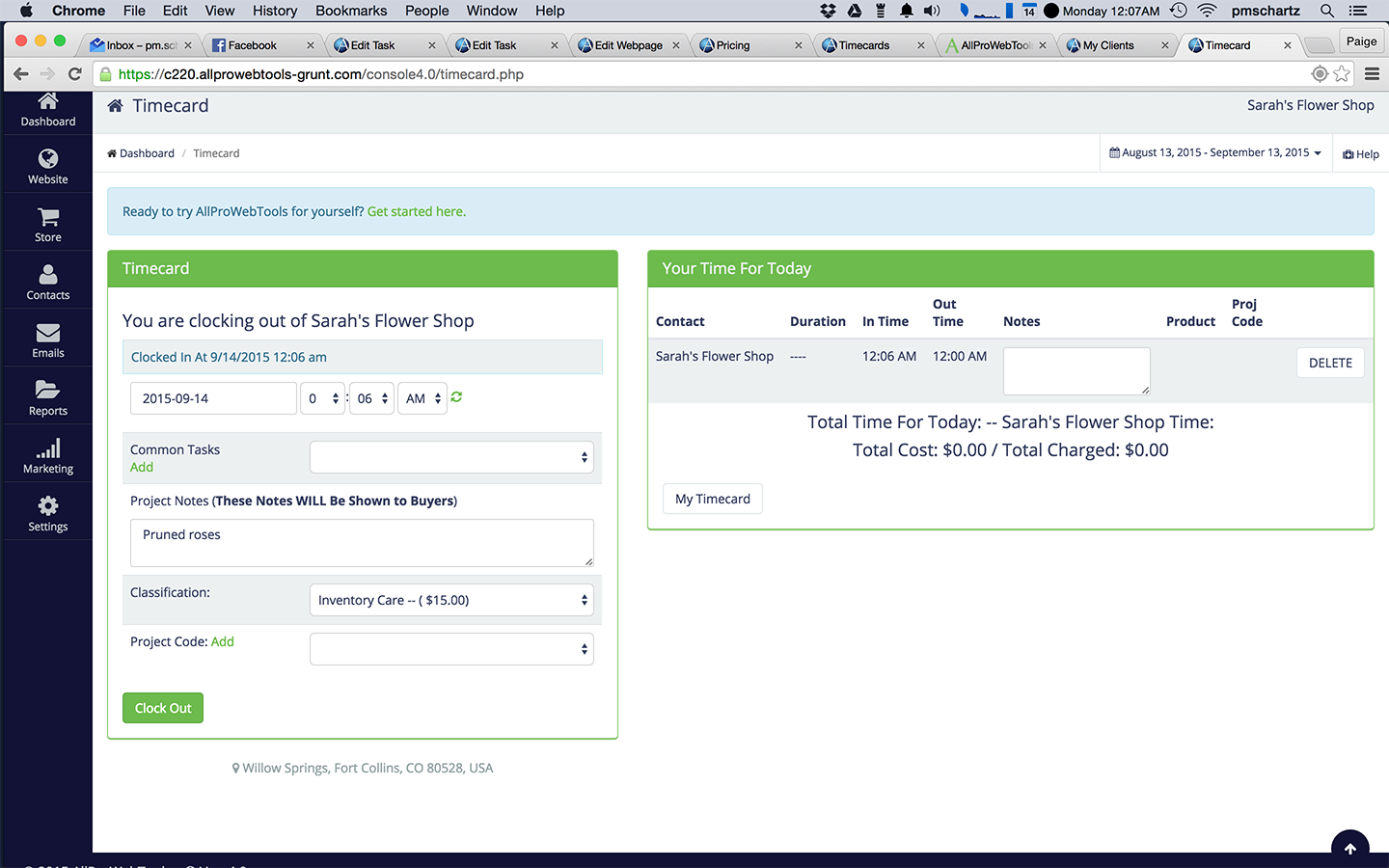
  • The built in timecard system allows me to "clock in" to whatever client that I am working on so that my time and hourly rate are automatically calculated for me. My invoices are sent automatically on the first of each month.
Read full review
  • Application customization is a key strength. We can create custom home page experiences for each type of user, customize object layouts to change dynamically depending on object type, and create an embedded sales process unique to our organization that helps facilitate the user through the process by specifying required fields dependent on what stage of the process they are in. The ability to customize goes directly to the success of user adoption - the fact that we can customize layouts and processes to support our internal business processes helps users make the most of the system.
  • Robust Reporting. The reporting and data warehouse capabilities are excellent. We have thousands of custom reports delivered in a number of ways - on home pages, on dashboards, on demand through the reporting menu, and on custom web tabs. These reports range from simple lists to complex multi-object analyses.
  • Ability to get data in and get data out. CRMOD makes it very easy to import data into any object. This is helpful for importing lists or making mass changes. Exporting data is equally easy, both from an administrator standpoint and for the user. Users can display a list or do a custom advanced search and then easily export the data to Excel without any admin help. They can also export from any report, which is helpful when sales data needs to be combined with other financial data in a larger analysis.
  • The system's workflow capabilities allow us to improve field validation, send important notifications, and enforce business process requirements.
Read full review
Cons
  • QuickBooks Integration
  • More email templates
  • They do not have an app
Read full review
  • A scripting mechanism is needed to customize the data entry forms. As any data driven system, Oracle CRM on demand is as reliable as its data is. Having sales people entering and maintaining the data you have to make sure they are doing that and not cutting corners. One way to do that is to enforce the business requirements in the entry forms.
  • User interface / user experience definitely can and should be improved.
  • It needs a way to send automatic reports on a schedule via email.
  • Support: as usual the Oracle support tends to be tedious and lengthy.
Read full review
Likelihood to Renew
No answers on this topic
Because am using oracle last 3 years and it’s great
Read full review
Usability
No answers on this topic
Compared to other competitors I find it very easy to use and learn .It has been helpful in our organisation and we have been able to manage our projects and operations well without interference.
Read full review
Support Rating
No answers on this topic
As am using oracle very much satisfy.
Read full review
Implementation Rating
No answers on this topic
With the right partner Oracle CRM On Demand can be implemented very quickly and seamlessly.
Read full review
Alternatives Considered
I used to use Microsoft Excel to organize my business - but it got pretty crazy pretty fast.
Read full review
MS Dynamics was easy to integrate to MS Power BI. This BI and reporting aspect is a clear strong point for Microsoft. MS solutions seem easier to integrate and learn, but this depends on the IT landscape and the complexity of integrations in a respective company.
Read full review
Return on Investment
  • It just makes it easier for me to track what is going on in my business.
  • I like having everything in one place, instead of a bunch of different programs.
Read full review
  • Much easier for us to track sales leads as we have had almost universal adoption and continued user interaction with the program as opposed to our previous tool, Salesforce. CRM has likely cut back on many hours of calls and check-ups with its easy to use system.
  • Customer feedback has been much improved as we are able to track any areas that need additional focus and address them immediately.
Read full review
ScreenShots

AllProWebTools Screenshots

Screenshot of CRM viewScreenshot of B2B Lead AquisitionScreenshot of Google Calendar Appointment IntegrationScreenshot of Internal Office ChatScreenshot of Time Card Tracking