Aladtec vs. Tempo Planner

Overview
ProductRatingMost Used ByProduct SummaryStarting Price
Aladtec
Score 8.8 out of 10
Small Businesses (1-50 employees)
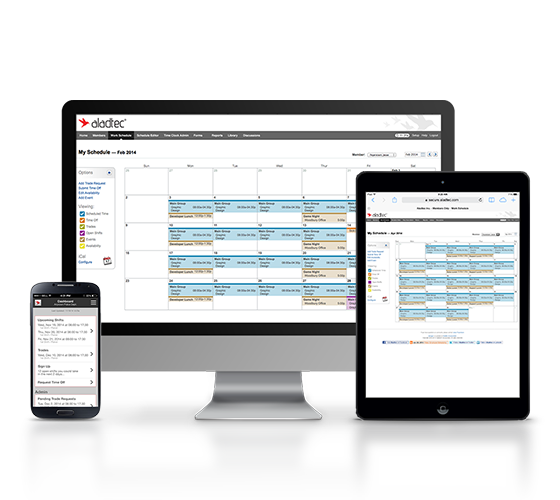
Aladtec is employee scheduling software that is targeted at businesses in the public safety sector, including EMS, Fire & Rescue, Law Enforcement, Communication Centers/Dispatch, Security and Health Care. According to the vendor, Aladtec helps organizations with the following: Monitor Operations: Access and change schedules, view employee info and credentials 24/7 from any computer, smartphone or other mobile devices with…N/A
Tempo Planner
Score 10.0 out of 10
N/A
Resource planning across functions and real-time capacity reports to enable efficient resource deployment. A tool for Jira that allows planning for multiple resources on one issue, Tempo Planner is presented as an effective and dynamic resource planning and capacity reporting tool embedded in Jira. Seeing available resources, in different locations and working remotely, and their capacity in one place provides a critical view across an organization.N/A
Pricing
AladtecTempo Planner
Editions & Modules
No answers on this topic
Offerings
Pricing Offerings
AladtecTempo Planner
Free Trial
YesYes
Free/Freemium Version
NoNo
Premium Consulting/Integration Services
NoNo
Entry-level Setup FeeNo setup feeNo setup fee
Additional DetailsAladtec is an annual subscription based on the number of people the customer has using the system, so it's fairly priced for any size organization.
More Pricing Information
Community Pulse
AladtecTempo Planner
User Ratings
AladtecTempo Planner
Likelihood to Recommend
9.0
(0 ratings)
-
(0 ratings)
Support Rating
8.0
(0 ratings)
-
(0 ratings)
User Testimonials
AladtecTempo Planner
Likelihood to Recommend
Aladtec works well in a large organization where employees need to access the schedule from all different locations/devices and being able to make adjustments on the go. Aladtec allows the adding of meetings, training, and work shifts all on the same calendar and details can be seen by clicking on the individual item. Aladtec allows the adding of many details and to customize looking at the calendar for each individual.
Read full review
No answers on this topic
Pros
  • User training is easy with Aladtec. We provided the employees with a login, and they were pros within 20 minutes of logging in.
  • Shift reminders help employees remember their next scheduled shift.
  • Exception alarms alert you when someone is late to work.
Read full review
No answers on this topic
Cons
  • Any specific improvements I have already mentioned to Aladtec and (I'm thrilled to report) several have already been implemented. They even made system accommodations for colorblind users - an industry first!
  • I am excited to see further development of the custom forms so we can merge to a completely paperless schedule & payroll system.
  • Although there is no specific fleet management tool, we have worked with Aladtec's Customer Support pros to develop a ways to accurately record all of our vehicles for scheduling maintenance, in-service and down time.
Read full review
No answers on this topic
Support Rating
Aladtec has given the support needed, especially in learning the new system and bringing it up to speed for the entire workforce. There is a need to reach out to them when everything freezes, which is rare. This system has been fairly smooth after it had been in use for at least 6 months.
Read full review
No answers on this topic
Alternatives Considered
The features, functionality, user-friendliness and cost were all factors. Aladtec surpassed all 4 of the other systems we evaluated, most especially with their customer support. We have not had major problems but the few minor glitches we had (all our fault, admittedly) were resolved quickly. The staff not only responded immediately but they made sure we fully understood what happened, helping us prevent future frustrations.
Read full review
No answers on this topic
Return on Investment
  • Less time spent on scheduling. More time on staff management and operations.
  • Affordable solution to scheduling and staff notifications. Very cheap compared to other similar vendors.
  • Streamlined operations for our department by using this software and database. Staff can access what they need anytime they want by computer or cell phone.
Read full review
No answers on this topic
ScreenShots

Aladtec Screenshots

Screenshot of 24/7 Accessibility from any computer, smartphone or other mobile device.Screenshot of Move all office forms online to Aladtec.Screenshot of Easily view schedules and make changes with drag and drop scheduling.Screenshot of Ideal for Public Safety AgenciesScreenshot of The Aladtec Team!

Tempo Planner Screenshots

Screenshot of Quickly find the resources needed to complete any project. Filter by teams, users and roles, including from other teams, in order to design an effective plan.Screenshot of Report on project feasibility by roles and responsibilities and quickly determine availability of geographically distributed resources. Plan and adjust work according to demand and balance against capacity limitations.Screenshot of Move away from static and unreliable sources and report on planned time to see current and future status. Together with Tempo Timesheets, limit the unknowns and report on planned vs actual time spent on projects.