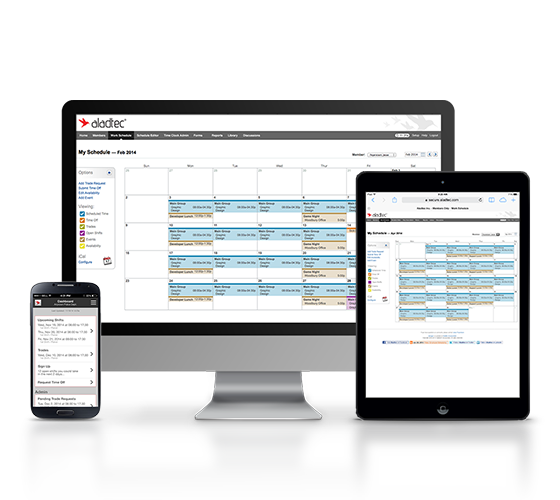
Aladtec is employee scheduling software that is targeted at businesses in the public safety sector, including EMS, Fire & Rescue, Law Enforcement, Communication Centers/Dispatch, Security and Health Care. According to the vendor, Aladtec helps organizations with the following: Monitor Operations: Access and change schedules, view employee info and credentials 24/7 from any computer, smartphone or other mobile devices with…
N/A
Homebase
Score6.9 out of 10
N/A
Homebase in San Francisco offers restaurants, hotels, hospitals, and retailers their employee scheduling and time tracking tools with scheduling optimization and team messaging for coordinating shifts; service includes a free time tracking app.
$14
per month
Pricing
Aladtec
Homebase
Editions & Modules
No answers on this topic
Essentials
$14
per month
Plus
$35
per month
All-in-one
$70
per month
Basic
Free
Offerings
Pricing Offerings
Aladtec
Homebase
Free Trial
Yes
Yes
Free/Freemium Version
No
Yes
Premium Consulting/Integration Services
No
No
Entry-level Setup Fee
No setup fee
No setup fee
Additional Details
Aladtec is an annual subscription based on the number of people the customer has using the system, so it's fairly priced for any size organization.
While most of my Aladtec experience is with public safety agencies, I cannot imagine an industry or service that would not benefit from an Aladtec system. Affordable, reliable, efficient and user-friendly - Aladtec offers a product that most companies simply can only dream about.
I loved using Homebase! The best feature, by far, is scheduling in shifts! It really could not be easier! For restaurants and bars it is the easiest and best software! Using the payroll feature can be very easy! The only downfall is trying to separate scheduled worked hours and overtime. The layout is simple and easy to navigate. The only real con I can think of is that lag.
A de minimis incentive was given to thank the reviewer for their time. The incentive was not used to bias or drive a particular response, nor was the incentive contingent on a positive endorsement. More Info
Aladtec allows easy access to forms, change orders and schedules from any device.
Aladtec offers the ability to see the schedule a month at a glance, by the week or day, with full detail of who is on the schedule; giving a bird's eye view of the openings and then able to see specifically who is on each daily schedule.
Aladtec offers the opportunity to put its recurring schedules and monthly choices and changes. It has several scheduling options that increase flexibility for employees.
A de minimis incentive was given to thank the reviewer for their time. The incentive was not used to bias or drive a particular response, nor was the incentive contingent on a positive endorsement. More Info
Homebase provides an easy way to schedule employees. Their scheduling platform is extremely user-friendly and easy to edit once the schedule is made.
Homebase makes it easy for employees to switch schedules on their own, a manager just simply has to approve rather than physically rescheduling both employees, this is great for any small retail business or restaurant with many hourly employees.
Homebase makes it easy to adjust hours that have been incorrectly clocked or clockouts that have been missed.
A de minimis incentive was given to thank the reviewer for their time. The incentive was not used to bias or drive a particular response, nor was the incentive contingent on a positive endorsement. More Info
The only item we would like to see is an online training module for our EMS staff. Being able to upload training items and quizzes for our staff to do under their user accounts would be a huge asset for our department and others. Similar to the Moodle training software.
A de minimis incentive was given to thank the reviewer for their time. The incentive was not used to bias or drive a particular response, nor was the incentive contingent on a positive endorsement. More Info
Aladtec has given the support needed, especially in learning the new system and bringing it up to speed for the entire workforce. There is a need to reach out to them when everything freezes, which is rare. This system has been fairly smooth after it had been in use for at least 6 months.
A de minimis incentive was given to thank the reviewer for their time. The incentive was not used to bias or drive a particular response, nor was the incentive contingent on a positive endorsement. More Info
Homebase is simpler to use. Easier to navigate and is much cheaper than other alternatives! We had trouble when I worked as they were harder to reach our ROI. Deputy was too expensive and it was the reason we decided on Homebase! Employees also find it easy to use on their end!
A de minimis incentive was given to thank the reviewer for their time. The incentive was not used to bias or drive a particular response, nor was the incentive contingent on a positive endorsement. More Info
In the first 12 months of use we saved nearly 13x our investment in overtime alone. The following year we realized an average of 46 hours per week of time saved in workforce management.
We have seen no negative impacts from the use of Aladtec. Our only regret is not having it earlier.
Homebase has made the day to day management of employees easier, freeing up time for management to work on other things that help secure customer satisfaction.
It has also made payroll easier since it's implementation and allowed for fewer mistakes than the previous manual method, leading to less monetary mistakes and happier employees.
Homebase has made monitoring hours and overtime, as well as completion of internship and volunteer hours, much easier to monitor, leading to less confusion and more satisfied volunteers, interns, and payroll managers
A de minimis incentive was given to thank the reviewer for their time. The incentive was not used to bias or drive a particular response, nor was the incentive contingent on a positive endorsement. More Info