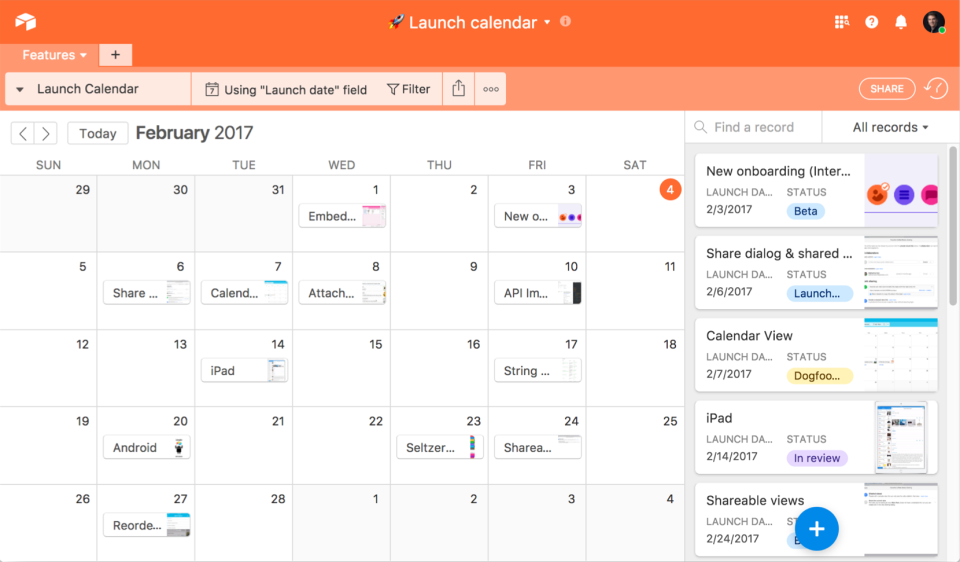
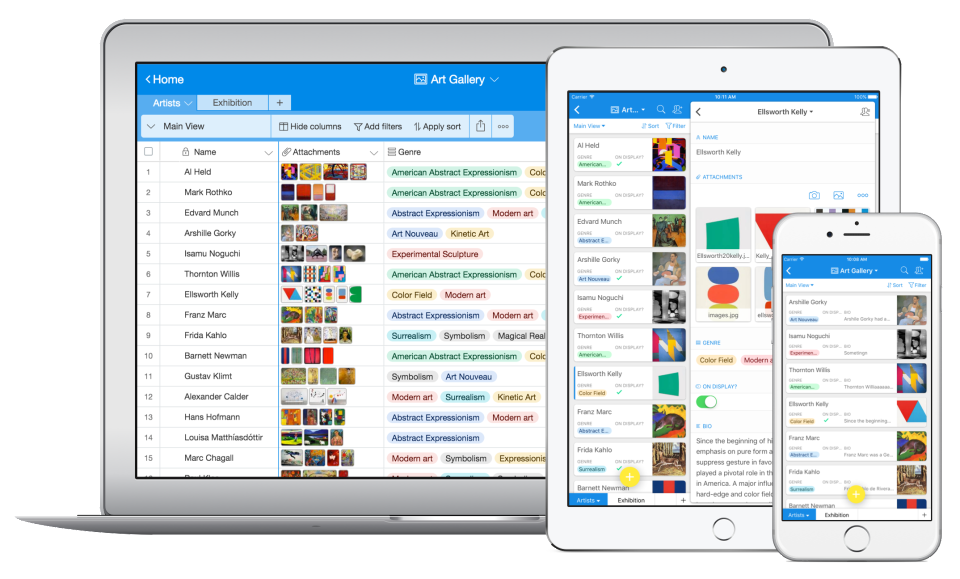
Airtable is a project management and collaboration platform designed to enable content pipelines, product management, events planning, user research, and more. It combines spreadsheet,database, calendar, and kanban functionality within one platform.
$24
per month per seat
Smartsheet
Score8.4 out of 10
N/A
Smartsheet is an online project management and collaboration tool. It includes automated alerts, instantaneous updating and sharing across team members, resource management, nested tasks organized in a hierarchy, a Gantt chart view, exportable and automated reports, and integration with email.
Creative Director at Iconic Arts Inc. (Entertainment, 1-10 employees)
Chose Airtable
While a very capable tool, Smartsheet ultimately didn't provide the ease of use we required for our scenario. Monday was a great tool that felt very similar to Airtable, except its mobile app actually lead to some mismatched information and difficult use in time-sensitive …
A de minimis incentive was given to thank the reviewer for their time. The incentive was not used to bias or drive a particular response, nor was the incentive contingent on a positive endorsement. More Info
Verified User
Chose Airtable
Airtable is much more user friendly than Smartsheet in my opinion. Though Smartsheet has a lot of functionality as well, it comes off as cold and technical. Airtable is fun to use, and kind of addicting to be completely honest. I've also tried Sheets instead of Airtable, but …
A de minimis incentive was given to thank the reviewer for their time. The incentive was not used to bias or drive a particular response, nor was the incentive contingent on a positive endorsement. More Info
Owner in Research & Development at Seattle Seed Company (Wholesale, 1-10 employees)
Chose Airtable
Airtable is much more affordable than Smartsheet, and more capable than Google Sheets as far as related tables, integrations, data views, and team collaboration.
A de minimis incentive was given to thank the reviewer for their time. The incentive was not used to bias or drive a particular response, nor was the incentive contingent on a positive endorsement. More Info
A de minimis incentive was given to thank the reviewer for their time. The incentive was not used to bias or drive a particular response, nor was the incentive contingent on a positive endorsement. More Info
Missions Pastor/ Non Profit Director in Product Management at Hillside Community Church/ Neighborhood Rehab Project (Non-Profit Organization Management, 1-10 employees)
Chose Airtable
Trello - It was hard to print relative fields and hard to export usable data. Smartsheet - Its still growing but didn't really have documents and jpeg insertion the way I hoped, and less "fun" to work on. Excel - Good spreadsheets, but not a lot of extras.
A de minimis incentive was given to thank the reviewer for their time. The incentive was not used to bias or drive a particular response, nor was the incentive contingent on a positive endorsement. More Info
Director Of Finance And Administration in Finance and Accounting at Academy of Natural Sciences (Non-Profit Organization Management, 51-200 employees)
Chose Airtable
I enjoy using Asana for task lists, but I don't love the mobile app and I didn't get the most out of it since my projects are usually not collaborative. Smartsheet has a good gantt chart tool, but the UI is terrible and it isn't as dynamic as I'd have liked. Airtable combines …
A de minimis incentive was given to thank the reviewer for their time. The incentive was not used to bias or drive a particular response, nor was the incentive contingent on a positive endorsement. More Info
Assistant Director, Digital Strategy at The Federalist Society (Public Policy, 11-50 employees)
Chose Airtable
Originally we were using Smartsheet but it didn't empower us to build such a robust database - data entered in one sheet wasn't automatically added to other sheets and it created a lot more manual labor for us.
A de minimis incentive was given to thank the reviewer for their time. The incentive was not used to bias or drive a particular response, nor was the incentive contingent on a positive endorsement. More Info
A de minimis incentive was given to thank the reviewer for their time. The incentive was not used to bias or drive a particular response, nor was the incentive contingent on a positive endorsement. More Info
Knowledge Lead in Information Technology at ACC New Zealand (Government Administration, 1001-5000 employees)
Chose Airtable
Airtable was a really good fit for this specific use case as it provided a huge number of collaboration features in an intuitive and pleasant-to-use interface. The free tier worked initially with our work, and the upgrade pathway was fair and made sense for us.
A de minimis incentive was given to thank the reviewer for their time. The incentive was not used to bias or drive a particular response, nor was the incentive contingent on a positive endorsement. More Info
A de minimis incentive was given to thank the reviewer for their time. The incentive was not used to bias or drive a particular response, nor was the incentive contingent on a positive endorsement. More Info
Account Executive in Marketing at GayTravel (Airlines/Aviation, 11-50 employees)
Chose Airtable
We have tried to use smart-sheet before but it is nowhere as good as Airtable. The user interface with Airtable is much better and it also has much more functionality.
A de minimis incentive was given to thank the reviewer for their time. The incentive was not used to bias or drive a particular response, nor was the incentive contingent on a positive endorsement. More Info
A de minimis incentive was given to thank the reviewer for their time. The incentive was not used to bias or drive a particular response, nor was the incentive contingent on a positive endorsement. More Info
Program Manager at River's Edge (Non-Profit Organization Management, 1-10 employees)
Chose Airtable
Airtable is the only system that gives us the flexibility to both store information related to our clients and event details while also managing the workflow and responsible parties for the tasks associated with these clients and events. The way these two key components of our …
A de minimis incentive was given to thank the reviewer for their time. The incentive was not used to bias or drive a particular response, nor was the incentive contingent on a positive endorsement. More Info
Content Librarian in Marketing at The Institute for Functional Medicine (Health, Wellness and Fitness, 51-200 employees)
Chose Airtable
For us, the most important things to consider were the relational aspect (linking one record to another record) and the ease of use. We found Smartsheets clunky and unable to add relationships, and introducing relationships in Google Sheets or Excel was just too difficult to …
A de minimis incentive was given to thank the reviewer for their time. The incentive was not used to bias or drive a particular response, nor was the incentive contingent on a positive endorsement. More Info
A de minimis incentive was given to thank the reviewer for their time. The incentive was not used to bias or drive a particular response, nor was the incentive contingent on a positive endorsement. More Info
Executive Director in Corporate at TEL Library (Publishing, 11-50 employees)
Chose Airtable
Our needs are broad and general. We needed a trued database solution that would take us beyond spreadsheet management, and also a product that could be used for CRM and project management. Airtable was the only solution we found that could meet all our needs at an affordable …
A de minimis incentive was given to thank the reviewer for their time. The incentive was not used to bias or drive a particular response, nor was the incentive contingent on a positive endorsement. More Info
Smartsheet
Verified User
Chose Smartsheet
Asana has a nicer interface but it expensive for what you get. Airtable works well. I would prefer Airtable over Smartsheet except it does not have the capability to fill out the DocuSign's we need. Otherwise, I would solely use Airtable for this. Google Sheets is great and …
A de minimis incentive was given to thank the reviewer for their time. The incentive was not used to bias or drive a particular response, nor was the incentive contingent on a positive endorsement. More Info
A de minimis incentive was given to thank the reviewer for their time. The incentive was not used to bias or drive a particular response, nor was the incentive contingent on a positive endorsement. More Info
UX Program Manager at Google via Artech Information Systems (Internet, 10,001+ employees)
Chose Smartsheet
.Asana is more task-oriented when I first tried it. I needed something that offered higher-level reporting and aggregation. Smartsheet's automation is also tighter. Podio is great for project-based intake workflows. It has very flexible and customizable fields allowing the …
A de minimis incentive was given to thank the reviewer for their time. The incentive was not used to bias or drive a particular response, nor was the incentive contingent on a positive endorsement. More Info
Airtable is an ideal platform for small and growing businesses to keep track of just about EVERYTHING they need to keep things running smoothly. It's a great way to keep tasks organized, and keep everyone on the same page with progress on all things. Our company finds the kanban particularly useful, as products go through a lifecycle from ideation to retirement, it's good to keep a database of what is in production, what's working, and what we've tried before. I can see the platform being challenging with much larger businesses, but for the small to medium businesses I've used the platform with, it is ideal.
A de minimis incentive was given to thank the reviewer for their time. The incentive was not used to bias or drive a particular response, nor was the incentive contingent on a positive endorsement. More Info
Smartsheet shines for collaboration. When you have multiple people involved with planning events Smartsheet makes it easy to share and collaborate. For instance, multiple people can be in Smartsheet working at the same time. Also setting permissions for exactly those who need to know is quite easy with Smartsheet. For data analytics and general spreadsheet purposes Excel is better but for project management and event planning Smartsheet is superior
A de minimis incentive was given to thank the reviewer for their time. The incentive was not used to bias or drive a particular response, nor was the incentive contingent on a positive endorsement. More Info
Airtable has capabilities commonly found in spreadsheet applications, but also has some of the features found in databases.
The ability to filter fields. I set up a filter on the status field, so when a project is marked, complete, on hold, or canceled, that record is hidden from my current projects table view. If it is marked complete, the record is moved to the completed projects table view. In this way I can easily access a record of past projects
Being able to duplicate tables and create alternate views
Collapse and expand records. When I collapse the rows, I can easily scan current projects, next steps, project status, and due dates. When I expand the row, or field, I can see more detailed information about that field or record very easily. I can also expand or open the entire record. This is is helpful, when I am entering a lot of information to multiple fields in that record.
A de minimis incentive was given to thank the reviewer for their time. The incentive was not used to bias or drive a particular response, nor was the incentive contingent on a positive endorsement. More Info
Its hard to overstate the value of familiarity. Being able to use a tool that has some familiarity takes away the time needed to train and orient employees on a new tool and allows an organization to hit the ground running.
Smartsheet covers most of the basics of a project management tool, the usual tasks, milestones and project viewing options.
For data viewing, you get multiple data viewing options including a calendar view (good for marketing teams and those who work around scheduling), Kanban, Gaant etc
A de minimis incentive was given to thank the reviewer for their time. The incentive was not used to bias or drive a particular response, nor was the incentive contingent on a positive endorsement. More Info
A de minimis incentive was given to thank the reviewer for their time. The incentive was not used to bias or drive a particular response, nor was the incentive contingent on a positive endorsement. More Info
Smartsheet set up is similar to Excel, yet when you upload an Excel file, things like conditional formatting are lost. Smartsheet has its own conditional formatting, and you have to reinstate the rules. It would be great if those would apply automatically once a file is uploaded
Some Smartsheet management and access rules can take some tweaking to work properly. This may be a case of offering more info to admins so they can apply these better and with more efficiency
A de minimis incentive was given to thank the reviewer for their time. The incentive was not used to bias or drive a particular response, nor was the incentive contingent on a positive endorsement. More Info
We will 10/10 renew the use of Airtable because it has brought great value to our team. Not only is Airtable affordable, but it's also user-friendly and helps our team be efficient. We no longer need to rely on Excel spreadsheets being passed from person to person via email. Furthermore, we aren't dealing with corrupt Excel spreadsheets and the need to salvage data when a file is accidentally altered.
It definitely meets our needs as far as organizing and archiving our tasks and files. As we train more staff to view it, I see opportunities for more improvement, which I am sure this program can handle. I look forward to seeing continued improvement from Smartsheet on their capabilities and functionality.
A de minimis incentive was given to thank the reviewer for their time. The incentive was not used to bias or drive a particular response, nor was the incentive contingent on a positive endorsement. More Info
IMO the usability of this product is its greatest asset. The UI is clean and the menus are intuitive to the point where I'd feel confident having a non-spreadsheety colleague take on building an Airtable for the first time with next to no training. I can't say that about every table-like software product that I've used such as Notion.
A de minimis incentive was given to thank the reviewer for their time. The incentive was not used to bias or drive a particular response, nor was the incentive contingent on a positive endorsement. More Info
Smartsheet is very easy to learn. However, while I have been able to pick it easily, Microsoft Excel and Project super users that I have trained on Smartsheet get bogged down in the differences and can find it frustrating. Explaining the differences ahead of time and why Smartsheet is being chosen instead of a different software seems to counteract those reactions
A de minimis incentive was given to thank the reviewer for their time. The incentive was not used to bias or drive a particular response, nor was the incentive contingent on a positive endorsement. More Info
I have rarely experience downtime, compared to other tools, and given how much time we spend on the tool. Even if there were to be, their updates on it are very timely, and our support team are able to provide any questions regarding
A de minimis incentive was given to thank the reviewer for their time. The incentive was not used to bias or drive a particular response, nor was the incentive contingent on a positive endorsement. More Info
I never had any issues with load time, even with the integrations that we use today (google sheets) However, I'm curious if adding additional layers of integrations would slow down performance. We do carry quite a bit of data in Airtable, but, again, no impact on overall performance
A de minimis incentive was given to thank the reviewer for their time. The incentive was not used to bias or drive a particular response, nor was the incentive contingent on a positive endorsement. More Info
Airtable has great support. They have a variety of support features to answer any questions. They have great self teaching instructions for templates and product tours. They also have support for teams and project management. They also have a fantastic customer help line. They are able and willing to answer customer questions and never have customers waiting long
A de minimis incentive was given to thank the reviewer for their time. The incentive was not used to bias or drive a particular response, nor was the incentive contingent on a positive endorsement. More Info
I give this rating because it fills a niche in the market. MS Project scares many away from proper task management but there are limited tools our there, especially cloud-based that are mobile-friendly. Smartsheet fills this market gap, especially for small to medium-sized businesses. IT is not fair to compare it to MS Project, but fairer to see what gaps it fills.
A de minimis incentive was given to thank the reviewer for their time. The incentive was not used to bias or drive a particular response, nor was the incentive contingent on a positive endorsement. More Info
A de minimis incentive was given to thank the reviewer for their time. The incentive was not used to bias or drive a particular response, nor was the incentive contingent on a positive endorsement. More Info
Recorded trainings were provided by the Airtable team. Great as an evergreen resources to new team members and for anyone that wants to refresh their Airtable knowledge
A de minimis incentive was given to thank the reviewer for their time. The incentive was not used to bias or drive a particular response, nor was the incentive contingent on a positive endorsement. More Info
Training all users was an important part of the implementation, which did take considerable time and effort. At first glance without training, the content calendar can be overwhelming because of the amount of data. The features within Airtable seem to be endless but our team was able to identify the most important to be successful.
It's absolutely paramount to take a few minutes to actually play with the software. It's nearly impossible to do anything wrong or make a mistake which cannot be fixed easily. Under the help menu is Live Training option. After you familiarize yourself with the commands, watch the live training for some in depth understanding of how to make the software fit your needs perfectly.
Airtable was a really good fit for this specific use case as it provided a huge number of collaboration features in an intuitive and pleasant-to-use interface. The free tier worked initially with our work, and the upgrade pathway was fair and made sense for us.
A de minimis incentive was given to thank the reviewer for their time. The incentive was not used to bias or drive a particular response, nor was the incentive contingent on a positive endorsement. More Info
Jira and Redmine are much more robust and technologically advanced project management solutions. I enjoy using either when managing a very large project. However, I prefer to use Smartsheet for my smaller to medium sized projects. As for Google Drive - I would say that Google sheets and Smartsheet are almost identical in my opinion when it comes to functionality. Personally I prefer to manage smaller projects via Google Drive, but it is a personal preference!
A de minimis incentive was given to thank the reviewer for their time. The incentive was not used to bias or drive a particular response, nor was the incentive contingent on a positive endorsement. More Info
A de minimis incentive was given to thank the reviewer for their time. The incentive was not used to bias or drive a particular response, nor was the incentive contingent on a positive endorsement. More Info
There are TONS of opportunity to scale, but I think it's a matter if you have the time and resources to do so because the initial setup can be fairly time consuming and prioritized dedication
A de minimis incentive was given to thank the reviewer for their time. The incentive was not used to bias or drive a particular response, nor was the incentive contingent on a positive endorsement. More Info
Through this platform, I always have the idea bout which of my team member is working on which particular part of the project, I can easily track their progress, and also I can easily correct them where it is required by adding sticky notes, by sending the attachments and URLs.
A de minimis incentive was given to thank the reviewer for their time. The incentive was not used to bias or drive a particular response, nor was the incentive contingent on a positive endorsement. More Info
A de minimis incentive was given to thank the reviewer for their time. The incentive was not used to bias or drive a particular response, nor was the incentive contingent on a positive endorsement. More Info