Aha! Roadmaps is used to set strategy, prioritize features, and share visual plans. It includes Aha! Ideas Essentials for crowdsourcing feedback. For an integrated product development approach, Aha! Roadmaps and Aha! Develop can be used together. The software is available with a 30-day trial.
$59
per month per user
Airtable
Score9 out of 10
N/A
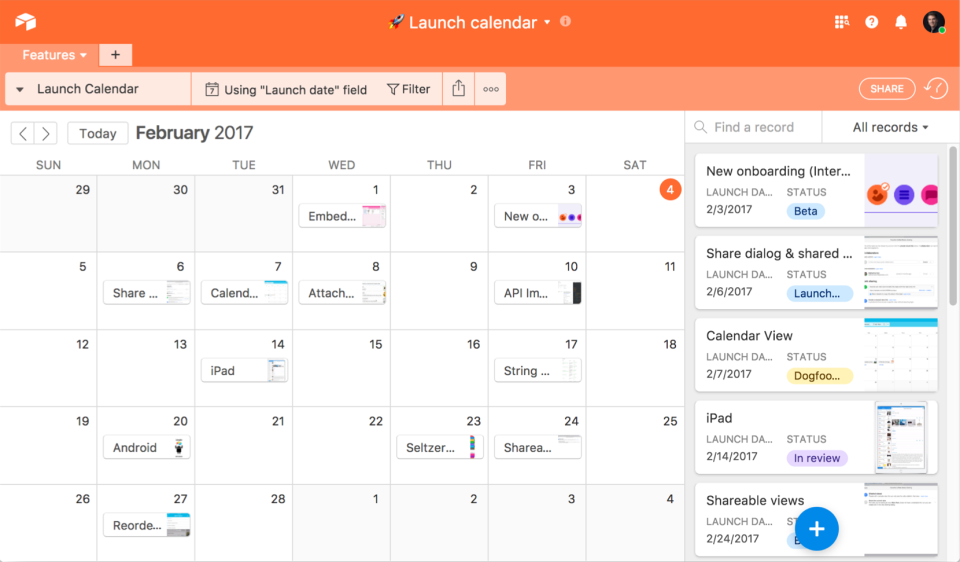
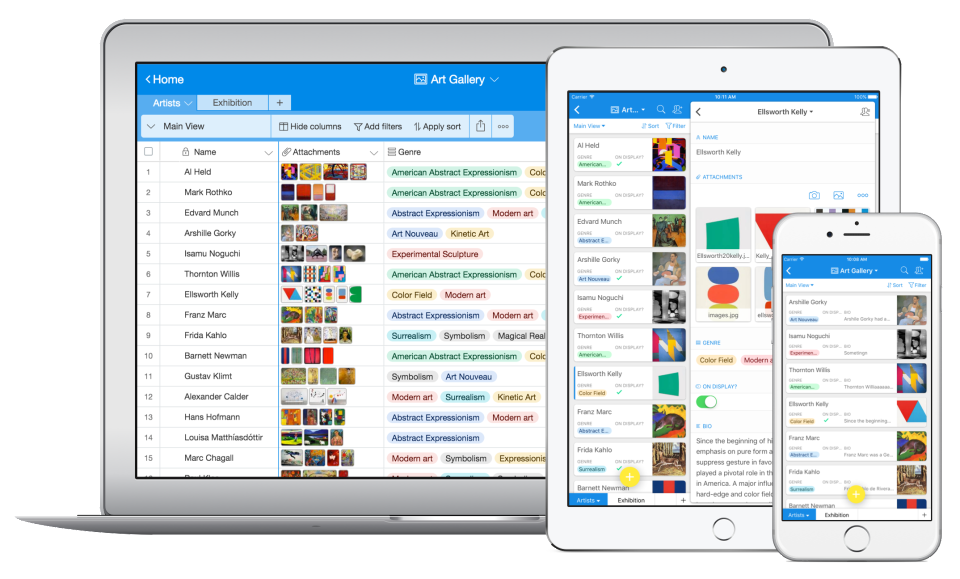
Airtable is a project management and collaboration platform designed to enable content pipelines, product management, events planning, user research, and more. It combines spreadsheet,database, calendar, and kanban functionality within one platform.
$24
per month per seat
Pricing
Aha! Roadmaps
Airtable
Editions & Modules
Premium
$59
per month per user
Enterprise
$99
per month workspace owner or contributor
Enterprise+
$149
per month workspace owner or contributor
Team
$24
per month per user
Business
$54
per month per user
Enterprise
Custom Pricing
Offerings
Pricing Offerings
Aha! Roadmaps
Airtable
Free Trial
Yes
Yes
Free/Freemium Version
No
Yes
Premium Consulting/Integration Services
No
No
Entry-level Setup Fee
Optional
No setup fee
Additional Details
Startup pack available for early stage companies.
—
More Pricing Information
Community Pulse
Aha! Roadmaps
Airtable
Considered Both Products
Aha
Verified User
Chose Aha! Roadmaps
We selected Aha over the other options as our specific goal and need was to align as a Product Management team across all our lines of business. While other products did well, the customized abilities of Aha, price points, and Atlassian integration tools made it a clear choice.
A de minimis incentive was given to thank the reviewer for their time. The incentive was not used to bias or drive a particular response, nor was the incentive contingent on a positive endorsement. More Info
It is great for organizations that want to ensure that the work they focus on is the work that will have the most impact on value and drive them toward their strategic objectives. I consider it to be a real Product Management tool. If all you are looking for is a tool to hold your product backlog or collect customer feedback, then Aha! is probably going to be overkill for your needs
A de minimis incentive was given to thank the reviewer for their time. The incentive was not used to bias or drive a particular response, nor was the incentive contingent on a positive endorsement. More Info
Airtable is an ideal platform for small and growing businesses to keep track of just about EVERYTHING they need to keep things running smoothly. It's a great way to keep tasks organized, and keep everyone on the same page with progress on all things. Our company finds the kanban particularly useful, as products go through a lifecycle from ideation to retirement, it's good to keep a database of what is in production, what's working, and what we've tried before. I can see the platform being challenging with much larger businesses, but for the small to medium businesses I've used the platform with, it is ideal.
A de minimis incentive was given to thank the reviewer for their time. The incentive was not used to bias or drive a particular response, nor was the incentive contingent on a positive endorsement. More Info
Aha! is an all around product management suite. It is great for breaking product plans into initiatives, features, and user stories. This helps the organization understand the product plan and what is driving individual work items. Unlike Jira and project management tools, it helps you prioritize by major themes, features, and releases. Once you start to use it, you can't go back to a project management tool because the views for organizing and prioritizing features just isn't there.
Aha! also excels at idea management. You can create a portal for users to submit ideas and manage them through a workflow. Users can submit ideas through a variety of channels, including email, ZenDesk, and SalesForce. You can even attach account values to an idea submitted through SalesForce, though the UI in SalesForce is a little kludgy. This is a great feature for those that have the capacity to manage feedback this way, but be aware that it takes time to manage.
Aha! works pretty well with Jira so that project managers can have their backlog that is understandable to the business and engineering can break down those work items however they want.
Aha! also has a lot of useful integrations: Slack, ZenDesk, Zapier, etc. It also integrates with every major software project management tool on the market: Jira, Pivotal, Rally, Redmine, and TFS.
Airtable has capabilities commonly found in spreadsheet applications, but also has some of the features found in databases.
The ability to filter fields. I set up a filter on the status field, so when a project is marked, complete, on hold, or canceled, that record is hidden from my current projects table view. If it is marked complete, the record is moved to the completed projects table view. In this way I can easily access a record of past projects
Being able to duplicate tables and create alternate views
Collapse and expand records. When I collapse the rows, I can easily scan current projects, next steps, project status, and due dates. When I expand the row, or field, I can see more detailed information about that field or record very easily. I can also expand or open the entire record. This is is helpful, when I am entering a lot of information to multiple fields in that record.
A de minimis incentive was given to thank the reviewer for their time. The incentive was not used to bias or drive a particular response, nor was the incentive contingent on a positive endorsement. More Info
A de minimis incentive was given to thank the reviewer for their time. The incentive was not used to bias or drive a particular response, nor was the incentive contingent on a positive endorsement. More Info
A de minimis incentive was given to thank the reviewer for their time. The incentive was not used to bias or drive a particular response, nor was the incentive contingent on a positive endorsement. More Info
We will 10/10 renew the use of Airtable because it has brought great value to our team. Not only is Airtable affordable, but it's also user-friendly and helps our team be efficient. We no longer need to rely on Excel spreadsheets being passed from person to person via email. Furthermore, we aren't dealing with corrupt Excel spreadsheets and the need to salvage data when a file is accidentally altered.
If you have the time and resources there really isn't anything you can't get Aha! to do for you in regards to managing workflow and releases. The Prioritization features are top of its class, the dashboards are getting better and better every day and the team all seem to really enjoy using it to manage their workloads.
A de minimis incentive was given to thank the reviewer for their time. The incentive was not used to bias or drive a particular response, nor was the incentive contingent on a positive endorsement. More Info
IMO the usability of this product is its greatest asset. The UI is clean and the menus are intuitive to the point where I'd feel confident having a non-spreadsheety colleague take on building an Airtable for the first time with next to no training. I can't say that about every table-like software product that I've used such as Notion.
A de minimis incentive was given to thank the reviewer for their time. The incentive was not used to bias or drive a particular response, nor was the incentive contingent on a positive endorsement. More Info
I have rarely experience downtime, compared to other tools, and given how much time we spend on the tool. Even if there were to be, their updates on it are very timely, and our support team are able to provide any questions regarding
A de minimis incentive was given to thank the reviewer for their time. The incentive was not used to bias or drive a particular response, nor was the incentive contingent on a positive endorsement. More Info
I never had any issues with load time, even with the integrations that we use today (google sheets) However, I'm curious if adding additional layers of integrations would slow down performance. We do carry quite a bit of data in Airtable, but, again, no impact on overall performance
A de minimis incentive was given to thank the reviewer for their time. The incentive was not used to bias or drive a particular response, nor was the incentive contingent on a positive endorsement. More Info
When we signed up for Aha!, we were assigned an Aha! team members to help us with training/questions. The meeting was set weekly, and it exponentially helped with our familiarity with Aha! Support is beneficial and has a lot of experience working with product teams.
A de minimis incentive was given to thank the reviewer for their time. The incentive was not used to bias or drive a particular response, nor was the incentive contingent on a positive endorsement. More Info
Airtable has great support. They have a variety of support features to answer any questions. They have great self teaching instructions for templates and product tours. They also have support for teams and project management. They also have a fantastic customer help line. They are able and willing to answer customer questions and never have customers waiting long
A de minimis incentive was given to thank the reviewer for their time. The incentive was not used to bias or drive a particular response, nor was the incentive contingent on a positive endorsement. More Info
A de minimis incentive was given to thank the reviewer for their time. The incentive was not used to bias or drive a particular response, nor was the incentive contingent on a positive endorsement. More Info
Recorded trainings were provided by the Airtable team. Great as an evergreen resources to new team members and for anyone that wants to refresh their Airtable knowledge
A de minimis incentive was given to thank the reviewer for their time. The incentive was not used to bias or drive a particular response, nor was the incentive contingent on a positive endorsement. More Info
Training all users was an important part of the implementation, which did take considerable time and effort. At first glance without training, the content calendar can be overwhelming because of the amount of data. The features within Airtable seem to be endless but our team was able to identify the most important to be successful.
In terms of outright features, a lot of roadmapping tools have the same feature set. We chose Aha! based on look-and-feel, the easy learning curve, and the reviews it has. Between collaboration, milestone tracking, comment threads, and content importing and exporting, we had every feature in Aha! that we were looking for.
A de minimis incentive was given to thank the reviewer for their time. The incentive was not used to bias or drive a particular response, nor was the incentive contingent on a positive endorsement. More Info
Airtable was a really good fit for this specific use case as it provided a huge number of collaboration features in an intuitive and pleasant-to-use interface. The free tier worked initially with our work, and the upgrade pathway was fair and made sense for us.
A de minimis incentive was given to thank the reviewer for their time. The incentive was not used to bias or drive a particular response, nor was the incentive contingent on a positive endorsement. More Info
A de minimis incentive was given to thank the reviewer for their time. The incentive was not used to bias or drive a particular response, nor was the incentive contingent on a positive endorsement. More Info
There are TONS of opportunity to scale, but I think it's a matter if you have the time and resources to do so because the initial setup can be fairly time consuming and prioritized dedication
A de minimis incentive was given to thank the reviewer for their time. The incentive was not used to bias or drive a particular response, nor was the incentive contingent on a positive endorsement. More Info
It has helped us improve our product lifecycle communication. We have less wasted time spent figuring out where the project is and what it's waiting on. This has helped departments further down the project better use their time so they're already aligned with what's happening rather than waiting for a handoff.
Aha! has helped include our customers more in our product planning and especially in our bug fixes and new feature roadmaps.
Aha! has improved our strategy meetings or roundup discussions by storing everything in one place. They're shorter and more focused.
A de minimis incentive was given to thank the reviewer for their time. The incentive was not used to bias or drive a particular response, nor was the incentive contingent on a positive endorsement. More Info
Through this platform, I always have the idea bout which of my team member is working on which particular part of the project, I can easily track their progress, and also I can easily correct them where it is required by adding sticky notes, by sending the attachments and URLs.
A de minimis incentive was given to thank the reviewer for their time. The incentive was not used to bias or drive a particular response, nor was the incentive contingent on a positive endorsement. More Info