Agiloft's Flexible Service Desk Suite included an Internal Help Desk, External Customer Support, Change Management, Asset Management, RMA Management, and ITIL/ITSM capability. The product is no longer available.
$0
per license/per month
Kustomer
Score 8.7 out of 10
N/A
Kustomer is a customer service CRM platform built for managing high support volume by optimizing experiences throughout the customer service journey. Kustomer was acquired by Facebook in late 2020, but spun out in 2023 and re-launched as an independent entity, Kustomer, LLC.
$89
per month, per user
Pricing
Agiloft Service Desk (discontinued)
Kustomer
Editions & Modules
Free Trial
$0
per license/per month
Professional
Contact sales team
Professional Extended
Contact sales team
Enterprise
Contact sales team
Enterprise Extended
Contact sales team
Enterprise
$89
per month, per user
Ultimate
$139
per month, per user
Offerings
Pricing Offerings
Agiloft Service Desk (discontinued)
Kustomer
Free Trial
Yes
No
Free/Freemium Version
Yes
No
Premium Consulting/Integration Services
No
No
Entry-level Setup Fee
Required
No setup fee
Additional Details
—
All plans require an annual subscription and 8 users minimum.
More Pricing Information
Community Pulse
Agiloft Service Desk (discontinued)
Kustomer
Features
Agiloft Service Desk (discontinued)
Kustomer
Incident and problem management
Comparison of Incident and problem management features of Product A and Product B
Agiloft Service Desk (discontinued)
9.4
Ratings
15% above category average
Kustomer
8.1
Ratings
1% above category average
Organize and prioritize service tickets
10.00 Ratings
8.00 Ratings
Service restoration
10.00 Ratings
00 Ratings
Self-service tools
10.00 Ratings
00 Ratings
Subscription-based notifications
10.00 Ratings
8.50 Ratings
ITSM reports and dashboards
7.10 Ratings
00 Ratings
Expert directory
00 Ratings
8.30 Ratings
ITSM collaboration and documentation
00 Ratings
8.00 Ratings
Ticket creation and submission
00 Ratings
8.00 Ratings
Ticket response
00 Ratings
8.00 Ratings
ITSM asset management
Comparison of ITSM asset management features of Product A and Product B
Agiloft Service Desk (discontinued)
9.0
Ratings
9% above category average
Kustomer
-
Ratings
Configuration mangement
8.10 Ratings
00 Ratings
Policy and contract enforcement
10.00 Ratings
00 Ratings
Change management
Comparison of Change management features of Product A and Product B
Agiloft Service Desk (discontinued)
10.0
Ratings
18% above category average
Kustomer
-
Ratings
Change requests repository
10.00 Ratings
00 Ratings
Service-level management
10.00 Ratings
00 Ratings
Self Help Community
Comparison of Self Help Community features of Product A and Product B
Agiloft Service Desk (discontinued)
-
Ratings
Kustomer
8.5
Ratings
8% above category average
External knowledge base
00 Ratings
8.00 Ratings
Internal knowledge base
00 Ratings
9.00 Ratings
Multi-Channel Help
Comparison of Multi-Channel Help features of Product A and Product B
Agiloft is a fully GUI based system that requires very little or no coding. That allows for a very quick deployment of a new install and for adding new features. Therefore, it works great for companies that don't want to write a new system from the ground up.
It works really well for you to ask a teammate to review a case/email/message and provide some input since you can all review the same conversations and client accounts. They can also cover your inbox using your email handle in case you are out of the office suing some well deserved PTO.
Agiloft's performance has been excellent. This includes 1) Scalability, 2) System response, and 3) Reliability. We have not had a reported issue with the system for at least 2 years.
Professional Services. When we had an issue interfacing with an external data mart we brought in Agiloft's Professional Services and got a quick, cost-effective solution.
Strategic Planning. As we look to the future we are hoping to move to the ITIL model. We love Agiloft's solution and have embraced it as our future direction.
Flexibility. This includes 1) Custom form design, 2) Routing based on just about any criteria, 3) Addition of attributes, 4) Search capabilities for end users.
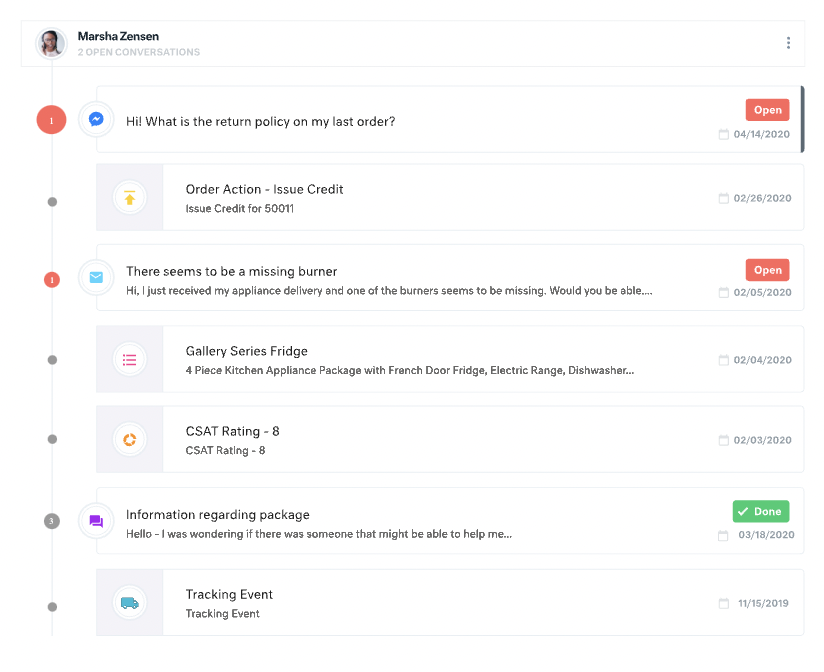
All customer data (past orders, communication with customer service, rewards account data) is in one place. This helps agents avoid confusion and reduces the number of tabs they need to open.
The Knowledge Base (or K Base) is very helpful. Any time we roll out a new policy or have a limited-time promotion, we can add all the relevant information and worksheets there for the convenience of the agents. That way they can stay in a chat while looking up the answer to a question.
We can seamlessly move from chat into email if the customer leaves or the queue times are too long. All the interactions will stay on the customer profile page, so they are kept up to date.
They could build a slicker look to the graphical charts output for the reports. These look a bit dated, and I would like the ability to customize them more.
I find that some features of the tool are difficult to find, and aren't necessarily in the most common sense of places. This definitely eases with experience with the tool, but initially it will take some time just to figure out the setup of the tool and where things are located. For example, permissions can be set on many different levels, which is great, but logically finding where to find the differing permission levels is difficult at first. I would suggest attending their admin training session to initiate yourself with the tool at first, so you're not as reliant on Agiloft initially to guide you in building the tool, which can get expensive.
For our team, the feature that defaults all notes to begin in "done" status is difficult. Throughout each day we need to have notes open and assigned back and forth to different teams, and we have to remember to manually "open" each note. There is too much room for human error with this setting, and it is easy for important notes to be missed if a user forgets to open the note.
Similarly, it can be hard to remember to assign emails/notes to a particular team in addition to a user. We almost exclusively work out of team inboxes, and if someone on Care writes an email to a customer, the email will automatically be "done" when it is created, and it will be assigned to the user who wrote it, but not also to the user's team. There are instances where an email needs to be snoozed for several days/hours with further action needed, and unless the user remembers to assign the email to their team it may "awake" from the snooze and not be visible to anyone except the user who created it. Similarly to my first comment, this leaves a lot of room for human error and is not very intuitive.
Personally, I do not love that all tickets/emails/notes are jumbled together in the same inbox. While this gives visibility to everything on the "to do" list at the same time, it can be visually overwhelming. We have created unique folders for certain types of projects or categories of work, but have experienced tech glitches or just the awkwardness of another step to manually read the note, determine what type of category it is, and then manually assign it to another folder. Would love to have things auto-sort and take out this manual lift.
I love the idea of the autopilot setting, but we have not been able to use this for our work because it sorts items based on time, and not based on priority. In our line of work, we may have an urgent situation arise that needs attention before an email that was sent in 60 minutes ago. The autopilot feature would push the email to my associates sooner than it would the urgent situation from 5 minutes ago. Due to this, we manually monitor inboxes and assign work to ourselves and others.
We have invested a lot of effort in tailoring the solution to our needs. Our users (both internal and external) are comfortable with it and we have aligned it with our workflow. We have also integrated it into our implementation processes and are working to connect it to our SDLC.
For the most part, it is an easy and intuitive system to use. There are many small things that could be improved to make the system work even easier. However, overall it is very easy to use if you have a good grasp on computer programs and using them to build things. I do not have any computer science or programming background, and I am able to use this system with few problems.
There is a learning curve, but it is more than worth it, especially to have a dedicated resource pointed at Kustomer and any other software it interacts with. The basic implementation is useful, and powerful - certainly a MASSIVE upgrade over taking care of your customers in an email inbox or shuffling between multiple windows and applications! It is also set up really well to grow and reconfigure with your business. I'm a big fan.
We often hear back very quickly with answers to our questions. They also support their answers at times with screenshots and videos to help further explain their advice and suggestions. The only reason it isn't a 10 is because sometimes using only the online support system, sometimes things aren't communicated as well as they would be over the phone. However, we know if there is a major issue going on, we can call Agiloft for support.
It’s a great tool that has helped our company and overall customer service. I believe if we were able to edit certain setting for our specific company that would be hopeful. We have been told before that certain desires of ours would make a change throughout all of Kustomer. Which is not something we would want, we would just want that to change for our business.
Agiloft's singular advantage is its ease of customization that allows you to capture automation requirements right at the point of use. We knew our company would always be developing new requirements for its customer-facing processes and any tool that made customization difficult was an inferior choice for us. Other vendors offered similar levels of customization, but when we dug deeper, Agiloft was the only one that delivered it. Our management team came from the IT and development side of NetSuite and we have used it to manage our business almost since inception. However, its support, marketing, and sales functionality was too difficult to modify and built to meet too broad a set of requirements, so we could never get full adoption or utilization, and it stood in the way of delivering the service levels we needed to provide our customers. We still use NetSuite for back-of-the-house financial functions which don't need that level of customization, but for everything else, the way forward has led us to choose Agiloft.
I find it baffling how little data can be stored or associated with a customer in many other systems, and how difficult that can be to set up. It is fine if you already have a robust CDP that you can hook up and use to power your CRM, but it is rare that an organization has the resources or the customer-focus to rally behind setting up their customer service/experience team up for success. With a platform like Kustomer, you can actually evolve the relationship over time, or use the past experiences (number of contacts, purchases, previous issues, etc.) to power your next steps with a customer, making for a much more nuanced relationship with a human, not just a ticket.
We’re getting so much positive feedback — which is not something you traditionally associate with a customer care team — because we’re making it effortless for customers to deliver both positive and negative feedback, and we can now resolve the bad feedback really really quickly.
Primarily from our increased efficiency with Kustomer, we’ve seen a significant reduction of $3 to $4 for every cost per contact.