ADP Workforce Now vs. PDS Vista

Overview
ProductRatingMost Used ByProduct SummaryStarting Price
ADP Workforce Now
Score 8.0 out of 10
Mid-Size Companies (51-1,000 employees)
ADP Workforce Now is a cloud-based HR platform for mid-sized businesses. It features customizable modules of various HR services that businesses can tailor to their specific needs, as well as regulatory monitoring and alerts to help businesses remain compliant.N/A
PDS Vista
Score 1.3 out of 10
Enterprise companies (1,001+ employees)
Vista® is a human resource, benefits, payroll, recruiting, and self-service software. Functional elements include recruitment, staffing, position and training management, compliance, and performance and compensation.N/A
Pricing
ADP Workforce NowPDS Vista
Editions & Modules
Essential
Contact sales team
Enhanced
Contact sales team
Complete
Contact sales team
HR Pro
Contact sales team
Payroll Essentials
Contact sales team
HR Plus
Contact sales team
Hiring Advantage
Contact sales team
Performance Plus
Contact sales team
No answers on this topic
Offerings
Pricing Offerings
ADP Workforce NowPDS Vista
Free Trial
NoNo
Free/Freemium Version
NoNo
Premium Consulting/Integration Services
NoNo
Entry-level Setup FeeRequiredNo setup fee
Additional DetailsPlease contact ADP for a product demo and ask about a hands-on "test drive" of Workforce Now.License pricing is based on the number of full and part-time active employees within bands (e.g. 751-1,000). SaaS pricing is based on PEPM.
More Pricing Information
Community Pulse
ADP Workforce NowPDS Vista
Features
ADP Workforce NowPDS Vista
Human Resource Management
Comparison of Human Resource Management features of Product A and Product B
ADP Workforce Now
7.8
Ratings
1% below category average
PDS Vista
1.9
Ratings
122% below category average
Employee demographic data8.00 Ratings1.00 Ratings
Employment history7.80 Ratings1.00 Ratings
Job profiles and administration8.40 Ratings1.00 Ratings
Workflow for transfers, promotions, pay raises, etc.7.90 Ratings1.00 Ratings
Organizational charting8.00 Ratings3.00 Ratings
Organization and location management8.00 Ratings3.00 Ratings
Compliance data (COBRA, OSHA, etc.)6.80 Ratings3.00 Ratings
Payroll Management
Comparison of Payroll Management features of Product A and Product B
ADP Workforce Now
7.8
Ratings
2% below category average
PDS Vista
3.2
Ratings
85% below category average
Pay calculation8.50 Ratings3.00 Ratings
Support for external payroll vendors6.70 Ratings1.00 Ratings
Off-cycle/On-Demand payment7.40 Ratings4.00 Ratings
Benefit plan administration7.50 Ratings1.00 Ratings
Direct deposit files8.30 Ratings4.00 Ratings
Salary revision and increment management7.70 Ratings1.00 Ratings
Reimbursement management8.20 Ratings8.20 Ratings
Leave and Attendance Management
Comparison of Leave and Attendance Management features of Product A and Product B
ADP Workforce Now
7.7
Ratings
4% below category average
PDS Vista
1.0
Ratings
156% below category average
Approval workflow7.60 Ratings1.00 Ratings
Balance details7.30 Ratings1.00 Ratings
Annual carry-forward and encashment8.10 Ratings1.00 Ratings
Employee Self Service
Comparison of Employee Self Service features of Product A and Product B
ADP Workforce Now
7.7
Ratings
5% below category average
PDS Vista
2.0
Ratings
121% below category average
View and generate pay and benefit information8.00 Ratings4.00 Ratings
Update personal information7.70 Ratings1.00 Ratings
View company policy documentation7.90 Ratings3.00 Ratings
Employee recognition7.00 Ratings1.00 Ratings
View job history7.70 Ratings1.00 Ratings
Asset Management
Comparison of Asset Management features of Product A and Product B
ADP Workforce Now
6.0
Ratings
29% below category average
PDS Vista
7.3
Ratings
10% below category average
Tracking of all physical assets6.00 Ratings7.30 Ratings
HR Reporting
Comparison of HR Reporting features of Product A and Product B
ADP Workforce Now
6.8
Ratings
10% below category average
PDS Vista
2.0
Ratings
116% below category average
Report builder7.80 Ratings2.00 Ratings
Pre-built reports7.20 Ratings2.00 Ratings
Ability to combine HR data with external data5.30 Ratings2.00 Ratings
Onboarding
Comparison of Onboarding features of Product A and Product B
ADP Workforce Now
7.2
Ratings
9% below category average
PDS Vista
1.0
Ratings
155% below category average
New hire portal7.60 Ratings1.00 Ratings
Manager tracking tools6.80 Ratings1.00 Ratings
Performance and Goals
Comparison of Performance and Goals features of Product A and Product B
ADP Workforce Now
7.7
Ratings
3% below category average
PDS Vista
2.8
Ratings
96% below category average
Corporate goal setting7.50 Ratings1.00 Ratings
Individual goal setting7.60 Ratings1.00 Ratings
Line-of sight-visibility7.90 Ratings00 Ratings
Performance tracking7.60 Ratings6.40 Ratings
Performance Management
Comparison of Performance Management features of Product A and Product B
ADP Workforce Now
6.4
Ratings
20% below category average
PDS Vista
1.0
Ratings
155% below category average
Performance plans6.90 Ratings1.00 Ratings
Performance improvement plans6.30 Ratings1.00 Ratings
Review status tracking5.50 Ratings1.00 Ratings
Review reminders7.00 Ratings1.00 Ratings
Multiple review frequency6.50 Ratings1.00 Ratings
Succession Planning
Comparison of Succession Planning features of Product A and Product B
ADP Workforce Now
6.0
Ratings
26% below category average
PDS Vista
2.3
Ratings
109% below category average
Create succession plans/pools5.80 Ratings3.60 Ratings
Candidate ranking5.80 Ratings1.00 Ratings
Candidate search6.30 Ratings1.00 Ratings
Candidate development6.20 Ratings3.60 Ratings
Recruiting / ATS
Comparison of Recruiting / ATS features of Product A and Product B
ADP Workforce Now
6.6
Ratings
16% below category average
PDS Vista
1.4
Ratings
139% below category average
Job Requisition Management7.50 Ratings1.00 Ratings
Company Website Posting7.40 Ratings1.00 Ratings
Publish to Social Media6.90 Ratings00 Ratings
Job Search Site Posting6.60 Ratings00 Ratings
Duplicate Candidate Prevention2.30 Ratings1.90 Ratings
Applicant Tracking7.20 Ratings1.00 Ratings
Notifications and Alerts8.00 Ratings2.00 Ratings
User Ratings
ADP Workforce NowPDS Vista
Likelihood to Recommend
8.1
(0 ratings)
1.0
(0 ratings)
Likelihood to Renew
7.2
(0 ratings)
9.1
(0 ratings)
Usability
2.2
(0 ratings)
2.0
(0 ratings)
Availability
7.3
(0 ratings)
9.5
(0 ratings)
Performance
6.4
(0 ratings)
10.0
(0 ratings)
Support Rating
7.3
(0 ratings)
8.2
(0 ratings)
In-Person Training
8.2
(0 ratings)
-
(0 ratings)
Online Training
5.8
(0 ratings)
9.0
(0 ratings)
Implementation Rating
1.5
(0 ratings)
7.3
(0 ratings)
Configurability
6.4
(0 ratings)
-
(0 ratings)
Ease of integration
6.1
(0 ratings)
-
(0 ratings)
Product Scalability
7.4
(0 ratings)
-
(0 ratings)
Vendor post-sale
5.2
(0 ratings)
-
(0 ratings)
Vendor pre-sale
6.1
(0 ratings)
-
(0 ratings)
User Testimonials
ADP Workforce NowPDS Vista
Likelihood to Recommend
well suited for folks in manufacturing or building (jobs and tasks required). Good for small and big business, ease of forming to what you want rather then getting oversold on items that you will not use. Lots of training options available
Read full review
You have the option of taking the system in house or being a hosted client. Figure out what resources your IT department has to spare, if you will have a dedicated administrator who will do all the upgrades and enhancements or if you will be job sharing those responsibilities. Like all software, Vista HRMS has multiple upgrades a year. You will need someone or a team of a few individuals to test these upgrades out and be able to take on a role of administrator, technology consultant or front end user and make sure these upgrades are working from all angles. Vista HRMS really is a good product for keeping all HR and Payroll related records in one system, I just stress the fact that you have to have someone on hand who wants to own the product and be willing to learn as much as possible. The more you put into this product, the more you will get out of it
Read full review
Pros
  • HRIS that is personalized for the employee and addresses DE&I needs.
  • Payroll, of course! The system addresses all needs, such as deductions, additional pay, premium OT, and shift differentials.
  • Onboarding is an excellent way to stay in compliance and have all documents completed.
  • Tax and Banking and resolution to any issues.
Read full review
  • Vista HRMS is very flexible, it does everything we need for HR, benefits and payroll. It’s user-friendly and intuitive to use, when we roll out new self-service items our employees have no problems and require minimal training or documentation.
  • PDS has excellent customer service and support. We get answers to the majority of our questions and problems quickly, within the day that we call. More complex issues that may require PDS’ technical support are usually addressed within a few days. We were upgrading our production servers to Windows 2012 over a weekend and a key person in our organization was on leave. When we checked with PDS to see what cost would be involved if we needed their help, they said it was included in our regular maintenance, no extra cost.
  • The PDS User’s Conference is an excellent learning opportunity for training on everything Vista does, including using Crystal Reports for custom reporting. You also get to meet and talk to the executive and development staff and have direct input into the future product development.
Read full review
Cons
  • Customized pre-process payroll reports (Limited on pre-process payroll reports)
  • Labor Allocation (Allocations make payroll reporting very hard to review and find any errors )
  • Recruiting (ATS is very basic)
  • Geofencing (should be able to change shape rather than a circle)
  • Pay Classes (should be able to change at Practitioner level rather than reach out to support)
  • Cookies and Cache have to be cleared on a regular basis
  • Only able to see employee documents/acknowledgements one at a time in the employee file
  • Timecards can only be managed/viewed by 1 person
  • Timeoff emails do not have a link
  • Cost per payroll - not just monthly fee so cost with off cycle payrolls
  • Separate I9 step not needed - during onboarding - 2nd Everify step
  • ADP Workforce Now does not pull in allowances for Houly employees into payroll ONLY Salaried employees
Read full review
  • Job History - Too many areas that dates populate.
  • ATS - There is a lack of flexibility for applicants when applying for multiple jobs.
  • Searching - The functionality is a little limited, would be nice to type in any information on a person and search.
Read full review
Likelihood to Renew
We are happy with the service and options offered by ADP. Although the cost is a bit high for a not-for-profit organization, it is essential that we have multi-jurisdictional support for the 20 plus states where employees work and reside. As our company is diminishing in size, we may need to look at making a change to conserve costs. At this time, that would be the only reason we would not renew our WFN contract.
Read full review
It's working well for us. Yes, we do have some challenges, but we're working through them. With all the time and money put in to this, why would we switch. Especially since we really haven't used this product to it's full potential, but that's many due to time challenges.
Read full review
Usability
Lack of documentation and test environment make it extremely difficult to deploy work processes through the system. While there are a handful of things throughout the system that work well, particularly from an employee's perspective, many tasks, which would be simple for practitioner users in other systems, require these users to ask for administrator support. Additionally, the ghosts in the ADP machine cause established process (e.g. automated report delivery) to stop working with no notice and no error report.
Read full review
In my line of work, PDS Vista doesn't fit. I recruit and manager talent pipelines, as well as all onboarding aspects of 11 companies. I spend more hours getting data configured and searching for information within this software than I spend with my candidates. Theres an abundance duplication, and there isn't a single stream of information shared across screens. I have to input the SAME details into several screens for them to match up. Nothing is intuitive, and its certainly not end user friendly
Read full review
Reliability and Availability
ADP outages are very rare
Read full review
No answers on this topic
Performance
Overall, I think the functionality of the program works pretty well. Sometimes, certain browsers do not work well for the policy function of ADP, but that is the only issue thus far
Read full review
No answers on this topic
Support Rating
Most of it is not local, which impacts barriers and customs. I do think they know a lot, but not the cohesive piece. Some naturally know more about certain things than others. The payroll section should be broken out more because payroll is a big topic with many problems, so it can be hard to get the right person who can actually help you.
Read full review
PDS has excellent customer service and support. We get answers to the
majority of our questions and problems quickly, within the day that we
call. More complex issues that may require PDS’ technical support are
usually addressed within a few days
Read full review
In-Person Training
In-person training was pretty good - I think this significantly depends on the trainer. Our trainer was really good and showed what ADP can do - but I know that all trainers are not the same - and this truly makes such as difference. Overall, our training went pretty well.
Read full review
No answers on this topic
Online Training
At the time training was not as expansive as it is now. If it could go wrong it did for me so the process was difficult and lengthy. I needed to have more in person walkthroughs of things to ensure the transition was done correctly. Not sure what else I can say, we were part of the initial move to Workforce Now when it was introduced.
Read full review
The resources and online tools that PDS provide are extremely thorough and helpful in our training and learning.
Read full review
Implementation Rating
Either assign more than one specialist to the implementation process, or assign less clients to the implementation specialist. The process requires attention to detail and the ability to test and re-test as well as verify the information. It also requires a lot of back and forth between the client ant the implementation specialist, so they need to be readily available during the whole implementation process.
Read full review
Ask lots of questions, ensure you fully understand the functionality (particularly history records) and train, train, train the users for correct and complete utilization of the system.
Read full review
Alternatives Considered
I also used UltiPro (way back -- it didn't even appear in dropdown). Recommend ADP Workforce Now above all others. Paycor and Paycom were both very clunky. I even helped implement Paycom and could never get it to work how the business needed it to.
Read full review
We had multiple vendors come and demo their products/systems for us. Each one had great features but at the end of the day, based on what the Vista HRMS system had to offer and how we were able to personalize the system to meet our needs we felt the choice was simple and we havent looked back since.
Read full review
Scalability
We have been able to grow with ADP from just a few hundred employees to over 10,000 so it's actually very scalable for payroll usage. We do not use the benefits and onboarding offerings for most of our employees but they are built to scale easily enough for when our corporate team has over 1,000 FTE.
Read full review
No answers on this topic
Return on Investment
  • ADP Workforce Now handles all of our tax filing which frees up our time to do other things. They keep us compliant communicating updates on a timely basis.
  • Calculates payrolls accurately. Our management and employees have built a level of confidence due to the ease of pulling statements, year end documents etc.
  • A really nice feature is the follow up email what a change has been made to banking information. There were a couple of times the employee did not make changes to their account information. This kept their funds from getting routed into the wrong hands.
Read full review
  • Vista HRMS offers a very reasonably priced solution that performs the functions we need for our business.
  • With a very small IT staff we successfully implemented all modules of Vista HRMS in approx. 6 months from start of implementation. Compared to other projects the cost to implement this system was very cost effective.
  • We have been able to maintain our internal benefits, payroll & HR functions in-house with no additional staff at a significantly reduced annual maintenance cost.

Read full review
ScreenShots

ADP Workforce Now Screenshots

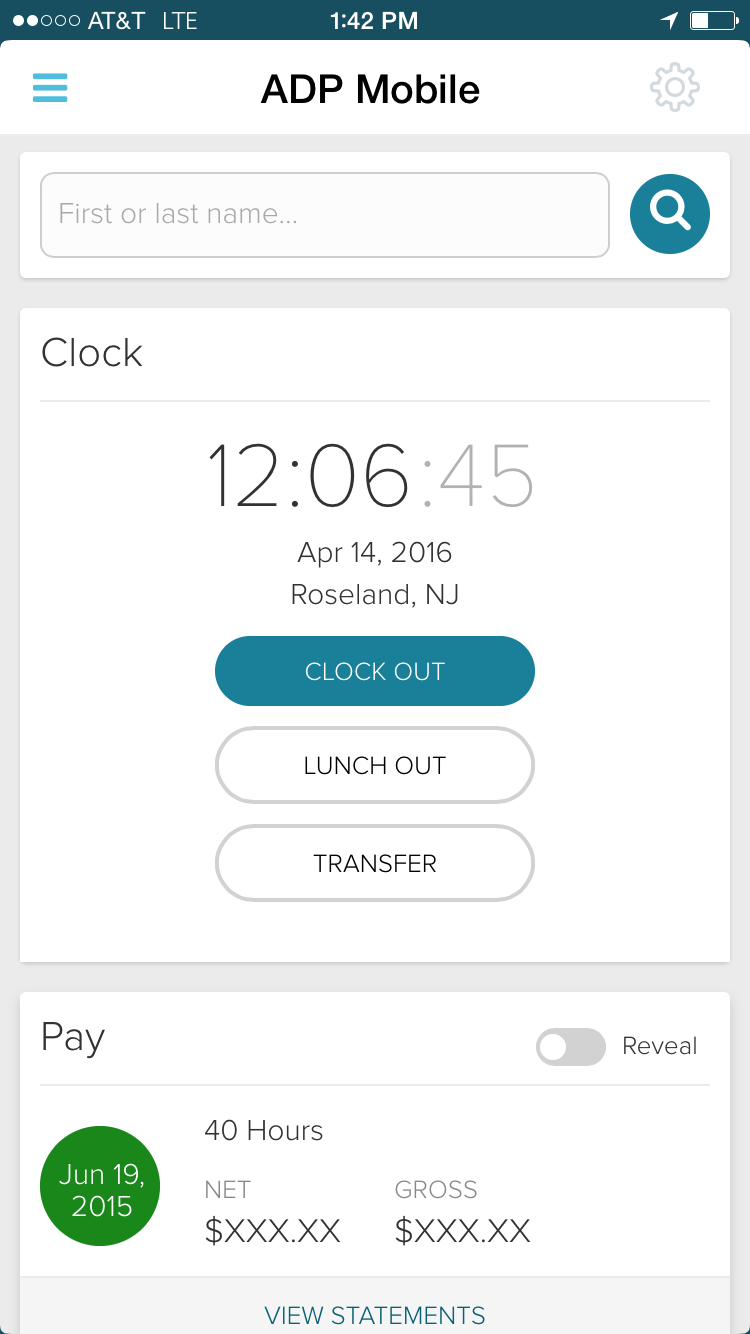
Screenshot of ADP Workforce Now: a simple and complete human capital management solutionScreenshot of Benchmarking by ADP DataCloud: an application with an extensive data set ... available to ADP Workforce Now clientsScreenshot of ADP Workforce Now clients can equip their employees with the ADP Mobile self-service app

PDS Vista Screenshots

Screenshot of employee data, which is the heart of a corporate knowledge base. Within Vista, an organized database of employees, applicants, jobs, and positions can be created and maintained. The product’s flexibility allows users to structure corporate data as simply or as complicated as business needs require.Screenshot of Vista Payroll, which is designed to strike the perfect balance between power and simplicity. It is designed to process large volumes of data within tight time constraints, whether U.S., Canadian, or Caribbean.

Vista Payroll is focused on its main tasks of calculating pay, creating paychecks, producing payroll registers, and federal, state, local, and provincial tax reports.Screenshot of the included Vista Benefits features, which can include unlimited plans and coverage levels, automated benefits eligibility, auto-housekeeping of valuations and premiums.Screenshot of Vista Recruiting, which presents critical applicant information in an efficient manner for both human resources professionals and hiring managers, alike.

Vista Recruiting gives HR departments command over the entire hiring process for each department in every location while more easily tracking and controlling costs, improving applicant management, strengthening relationships with applicants, and reducing paperwork for the HR team.