TrustRadius: an HG Insights company

Save this comparison

Save this comparison

Add Product

Recommended Comparisons

    Overview
    ProductRatingMost Used ByProduct SummaryStarting Price

    Adobe XD

    Score6.1 out of 10
    N/AAdobe XD is a prototyping and UX/UI option for website and mobile application design, featuring a range of UI tools and and templates, a versatile artboard and contextual layer panels, and deep integration with Adobe's creative suite of products for fast import of objects from these applications.

    $33.99

    per month per license

    HotGloo

    Score8 out of 10
    Small Businesses (1-50 employees)
    HotGloo is an online wireframing and prototyping tool. This solution has been designed for all those engaged in the concept, design and development of web or app projects: project managers, information architects, usability experts, freelancers, concept people, digital agencies, web companies, publishers, web designers, web developers and many more. The vendor’s value proposition is that this solution makes it easy to wireframe web and mobile sites and to collaborate with others due to the…

    $13

    up to 4 users, 2 active projects, unlimited reviewers

    Pricing
    Adobe XDHotGloo
    Editions & Modules
    Individual
    $9.99 ($119.88)
    per month (annual, prepaid)
    Students & Teachers - All Apps
    $19.99 ($239.88)
    per month, annual plan (for the year)
    Business - Single App
    $33.99
    per month per license
    Business - All Apps
    $79.99
    per month per license
    Schools & Universities - Institution Wide
    Contact Sales
    Group
    $13
    up to 4 users, 2 active projects, unlimited reviewers
    Team
    $27
    up to 10 users / 6 active projects / unlimited reviewers
    Agency
    $54
    up to 20 users / 15 active projects / unlimited reviewers
    Enterprise
    150 +
    More users and projects, priority support. Get in touch for an individual quote.
    Offerings
    Pricing Offerings
    Adobe XDHotGloo
    Free Trial
    NoYes
    Free/Freemium Version
    NoNo
    Premium Consulting/Integration Services
    NoYes
    Entry-level Setup FeeNo setup feeNo setup fee
    Additional DetailsThe billing period starts on the day you upgrade from the free trial to a paying plan. If you pay by credit card the service is billed in advance on a monthly basis and is non-refundable. There will be no refunds or credits for partial months of service, upgrade/downgrade refunds, or refunds for months unused with an open account. If you do choose to cancel your account in the future, you will never be charged again, but you are responsible for charges already incurred up until your cancellation. For monthly recurring payments we accept Visa, MasterCard and American Express through our online payment system. You can also prepay any account for 12 months with credit card. In certain cases we also take money transfers – please contact us beforehand if you want to use this option.
    More Pricing Information
    Community Pulse
    Adobe XDHotGloo
    Considered Both Products
    Adobe
    No answer on this topic
    HotGloo
    No answer on this topic
    Key User Insights
    Would buy again
    85%
    Would buy again
    23 Answers
    No answers on this topic
    Delivers good value for the price
    88%
    Delivers good value for the price
    22 Answers
    No answers on this topic
    Happy with the feature set
    78%
    Happy with the feature set
    21 Answers
    No answers on this topic
    Lived up to sales and marketing promises
    96%
    Lived up to sales and marketing promises
    22 Answers
    No answers on this topic
    Implementation went as expected
    92%
    Implementation went as expected
    24 Answers
    No answers on this topic
    Best Alternatives
    Adobe XDHotGloo
    Small Businesses
    Figma
    Score8.9 out of 10
    Balsamiq
    Score7.6 out of 10
    Medium-sized Companies
    Figma
    Score8.9 out of 10
    Balsamiq
    Score7.6 out of 10
    Enterprises
    Figma
    Score8.9 out of 10
    Balsamiq
    Score7.6 out of 10
    All AlternativesView all alternativesView all alternatives
    User Ratings
    Adobe XDHotGloo
    Likelihood to Recommend
    5.5
    (34 ratings)
    7.8
    (3 ratings)
    Likelihood to Renew
    7.7
    (3 ratings)
    -
    (0 ratings)
    Usability
    5.5
    (3 ratings)
    -
    (0 ratings)
    Support Rating
    8.3
    (16 ratings)
    -
    (0 ratings)
    Implementation Rating
    10.0
    (1 ratings)
    -
    (0 ratings)
    User Testimonials
    Adobe XDHotGloo
    Likelihood to Recommend
    Adobe
    If its already part of your organization, and they have a license for Creative Cloud, its worth learning. It doesnt take long to get started, but compared to other software in the same field, its lacking in many ways, from quality of life features to just simply not having the option for Darkmode. Even for website design, UX/UI, and mocking up proof-of-concepts, there are much better tools like Figma.
    Incentivized
    Read full review
    HotGloo
    Overall, I am happy with HotGloo. It supports and fits well into my workflow. Here, I use HotGloo mainly during the prototyping scale. More preciously for wireframing. Eventhough, there are other tools - which I also use in subsequent steps - that would support wireframing as well, I like HotGloo and will keep using it during this stage. This is mainly because I think the elements and symbol library has just the right depth and detail for wireframing. It is important in wireframing to not include to much detail yet. Otherwise, testers get distracted by design aspects. Therefore, I like HotGloo and us it for different Product and Service design projects.
    Incentivized
    Read full review
    Pros
    Adobe
    • Easy and simple animations.
    • Good tool for website mock-ups.
    • Easy user interface and tools that are like most Adobe products.
    • You can share a dev link and it displays all assets for developers to download or user like it's very own style guide.
    Incentivized
    Read full review
    HotGloo
    • Prototyping.
    • Collaboration.
    • Widget library.
    Incentivized
    Read full review
    Cons
    Adobe
    • Doesn’t have image editing tools, so having to go back to Photoshop or Lightroom just to make a sight edit can be a pain.
    • Could add some text editing functionality. It feels silly that I have to draw a line under text when I should just be able to underline.
    • Would be nice to have some real-time collaboration functionality.
    Incentivized
    Read full review
    HotGloo
    • logical structure of interface objects
    • preview view does not scale frame on small screens
    • Tool ribbon
    Incentivized
    Read full review
    Likelihood to Renew
    Adobe
    We utilize many of the applications in the Adobe CC suite and our usage of this application came about simply because it was the one that was already paid for. Bearing that in mind we will definitely be renewing the software upon the expiration of the licensing. I am not sure if this is the solution we would go with were it not already included, we would have to evaluate all other options
    Incentivized
    Read full review
    HotGloo
    No answers on this topic
    Usability
    Adobe
    Adobe XD is basically on life-support now, there are much better software out there that do everything XD can do, and a few that you don't even have to pay a monthly subscription fee on. While Adobe XD is great as shortcuts that are used in other CC software works, and its integration with CC is great. But it still lacks compared to its closest competitor.
    Incentivized
    Read full review
    HotGloo
    No answers on this topic
    Support Rating
    Adobe
    I have not had a need to connect with the Adobe XD support team as of yet, but from past experience when dealing with the other products, the support has been very very good, and I would have no reason to think that this product would be any different. There are a good number of training videos on the Adobe site for this product as well as on other social media sites so a quick search should let you find the answers in several different ways.
    Incentivized
    Read full review
    HotGloo
    No answers on this topic
    Implementation Rating
    Adobe
    Implementation was a snap
    Incentivized
    Read full review
    HotGloo
    No answers on this topic
    Alternatives Considered
    Adobe
    Before XD came to the company, screens were designed in Illustrator or Photoshop and a PDF presentation was generated, which was extremely time-consuming. XD saved us a lot of time (and money) by generating interactive prototypes, which are much more tangible for the client than a PDF. The "fight" with Figma is frequent. Both have features in which they are better than their competition. And, while I still choose Adobe XD, don't rule out moving to Figma with its multiple updates.
    Read full review
    HotGloo
    Being able to export the finished wireframe to HTML was a huge time saver for me and my team. Getting to that next step quickly and seamlessly was a massive help. Not only that, but other tools that do this, we have not as much luck. HotGloo's functionality was a step above the others.
    Incentivized
    Read full review
    Return on Investment
    Adobe
    • Ease of use means we are up and running in no time.
    • Integrates and is a part of the Adobe CC platform (which we already subscribe to) so there was no additional cost.
    • Online proofing and developer handoff links are the icing on the cake. Keeps everything in one place.
    • Handles all our assets (mostly created in Illustrator) like a dream. Even imports native Photoshop docs, too, so that saves us so much time round tripping.
    Incentivized
    Read full review
    HotGloo
    • Quicker lead time in testing interactions with latest designs.
    • Shorter build time through use of standard branding.
    Incentivized
    Read full review
    ScreenShots

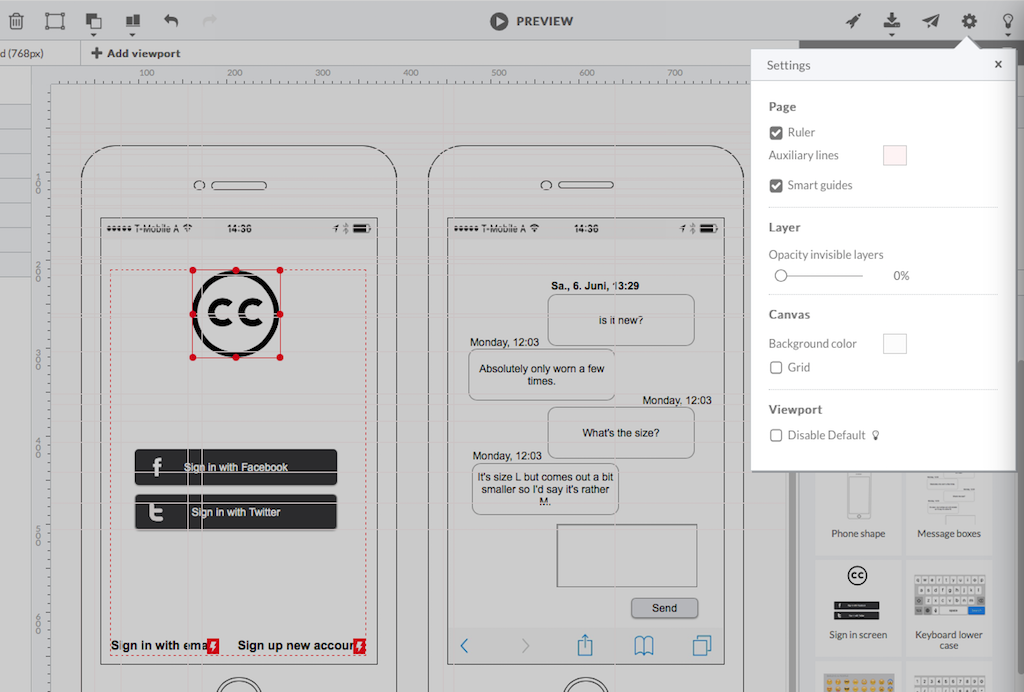
    HotGloo Screenshots

    Screenshot of HotGloo 24/7 run & test anywhere.Screenshot of Responsive wireframing with different viewports.Screenshot of Create mobile app wireframesScreenshot of From desktop over tablet to mobile.