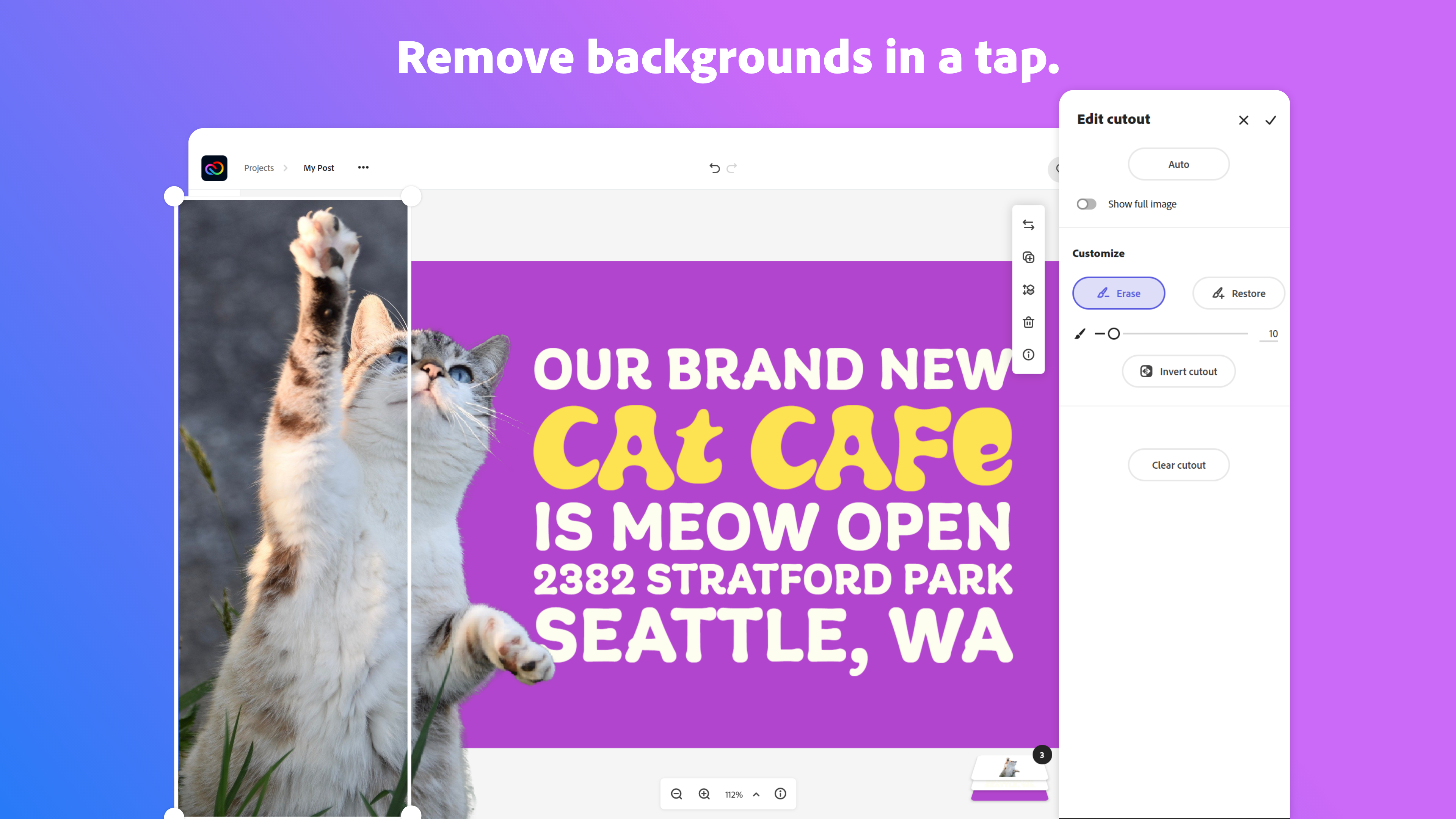
Adobe Creative Cloud Express (formerly Adobe Spark) is a task-based, web and mobile product used to create and share rich multimedia content – from social media posts and stories to invitations to marketing materials like logos, flyers and banners.
$0
Drawtify
Score8.9 out of 10
Small Businesses (1-50 employees)
Drawtify is a Free Online Vector Graphic Editor with Design Templates and Elements. It is a SaaS tool, for people who want to make designs more easily and quickly with templates. The user chooses templates, adjusts, and exports. And they also can use Drawtify's tools to make their own design flexible. Drawtify developed by high-performance technology, and cross-platform. The Drawtify vector editor brings tools for designers to draw what they want and gives templates and design…
$14.99
per month per user
Pricing
Adobe Express
Drawtify
Editions & Modules
Free
$0.00
Premium
$9.99 / $99.99
per month
Teams
$9.99
per month per user
No answers on this topic
Offerings
Pricing Offerings
Adobe Express
Drawtify
Free Trial
Yes
No
Free/Freemium Version
Yes
Yes
Premium Consulting/Integration Services
No
No
Entry-level Setup Fee
No setup fee
No setup fee
Additional Details
Contact Adobe directly for Enterprise pricing plan details.
Express is a great product for anyone that is more of a design novice than a seasoned designer. The tools can help you do lots of complex things that used to take lots of work very quickly. For example the 'Remove Object' and 'Remove background' tools work very well amazingly fast. You don't need to painstakingly trace around objects or worry about accidentally including something you didn't want.
A de minimis incentive was given to thank the reviewer for their time. The incentive was not used to bias or drive a particular response, nor was the incentive contingent on a positive endorsement. TR verified that a representative sample of customers was invited. More Info
As a filmmaker and designer, I've found that Drawtify is well suited for a variety of projects. One of the things I like most about it is its user-friendliness. Even if you're not a graphic design expert, you can still create professional-looking designs with this tool.One scenario where Drawtify is particularly well suited is for creating title cards and lower thirds for videos. The software's text and shape tools are easy to use and allow for a lot of customization, so you can create designs that perfectly match the aesthetic of your film.Another scenario where Drawtify shines is in creating animation. The software's animation feature is intuitive and easy to use, making it a great option for creating simple animations for your film's opening credits, transitions, and other visual elements.However, Drawtify is less appropriate for more complex and advanced graphic design tasks. It's not a professional graphic design software like Adobe Illustrator, it doesn't have all the features that a professional graphic designer would need. For example, if you're looking to create a detailed illustration or a complex logo, Drawtify might not have the advanced tools you need.Another scenario where Drawtify might not be the best choice is if you're working with a team of designers and need a more robust collaboration feature. Drawtify's collaboration feature is good, but it's not as advanced as some other design software.Overall, Drawtify is a great tool for beginners and those who are looking for an easy-to-use design software. It is well-suited for basic design tasks like creating title cards, lower thirds, posters, flyers, and simple animations. However, it's not the best option for more advanced tasks or for team collaborations.
A de minimis incentive was given to thank the reviewer for their time. The incentive was not used to bias or drive a particular response, nor was the incentive contingent on a positive endorsement. More Info
A de minimis incentive was given to thank the reviewer for their time. The incentive was not used to bias or drive a particular response, nor was the incentive contingent on a positive endorsement. More Info
A de minimis incentive was given to thank the reviewer for their time. The incentive was not used to bias or drive a particular response, nor was the incentive contingent on a positive endorsement. More Info
Canva has a better interface, in my opinion... I like that this one is friendly to Adobe users, but I would likely recommend Canva to someone who's never used design software for a complete beginner.
Removing the background from images doesn't always work well. I almost always need to switch to Photoshop for this.
The touch screen interface could be better; graphics on mobile apps are tough in general but specifically, the iPad interface could use some improvement.
A de minimis incentive was given to thank the reviewer for their time. The incentive was not used to bias or drive a particular response, nor was the incentive contingent on a positive endorsement. More Info
A de minimis incentive was given to thank the reviewer for their time. The incentive was not used to bias or drive a particular response, nor was the incentive contingent on a positive endorsement. More Info
I use it daily for almost all my marketing needs. So far it is the program that has the most and best to offer for what I need and is the easiest to use
A de minimis incentive was given to thank the reviewer for their time. The incentive was not used to bias or drive a particular response, nor was the incentive contingent on a positive endorsement. More Info
The overall usability of the software was strong. The application, especially relative to other Adobe services like Photoshop that can demand a lot of knowledge and skill, was highly easy to use. At the same time, that also speaks to the somewhat limited amount of customization opportunities that allow content designers to truly create content that is dynamic, engaging, and different than the standard stuff that floods our vision every day.
A de minimis incentive was given to thank the reviewer for their time. The incentive was not used to bias or drive a particular response, nor was the incentive contingent on a positive endorsement. More Info
Because adobe is so widespread the community support is amazing. I have never actually used adobe support short of their website, but I go to youtube a lot to get my questions answered. You can google any problem you have and not have any issues finding an answer. In my opinion, community support is much more meaningful and helpful than support directly from the company
A de minimis incentive was given to thank the reviewer for their time. The incentive was not used to bias or drive a particular response, nor was the incentive contingent on a positive endorsement. More Info
The Adobe Express Creative Cloud (premium) version is all you need. But even the free version is so much easier to edit than in Canva. Canva is cool for certain projects that don't need too much editing (editing in Canva can cause migraines). But, almost no matter what I think up to create, I will almost always open up AE rather than struggling through the learning curve in Canva.
A de minimis incentive was given to thank the reviewer for their time. The incentive was not used to bias or drive a particular response, nor was the incentive contingent on a positive endorsement. TR verified that a representative sample of customers was invited. More Info
Drawtify is a very easy tool in comparison to Adobe Suite. While Canva is easy but I don't like it due to redundant templates. Like if you have created something with Canva, everyone know that this has been created in Canva. Whilst the Drawtify templates are quite new. Also the motion graphics is a plus over all other platforms.
A de minimis incentive was given to thank the reviewer for their time. The incentive was not used to bias or drive a particular response, nor was the incentive contingent on a positive endorsement. More Info
Adobe Creative Cloud Express is included with an Adobe Creative Cloud account. Our company has a corporate team membership so it is nice to have a professional and powerful tool that anyone on our team can use for free. The pricing structure of giving the tool away for free will be fundamental to users utilizing the tool. Similar tools, such as Canva, cost significantly more but do not offer the same features
A de minimis incentive was given to thank the reviewer for their time. The incentive was not used to bias or drive a particular response, nor was the incentive contingent on a positive endorsement. More Info
The professional services for Adobe Creative Cloud Express is top notch and should be highly commended. I am thoroughly impressed with how far Adobe has come. In the past, I had several issues with how something were handled, but in the past few years things have been better than ever and they get no complaints from me
A de minimis incentive was given to thank the reviewer for their time. The incentive was not used to bias or drive a particular response, nor was the incentive contingent on a positive endorsement. More Info
It has allowed us to complete more demos and projects in less time by being so flexible.
It has positively impacted our efficiency in delivering creatives such as YouTube thumbnails, event poster designs, Instagram story posts, etc to clients in a timely manner no matter where work takes us.
I would say the ROI has been seeing more projects completed and invoiced per month. I would estimate overall a 20% increase in volume on deliverables.
A de minimis incentive was given to thank the reviewer for their time. The incentive was not used to bias or drive a particular response, nor was the incentive contingent on a positive endorsement. TR verified that a representative sample of customers was invited. More Info
A de minimis incentive was given to thank the reviewer for their time. The incentive was not used to bias or drive a particular response, nor was the incentive contingent on a positive endorsement. More Info