TrustRadius: an HG Insights company

Adobe Customer Journey Analytics B2B Edition vs. Fullstory

Save this comparison

Save this comparison

Add Product

Recommended Comparisons

    Overview
    ProductRatingMost Used ByProduct SummaryStarting Price

    Adobe Customer Journey Analytics B2B Edition

    N/AN/ALaunched in June of 2025, Adobe Customer Journey Analytics B2B Edition gives marketing sales teams actionable insights that let them optimize customer experiences, expand the sales pipeline, and drive strategic growth across the buyer’s journey.N/A

    Fullstory

    Score9.1 out of 10
    N/AFullstory’s behavioral data platform helps technology leaders make better, more informed decisions by injecting digital behavioral data into their analytics stack. The technology's behavioral data transforms digital visit into actionable insights.N/A
    Pricing
    Adobe Customer Journey Analytics B2B EditionFullstory
    Editions & Modules
    No answers on this topic
    Business
    Contact Sales
    Enterprise
    Contact Sales
    Offerings
    Pricing Offerings
    Adobe Customer Journey Analytics B2B EditionFullstory
    Free Trial
    NoYes
    Free/Freemium Version
    NoYes
    Premium Consulting/Integration Services
    NoYes
    Entry-level Setup FeeNo setup feeOptional
    Additional DetailsContact Adobe for pricing information.
    More Pricing Information
    Community Pulse
    Adobe Customer Journey Analytics B2B EditionFullstory
    Considered Both Products
    Adobe
    No answer on this topic
    Fullstory
    No answer on this topic
    Key User Insights
    Would buy again
    No answers on this topic
    96%
    Would buy again
    66 Answers
    Delivers good value for the price
    No answers on this topic
    98%
    Delivers good value for the price
    46 Answers
    Happy with the feature set
    No answers on this topic
    99%
    Happy with the feature set
    68 Answers
    Lived up to sales and marketing promises
    No answers on this topic
    98%
    Lived up to sales and marketing promises
    39 Answers
    Implementation went as expected
    No answers on this topic
    98%
    Implementation went as expected
    41 Answers
    Features
    Adobe Customer Journey Analytics B2B EditionFullstory
    Mobile Capabilities
    Comparison of Mobile Capabilities features of Adobe Customer Journey Analytics B2B Edition and Fullstory
    Feature
    Adobe Customer Journey Analytics B2B Edition
    -
    Ratings
    Fullstory
    6.2
    19 Ratings
    20% below category average
    Responsive Design for Web Access00 Ratings7.917 Ratings
    Mobile Application00 Ratings7.910 Ratings
    Dashboard / Report / Visualization Interactivity on Mobile00 Ratings7.913 Ratings
    Mobile App Analytics00 Ratings6.412 Ratings
    Results and Analysis
    Comparison of Results and Analysis features of Adobe Customer Journey Analytics B2B Edition and Fullstory
    Feature
    Adobe Customer Journey Analytics B2B Edition
    -
    Ratings
    Fullstory
    9.2
    49 Ratings
    2% below category average
    Heatmap tool00 Ratings9.937 Ratings
    Click analytics00 Ratings9.044 Ratings
    Scroll maps00 Ratings9.033 Ratings
    Form fill analysis00 Ratings9.026 Ratings
    Conversion tracking00 Ratings9.928 Ratings
    Goal tracking00 Ratings7.923 Ratings
    Funnel Analysis00 Ratings8.034 Ratings
    Session Recording and Replay00 Ratings10.048 Ratings
    User Segmentation00 Ratings10.043 Ratings
    Best Alternatives
    Adobe Customer Journey Analytics B2B EditionFullstory
    Small Businesses
    No answers on this topic
    No answers on this topic
    Medium-sized Companies
    No answers on this topic
    Contentsquare
    Score7 out of 10
    Enterprises
    No answers on this topic
    Glassbox
    Score8.1 out of 10
    All AlternativesView all alternativesView all alternatives
    User Ratings
    Adobe Customer Journey Analytics B2B EditionFullstory
    Likelihood to Recommend
    -
    (0 ratings)
    10.0
    (72 ratings)
    Likelihood to Renew
    -
    (0 ratings)
    9.7
    (9 ratings)
    Usability
    -
    (0 ratings)
    10.0
    (1 ratings)
    Availability
    -
    (0 ratings)
    9.0
    (1 ratings)
    Performance
    -
    (0 ratings)
    8.0
    (1 ratings)
    Support Rating
    -
    (0 ratings)
    8.3
    (61 ratings)
    Implementation Rating
    -
    (0 ratings)
    7.5
    (56 ratings)
    Configurability
    -
    (0 ratings)
    7.0
    (1 ratings)
    Ease of integration
    -
    (0 ratings)
    9.0
    (1 ratings)
    Product Scalability
    -
    (0 ratings)
    8.0
    (1 ratings)
    Vendor post-sale
    -
    (0 ratings)
    8.0
    (1 ratings)
    Vendor pre-sale
    -
    (0 ratings)
    8.0
    (1 ratings)
    User Testimonials
    Adobe Customer Journey Analytics B2B EditionFullstory
    Likelihood to Recommend
    Adobe
    No answers on this topic
    Fullstory
    It was extremely useful in identifying places in our product where things weren't functioning, or where it looked like action was available to the end user but in reality, it was not and therefore caused lots of confusion. It doesn't help as much in other scenarios to see what catches a user's Eye or where they go if they leave our application as well as an actual in-person interview would help with eye-tracking software.
    Incentivized
    Read full review
    Pros
    Adobe
    No answers on this topic
    Fullstory
    • Tracks users' online experiences from start to finish.
    • Makes it easy to share a customer's experiences with the rest of my team.
    • Allows me to use different methods to find evidence of a customer's experience.
    • Shows page insights via segmentation that help me know where to improve my site.
    • Tracks error clicks and dead clicks for quick insights into site improvements.
    • Integrates with HelpScout for easy access to customer problem-solving.
    Incentivized
    Read full review
    Cons
    Adobe
    No answers on this topic
    Fullstory
    • The ramp-up time to learn the entire product can take a little while. There are just so many absolutely wonderful tools and different ways to look at the same type of information that it can take a new user a few weeks to understand and then more time to master. However, FullStory has a ton of training resources to help with that! A lot of my own teammates have taught themselves FullStory through those training resources.
    • The UX of the product is totally wonderful, but there are tiny things that make getting to certain parts of the product slightly more challenging (like clicking into a modal in a modal). Sometimes buttons or links are placed out of my field of view, but those are minor things I notice because I work in UX.
    Incentivized
    Read full review
    Likelihood to Renew
    Adobe
    No answers on this topic
    Fullstory
    It's been a phenomenal tool for us; every department that uses it has found something new and unexpected that it can do that they're really excited about. Even if we *only* used it for bug triage, it would be worth our time and money. The fact that we can use it for so many other things as well--gauging how customers interact and use our site, identifying UI problems, etc.--is above and beyond
    Incentivized
    Read full review
    Usability
    Adobe
    No answers on this topic
    Fullstory
    Because everything seems to be easy to find and it doesn't take long at all to learn how to use the product
    Incentivized
    Read full review
    Reliability and Availability
    Adobe
    No answers on this topic
    Fullstory
    We've never had issues with availability
    Incentivized
    Read full review
    Performance
    Adobe
    No answers on this topic
    Fullstory
    It seems the performance is really good and always loads quickly
    Incentivized
    Read full review
    Support Rating
    Adobe
    No answers on this topic
    Fullstory
    They have been overall pretty responsive and proactive. The tool is pretty straightforward to use. Most of the questions we have had to work with them on our how to use new features or adjust our integration to ensure we are gathering all the data from all of our tools.
    Incentivized
    Read full review
    Implementation Rating
    Adobe
    No answers on this topic
    Fullstory
    To successfully implement FullStory, it is important to plan your implementation carefully by defining your goals and user segments. You should also use tags and filters to analyze your user data, train your team to use FullStory effectively, and use FullStory in conjunction with other analytics tools to get a more complete picture of your user's behavior. By following these tips, you can gain valuable insights into your users' behavior and experiences, and use this information to improve your website or application.
    Incentivized
    Read full review
    Alternatives Considered
    Adobe
    No answers on this topic
    Fullstory
    Smartlook is software that records users on a website
    and mobile app. Finding useful information within thousands of recordings is
    made quick and easy with features that help you accomplish this. I have chosen FullStory because it is easier to use and has more advanced features compared to Smartlook.
    Incentivized
    Read full review
    Scalability
    Adobe
    No answers on this topic
    Fullstory
    Full story was easy to scale with the growth of our teams and organisation
    Incentivized
    Read full review
    Return on Investment
    Adobe
    No answers on this topic
    Fullstory
    • Triage for front end bugs - FullStory can sometimes help you spot a bug in action much more quickly than trying to recreate it on your own
    • Observing customers use new features and understanding why a new feature may be performing better or worse than expected
    Incentivized
    Read full review
    ScreenShots

    Adobe Customer Journey Analytics B2B Edition Screenshots
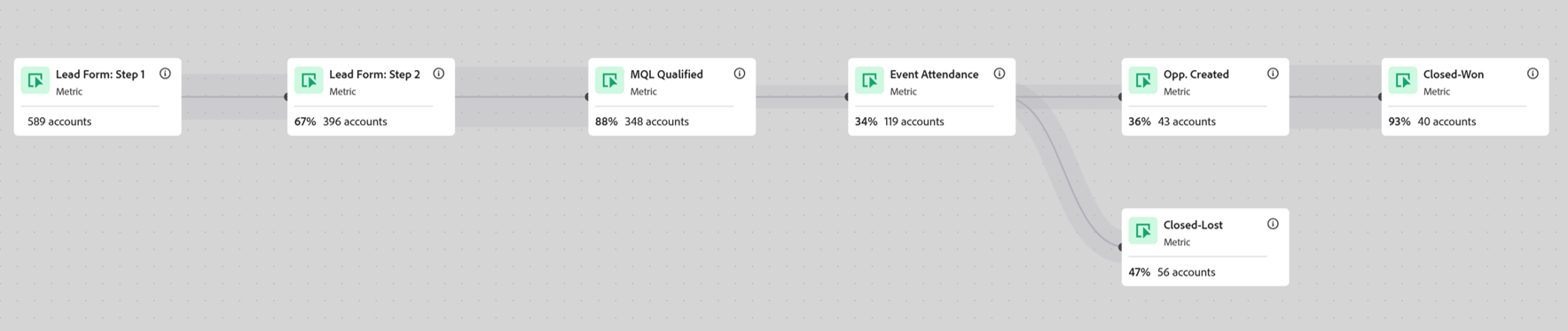
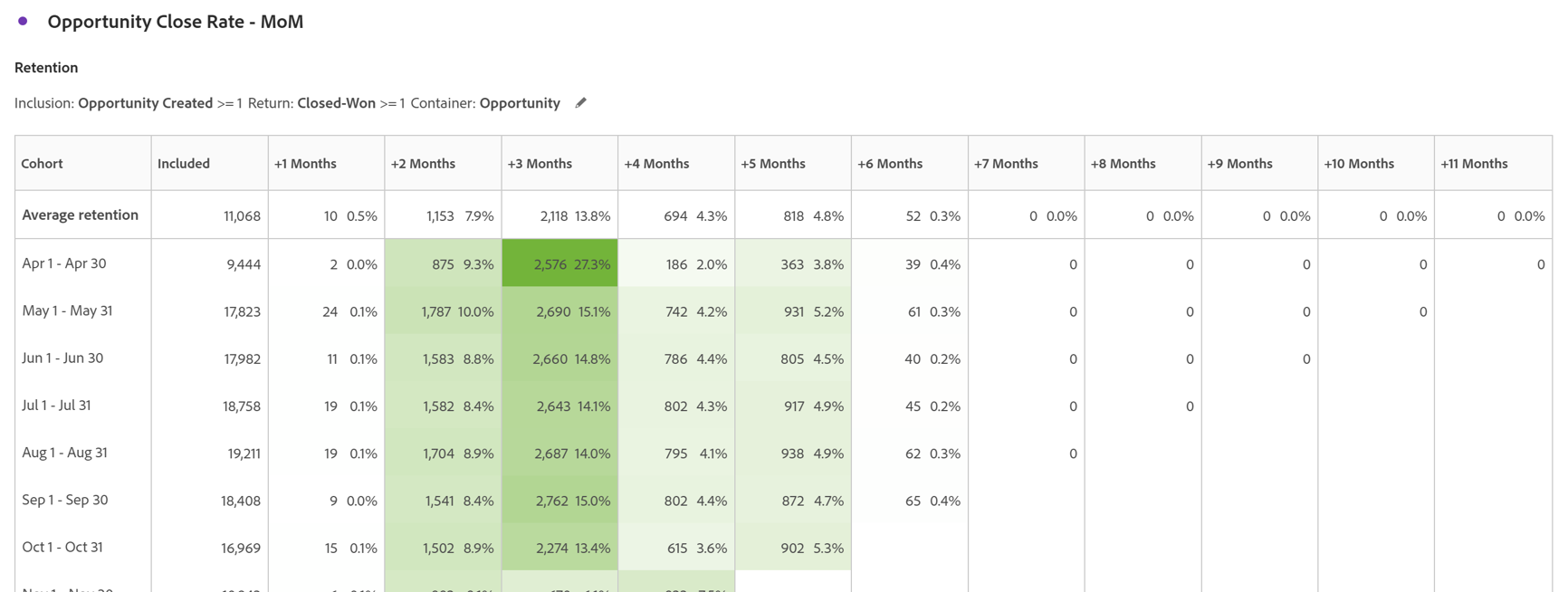
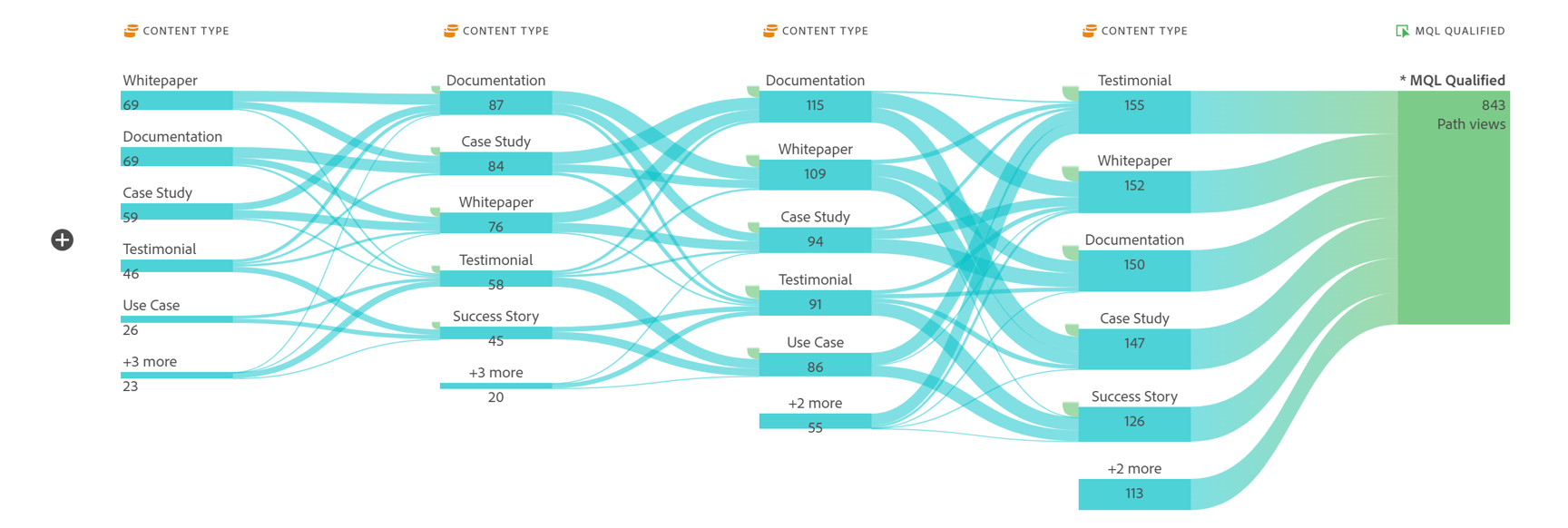
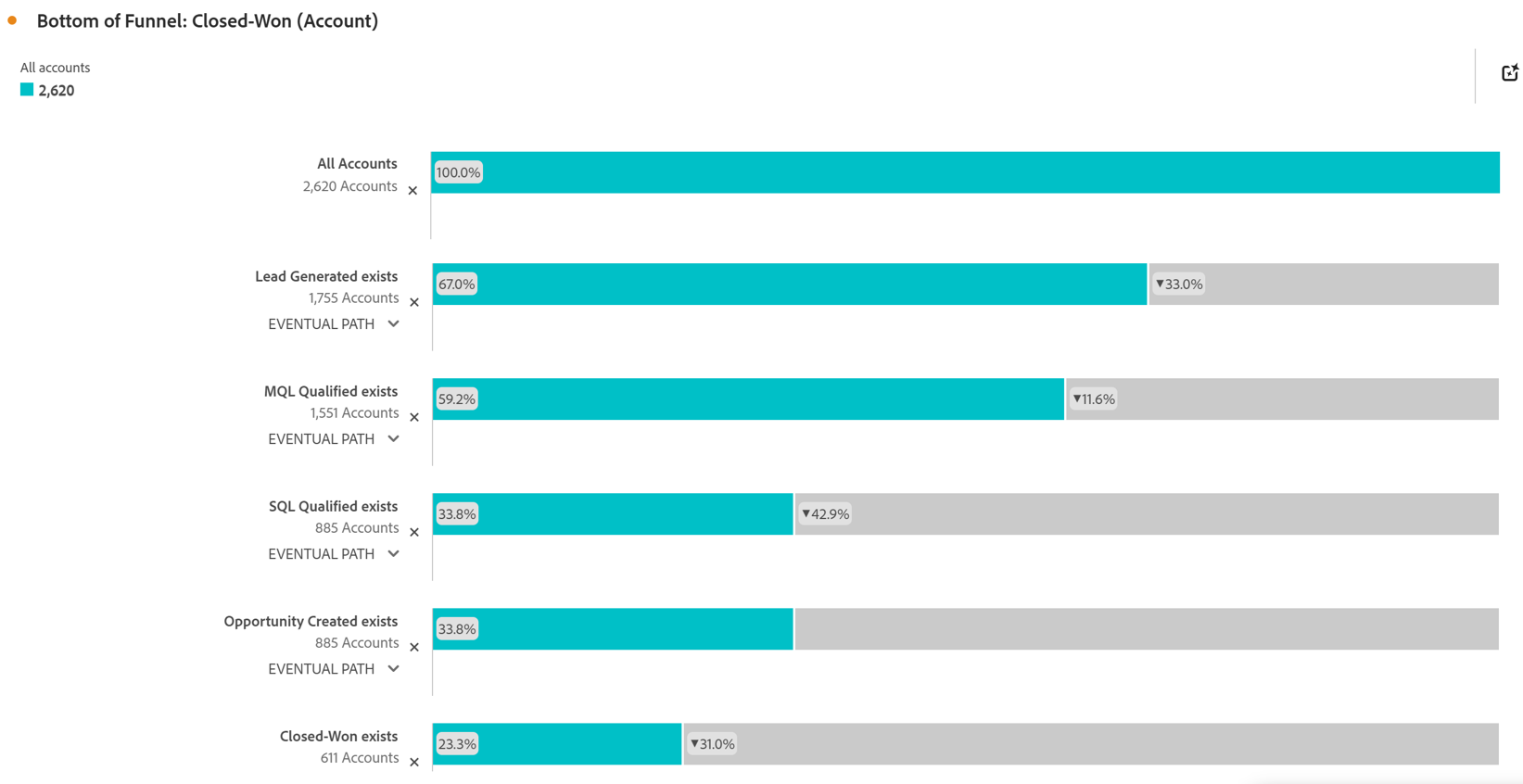
    Screenshot of Account Based Marketing Engagement using the Journey Canvas feature. Effective Account Based Marketing requires a deep understanding of the buying journey at the account level to determine the most impactful marketing activities to drive deal closer. Identify which experiences - both online and offline - are most impactful in driving closed opportunities. Journey canvas maps every interaction across accounts, buying groups, opportunities, campaigns and channels for clarity on what's working and what isn't. The Journey Canvas feature in CJA B2B Edition lets users see a detailed path for a specific high value account or buying group, including all known online and offline interactions. And users can contextualize key events, such as an MQL trigger and an Opportunity creation. Plus, Sales Development Reps can see the interaction history for specific accounts before outreach, allowing for highly relevant conversations.Screenshot of Cohort Segmentation. This identifies key groups of buyers to publish to CDP for activation in paid media, personalization or email orchestration. Cohort tables lets users group B2B entities - Accounts, Opportunities, Buying Groups - based on a shared starting point and track their progress across pipeline stages over time. By analyzing behavior patterns of buying groups, marketing and sales teams can understand the time to reach key milestones in the buying journey and determine which marketing efforts lead to faster pipeline progression.Screenshot of In-Person Events. The impact of in-person event attendance can be optimized by reporting on engaged accounts and viewing activity across multiple in-person events. Flow lets you visualize the paths accounts and buying groups take between key interactions or stages over time. Understanding what behaviors led to a key milestone, such as registering for an in-person event or flagging a lead as an MQL, helps both marketing and sales teams understand the most influential experiences that lead to conversion. For in-person events, the steps leading up to registration may include previous in-person event attendance, as well as digital experiences such as downloading white papers and case studies.Screenshot of Sales Stage Progression. The fallout report in CJA B2B Edition gives you sales funnel insights by letting you visualize conversion and drop off rates between predefined steps in a sequential journey. The fallout report can answer key questions around which steps in the sales stages caused the most drop off towards deal close.

    Fullstory Screenshots

    Screenshot of AI-generated Summaries used to Take Action More QuicklyScreenshot of a Visualization of Behavioral Data with Custom DashboardsScreenshot of Ready-made for AI Behavioral Data Straight to the organization's Data EcosystemScreenshot of Fullstory's Session Replay, Combined with Dev ToolsScreenshot of Mobile App Behavioral Data