Adobe Acrobat DC is the current version of the well-established document / PDF management solution, part of the Adobe Document Cloud (the other part being Adobe's eSign services based on technology acquired with EchoSign in 2011).
$29.99
per month per seat
SOHODOX
Score7 out of 10
N/A
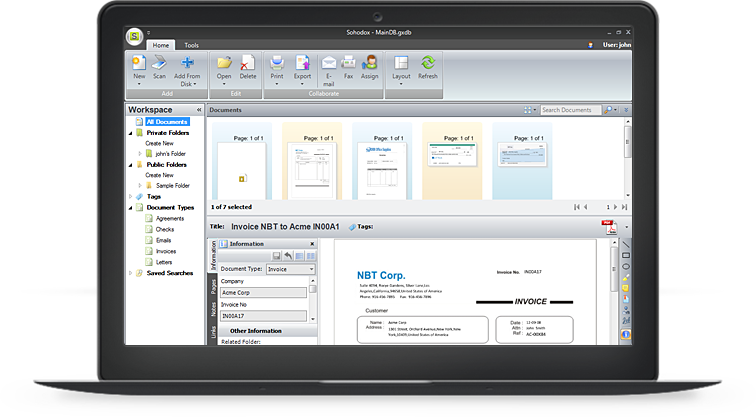
SOHODOX is a document management system for small businesses from Indian company ITAZ Technologies.
A de minimis incentive was given to thank the reviewer for their time. The incentive was not used to bias or drive a particular response, nor was the incentive contingent on a positive endorsement. More Info
The 12 primary users represent our core Human Resources, Payroll, and Finance operations teams. Within this group, HR managers use the platform to oversee employee lifecycle events, handle benefits administration, and process new-hire onboarding. The payroll specialists and finance staff manage bi-weekly payroll runs, direct deposits, tax compliance, and general ledger reporting. Additionally, a couple of operational team leads use administrative access to approve timesheets, track attendance, and monitor departmental PTO accruals.
Sohodox is a beneficial paperless office software product that is quick to install, cost-effective, and easy to operate; it works very well with any TWAIN compatible scanner. It is a perfect solution for small business document management that features all tools which are needed to manage electronic and paper documents more efficiently. It lets you scan, index, organize, store, search and manage documents.
For the business account, the Adobe Acrobat rep assigned to your account will actively look for ways to save you money.
We have found that our rep from Adobe Acrobat Business Account reviews our usage and related apps and has offered helpful tips on better ways to complete tasks we historically undertake with their software. They have saved us a great deal of time and money. They make us efficient.
The apps they offer that combine with the primary program are relevant to the tasks our business performs, and they function at a high level and never fail. It's really quite remarkable.
A de minimis incentive was given to thank the reviewer for their time. The incentive was not used to bias or drive a particular response, nor was the incentive contingent on a positive endorsement. TR verified that a representative sample of customers was invited. More Info
A de minimis incentive was given to thank the reviewer for their time. The incentive was not used to bias or drive a particular response, nor was the incentive contingent on a positive endorsement. More Info
A de minimis incentive was given to thank the reviewer for their time. The incentive was not used to bias or drive a particular response, nor was the incentive contingent on a positive endorsement. More Info
A de minimis incentive was given to thank the reviewer for their time. The incentive was not used to bias or drive a particular response, nor was the incentive contingent on a positive endorsement. More Info
Option 1: Cross-Departmental MixThe 12 Adobe Acrobat users in our organization represent several key business functions across operations:Legal & Compliance (3 users): Redact confidential information, review terms, and handle legally binding e-signatures for contracts.Finance (3 users): Consolidate financial statements, convert spreadsheets into secure PDFs, and process vendor invoices.Human Resources (2 users): Manage fillable onboarding paperwork, store confidential employee records, and distribute company policies.Sales (2 users): Send out client proposals, track service agreements, and capture executive signatures.Marketing (2 users): Review collateral proofs, combine media packages, and optimize PDF sizes for web distribution.
The features on the desktop version are all toolbar based, which makes it a little more cumbersome on a smaller device (and much simpler on a large screen). The web forms adjust well to different screen size so work well on mobile, tablet and computer
A de minimis incentive was given to thank the reviewer for their time. The incentive was not used to bias or drive a particular response, nor was the incentive contingent on a positive endorsement. TR verified that a representative sample of customers was invited. More Info
We have not had availability issues with Adobe Acrobat, or at least none that I am personally aware of. Some may encounter crashes of the software during outages of electricity in their city or neighborhood, which no one can plan for, but with generators in our organization, we have been lucky not to have outages
A de minimis incentive was given to thank the reviewer for their time. The incentive was not used to bias or drive a particular response, nor was the incentive contingent on a positive endorsement. More Info
One of the best features of Adobe Acrobat is its speed and stability. When dealing with massive multi-page files, having to reload a crashed program over and over again would slow down progress unnecessarily. And expanding on that, having the table of contents generated allows me to skip to different pages with ease, a necessary feature with exceptionally long files. word searches are even more helpful with text recognition.
A de minimis incentive was given to thank the reviewer for their time. The incentive was not used to bias or drive a particular response, nor was the incentive contingent on a positive endorsement. More Info
For a while, Acrobat DC crashed pretty frequently. I contacted Adobe Acrobat support about the problem. At first support was unable to provide a solution. After about a month Adobe's software engineers provided a fix. I just wish it had taken less than a month to solve the problem.
A de minimis incentive was given to thank the reviewer for their time. The incentive was not used to bias or drive a particular response, nor was the incentive contingent on a positive endorsement. More Info
A de minimis incentive was given to thank the reviewer for their time. The incentive was not used to bias or drive a particular response, nor was the incentive contingent on a positive endorsement. TR verified that a representative sample of customers was invited. More Info
I was not involved with the implementation process, so I cannot answer this question. However, when it was installed on my computer system, they did so virtually. I just sat there while they took control of my computer over the network and watch them install it, lickety split
A de minimis incentive was given to thank the reviewer for their time. The incentive was not used to bias or drive a particular response, nor was the incentive contingent on a positive endorsement. More Info
In my opinion, both complement each other. Microsoft clearly has with Copilot the AI Edge. However, the visual dynamics of Adobe Creative are Outstanding and provide a balanced approach to creativity, utilizing both Excellent, user-friendly Tools.
A de minimis incentive was given to thank the reviewer for their time. The incentive was not used to bias or drive a particular response, nor was the incentive contingent on a positive endorsement. TR verified that a representative sample of customers was invited. More Info
A de minimis incentive was given to thank the reviewer for their time. The incentive was not used to bias or drive a particular response, nor was the incentive contingent on a positive endorsement. TR verified that a representative sample of customers was invited. More Info
I find that many users aren't aware of many features of the software they use, nor may they be comfortable with learning multiple-step processes. For the simplest of PDF purposes (scanning, downloading, exporting), it gets a thumbs-up. For anything involving electronic signatures, meh--causes eyes to glaze over, or forgetting what all is involved.
A de minimis incentive was given to thank the reviewer for their time. The incentive was not used to bias or drive a particular response, nor was the incentive contingent on a positive endorsement. TR verified that a representative sample of customers was invited. More Info
A de minimis incentive was given to thank the reviewer for their time. The incentive was not used to bias or drive a particular response, nor was the incentive contingent on a positive endorsement. TR verified that a representative sample of customers was invited. More Info
A de minimis incentive was given to thank the reviewer for their time. The incentive was not used to bias or drive a particular response, nor was the incentive contingent on a positive endorsement. More Info