Adobe Acrobat Sign vs. Formstack Sign

Overview
ProductRatingMost Used ByProduct SummaryStarting Price
Adobe Acrobat Sign
Score 8.5 out of 10
Mid-Size Companies (51-1,000 employees)
Acrobat Sign is an e-signature solution that combines simple and secure e-signatures with Adobe Acrobat. With Acrobat Sign, the user can create, sign, send for signature, manage, and track documents from one Adobe platform. The user can create signing experiences for customers and teams by enabling them to sign documents on any device or browser – anytime, anywhere. No additional software download or accounts are needed. As Microsoft’s e-signature solution, Acrobat Sign…
$14.99
per month license
Formstack Sign
Score 10.0 out of 10
N/A
Formstack Sign (formerly InsureSign, acquired by Formstack July, 2019) offers their eSignature application for document signing across all platforms (e.g. mobile, tablet, etc), document backup with audit trail, and support with features built around the needs of insurance agents and agencies.N/A
Pricing
Adobe Acrobat SignFormstack Sign
Editions & Modules
Acrobat Standard DC for teams
$14.99
per month license
Acrobat Pro DC with advanced e-sign
$16.99
per month license
Acrobat Sign Solutions
Call 800-685-4192 for pricing
No answers on this topic
Offerings
Pricing Offerings
Adobe Acrobat SignFormstack Sign
Free Trial
YesNo
Free/Freemium Version
NoNo
Premium Consulting/Integration Services
NoNo
Entry-level Setup Fee$34.99 license per monthNo setup fee
Additional Details
More Pricing Information
Community Pulse
Adobe Acrobat SignFormstack Sign
User Ratings
Adobe Acrobat SignFormstack Sign
Likelihood to Recommend
7.1
(0 ratings)
10.0
(0 ratings)
Likelihood to Renew
8.0
(0 ratings)
-
(0 ratings)
Usability
7.3
(0 ratings)
-
(0 ratings)
Availability
9.0
(0 ratings)
-
(0 ratings)
Performance
9.0
(0 ratings)
-
(0 ratings)
Support Rating
7.3
(0 ratings)
-
(0 ratings)
Online Training
8.0
(0 ratings)
-
(0 ratings)
Implementation Rating
8.0
(0 ratings)
-
(0 ratings)
Configurability
9.0
(0 ratings)
-
(0 ratings)
Ease of integration
5.0
(0 ratings)
-
(0 ratings)
Product Scalability
8.0
(0 ratings)
-
(0 ratings)
Vendor post-sale
9.0
(0 ratings)
-
(0 ratings)
Vendor pre-sale
9.0
(0 ratings)
-
(0 ratings)
User Testimonials
Adobe Acrobat SignFormstack Sign
Likelihood to Recommend
Organizations with heavy usage inside Adobe product suites will find adoption seamless. However as it is driven on Adobe's platform some users may face challenges but as a whole the same business philosophy drives this as other Adobe platforms - they want your business - all of your business and it presents challenges if you don't agree. Product inculturation has been successful for organizations like Apple and even BMW, but with the global economy it can provide an appearance of elitism, often duly earned, or present unnecessary hurdles for integration which always impacts adoption timing and usage. While I understand and agree (for the most part) with revenue driven product layering, I believe that easier integration and full product availability definitely affect both acquisition and retention numbers. Adobe has a mighty and well deserved pedigree, and if you are aware of and prepared for the challenges I listed - you will probably love this software. If you need to have an easier and larger adoption and rollout, there are other options that will be a better fit especially if one of your data points is monitoring the impact and efficacy of the software on your team's time, conversion metrics and the impact on your clients. Adobe doesn't appear fond of self report analytics. On a side note, Adobe is a HUGE corporation and I have managed several of their enterprise platforms and they are awesome at allowing access to and support of legacy products, but identifying direct support was moderately to extremely difficult and requires a patience and tenacity above what one might expect for a company with whom you contribute significant income for their products. In a time when a new software pops up by the minute, having the heritage of Adobe is rock solid but a little more flexibility would make this product more attractive. I would still recommend the product albeit with awareness and acceptance of aforementioned challenges
Read full review
InsureSign is an ideal tool for any type of insurance-related document that requires client signatures - whether applications, lost policy release, waivers, statement of no loss,etc., - you can quickly and conveniently prepare and send documents for your clients to review and sign electronically.
Read full review
Pros
  • Adobe Acrobat Sign tracks whether or not a signer has viewed a document
  • Adobe Acrobat Sign tracks when a signer has signed, and the document has been sent to the next signer
  • Adobe Acrobat Sign sends you confirmation emails and progress update emails along the way
  • Adobe Acrobat Sign provides a "confirmation of signing" page at the end of the document package you put together, to prove the signatures are authentic
Read full review
  • Allows the customers signing our applications to sign in multiple ways (phone, computer).
  • Can attach multiple PDFs to be signed at once.
  • Provides many different options to fill out a form that needs to be signed. Allows fields to be mandatory or optional as well as options for initials, signatures, dates, etc.
Read full review
Cons
  • I've noticed if I am sent a link to sign through Adobe Acrobat Sign and I have several Acrobat windows open (especially if there is a prior sign window still open) the program freezes when it tries to open the new signature link (my firm uses Macs, so not sure how or if that is related to the glitch).
  • I have had times when one of the parties in the email string sent to gather signatures either encountered issues or are unable to sign and the integrated help menus don't seem to be sufficient to walk a novice through the process.
Read full review
  • While it's not a flaw specific to InsureSign I've found when multiple signatures are required using e-signing programs can prove more challenging particularly from the standpoint some clients (i.e. - husband & wife) may share one email account and these programs require a separate email account for each signer.
  • It would be useful to have an email prompt to the agent if a user hasn't signed within a specified time frame that enables the agent to send a personalized follow up message to the intended recipient.
Read full review
Likelihood to Renew
EchoSign has without a doubt helped our company to become more economic and time efficient. We can provide our customers with an entire documentation packet filled with all of the required paperwork they will ever need to sign in one quick email. The return time is at least four times quicker than sending through traditional mail methods, and is just as easy to instruct as flagging a hard copy. Our company is in the renewable energy industry, and it's great to know that there's a product like this that can help reduce waste. EchoSign diligently secures all documents and signatures, and provides an audit trail that is integral to keeping our customers' information private
Read full review
No answers on this topic
Usability
I've had very little trouble with it in all my uses with it. I do wish the text boxes you add wouldn't cut off the text if you entered too many words and that it would adjust it's size to fit within the space you've provided. However, that just takes a little refining in the initial set up of the document before you send it out.
Read full review
No answers on this topic
Reliability and Availability
I would have rated this a 9 or greater had they not had had such critical outages. They have taken steps to resolve this so I may come in and revise this
Read full review
No answers on this topic
Performance
The Adobe Acrobat Sign's performance are excellent.
When we send electronic document by email for signature all the customers receive it regularly, nobody has any issue to open it and the signature phase was very easy. The user-friendly aspect of this product reduce or reset the call for IT support
Read full review
No answers on this topic
Support Rating
It is a great tool to get signatures from the client and has reduced a lot of overhead that was caused before resulting in very long delays. With the integration of Adobe Acrobat Sign, we have reduced this delay making the process much smoother and more efficient.
Read full review
No answers on this topic
Online Training
The best types of training are well integrated into the product and Echosign does this well. As mentioned earlier in my review - there are some areas of functionality that can be difficult to understand ("only I sign") for the novice user. Other areas such as macro usage, bulk signature and so on were easily learned and understood via the online tools.
Read full review
No answers on this topic
Implementation Rating
Our IT team implemented and the implementation was fine. The only lesson learned is that the integration with Salesforce.com is great, but if you use the product for something other than sales orders (e.g. timesheets, client correspondence etc.), you need to plan with that in mind. They have a very good web based interface for that
Read full review
No answers on this topic
Alternatives Considered
DocuSign is a little more user-friendly and more updated that Adobe Acrobat Sign. Ultimately, we made the switch to Adobe due to their product offerings. By choosing Adobe, we can utilize other platforms within the suite that allow us to further edit documents. Which provides capabilities beyond what DocuSign offers
Read full review
InsureSign intergrates with my customer management software. InsureSign has a better price. InsureSign has a better online system for the entire process
Read full review
Scalability
At the beginning we assigned Adobe Acrobat Sign just to Purchase Office Department because at that moment we needed a tool that supported us to avoid manual signature and was compliance with remote working.
Now we are using it also in other situation because it help us with time and we can also reduce cost
Read full review
No answers on this topic
Return on Investment
  • Significantly reduced the time required for document signing processes reducing wasted time and effort
  • Cost savings since there is no longer any need to print and post/scan traditional signed paper-based documents
  • Faster decision-making since time-sensitive decisions and approvals can now be processed much more quickly by using e-signatures.
Read full review
  • Save time - signatures are usually obtained instantaneously.
  • Less follow-up needed.
  • E-signatures are accepted in our industry so we take advantage of it.
Read full review
ScreenShots

Adobe Acrobat Sign Screenshots

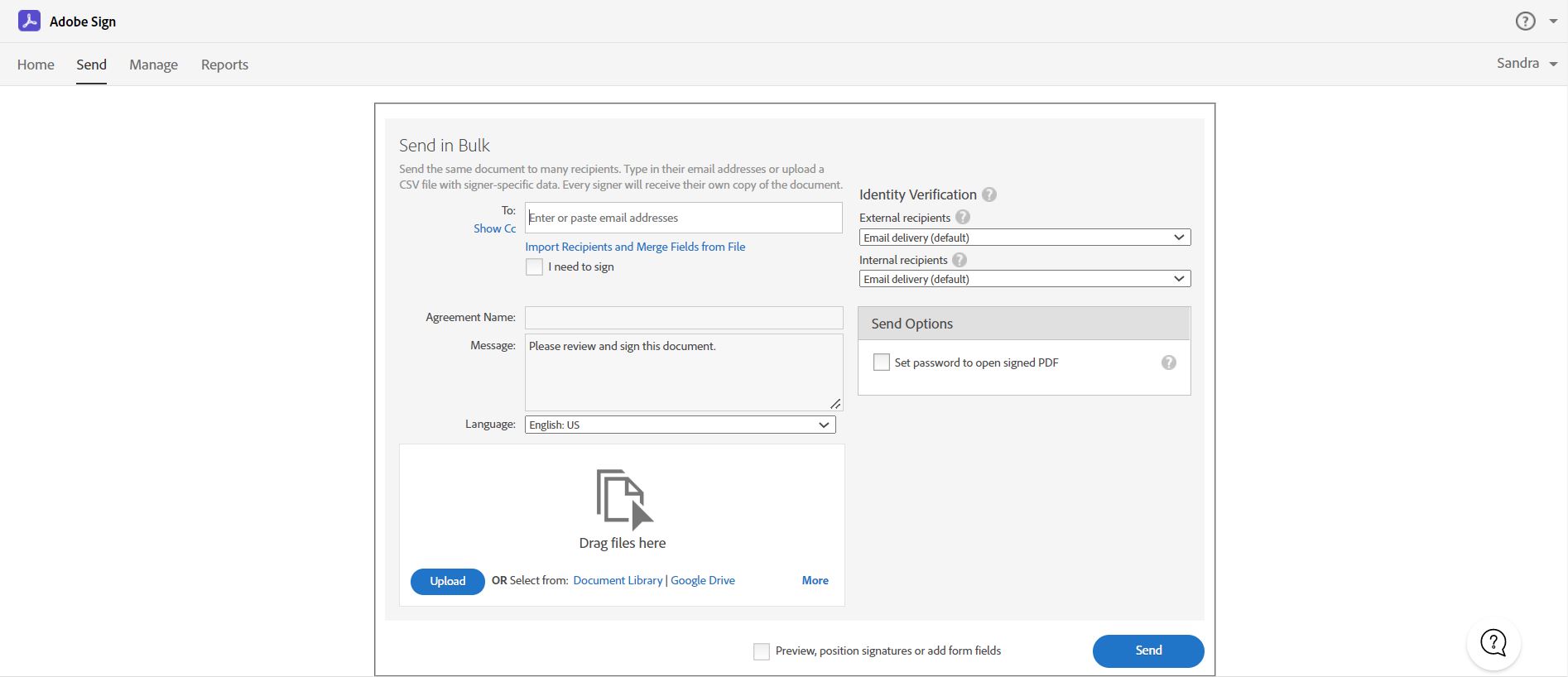
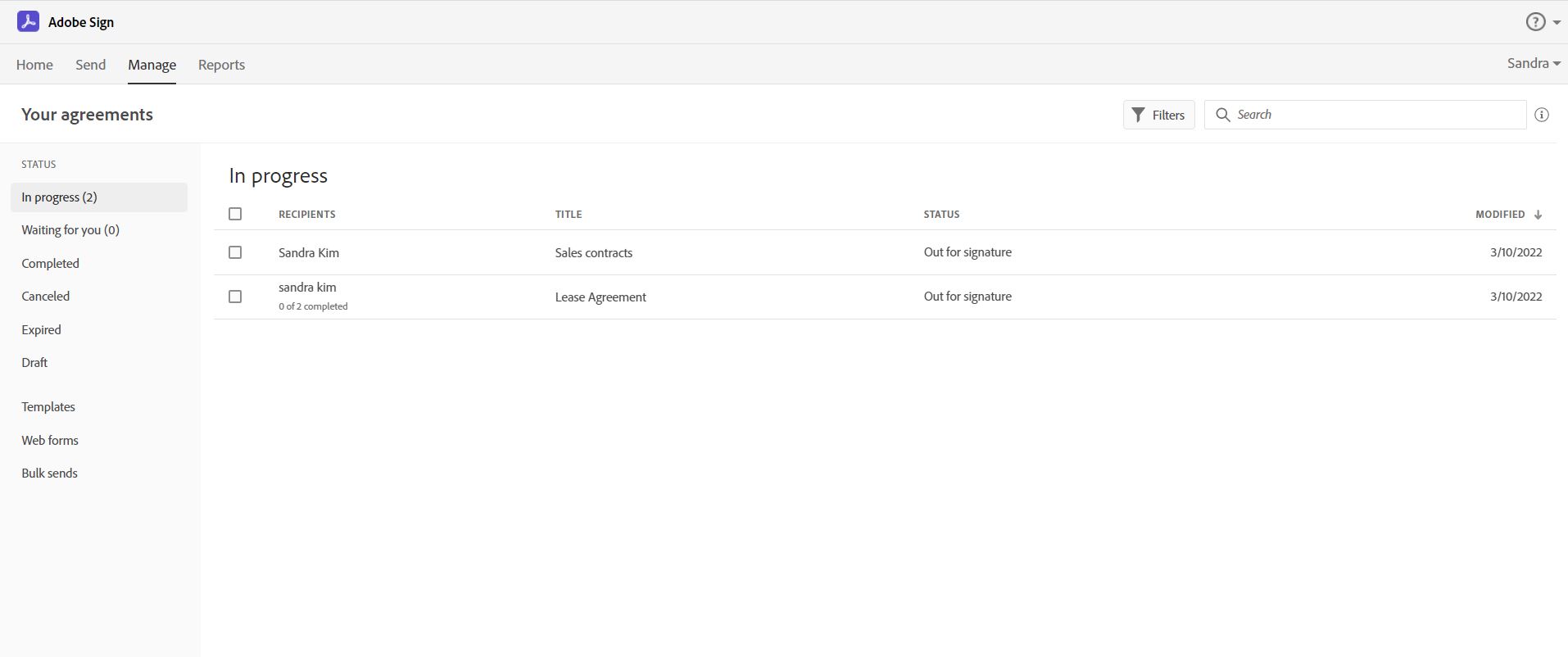
Screenshot of Send, sign, manage and archive documents with 100% legal e-signatures. Collecting e-signatures is as easy as swipe and tap with Adobe Sign. Sign from any device. Legally binding. Works with multiple apps. extremely cost-effective.Screenshot of Easily send e-signature requests to multiple recipients using Send in bulk feature.  Send a document to multiple people with one click, and every recipient gets their own personalized form ready to sign.Screenshot of Track and manage signatures with Adobe Acrobat Sign.  Get real-time visibility for every document out for signature, and receive notifications when documents have been signed.Screenshot of Create an online web form with Acrobat Sign.  It allows your recipients – whether they’re your employees or customers – to quickly access, complete, and sign critical documents without printing or mailing anything.  You will also get immediate access to the data and signatures.