AdNativia vs. Google Campaign Manager 360

Overview
ProductRatingMost Used ByProduct SummaryStarting Price
AdNativia
Score 0.0 out of 10
N/A
AdNativia is a platform for native advertising headquartered in the United Kingdom, specializing in the dissemination of ads through "recommended" content across a wide spectrum of popular media portals. This approach ensures that advertisements integrated into the user experience are less intrusive and more engaging for the audience. The vendor states that geographically, the platform is most popular in Europe, with a particular focus on the markets of Germany,…N/A
Google Campaign Manager 360
Score 9.0 out of 10
N/A
Replacing DoubleClick, Google Campaign Manager 360 is a web-based ad management system for advertisers and agencies, used to manage digital campaigns across websites and mobile. This includes features for ad serving, targeting, verification, and reporting.N/A
Pricing
AdNativiaGoogle Campaign Manager 360
Editions & Modules
No answers on this topic
Offerings
Pricing Offerings
AdNativiaGoogle Campaign Manager 360
Free Trial
NoNo
Free/Freemium Version
NoNo
Premium Consulting/Integration Services
NoNo
Entry-level Setup FeeNo setup feeNo setup fee
Additional Details
More Pricing Information
Community Pulse
AdNativiaGoogle Campaign Manager 360
Features
AdNativiaGoogle Campaign Manager 360
Ad Network Integration
Comparison of Ad Network Integration features of Product A and Product B
AdNativia
-
Ratings
Google Campaign Manager 360
9.0
Ratings
20% above category average
Data Transfer00 Ratings9.00 Ratings
DSP integration00 Ratings9.00 Ratings
Ad Campaigns
Comparison of Ad Campaigns features of Product A and Product B
AdNativia
-
Ratings
Google Campaign Manager 360
8.8
Ratings
13% above category average
Ad campaign creation00 Ratings8.00 Ratings
Ad deployment00 Ratings10.00 Ratings
Display advertising00 Ratings10.00 Ratings
Ad display and retargeting segmentation00 Ratings9.00 Ratings
Sequence targeting00 Ratings7.00 Ratings
Ad Reporting & Analytics
Comparison of Ad Reporting & Analytics features of Product A and Product B
AdNativia
-
Ratings
Google Campaign Manager 360
9.2
Ratings
17% above category average
Ad dashboards00 Ratings10.00 Ratings
Ad performance reports00 Ratings9.00 Ratings
Ad conversion tracking00 Ratings9.00 Ratings
Ad attribution reporting00 Ratings9.00 Ratings
Cross-channel ad management00 Ratings9.00 Ratings
Ad forecasting and optimization00 Ratings9.00 Ratings
Best Alternatives
AdNativiaGoogle Campaign Manager 360
Small Businesses
Amazon Advertising Sponsored Products
Score 7.7 out of 10
Google Ad Manager
Google Ad Manager
Score 8.5 out of 10
Medium-sized Companies
Amazon Advertising Sponsored Products
Score 7.7 out of 10
The Trade Desk
The Trade Desk
Score 9.0 out of 10
Enterprises
LinkedIn Marketing Solutions
Score 9.0 out of 10
LinkedIn Marketing Solutions
Score 9.0 out of 10
All AlternativesView all alternativesView all alternatives
User Ratings
AdNativiaGoogle Campaign Manager 360
Likelihood to Recommend
-
(0 ratings)
9.0
(0 ratings)
Likelihood to Renew
-
(0 ratings)
8.0
(0 ratings)
Usability
-
(0 ratings)
8.0
(0 ratings)
Support Rating
-
(0 ratings)
9.0
(0 ratings)
Online Training
-
(0 ratings)
8.0
(0 ratings)
Implementation Rating
-
(0 ratings)
6.0
(0 ratings)
User Testimonials
AdNativiaGoogle Campaign Manager 360
Likelihood to Recommend
No answers on this topic
I feel pretty neutral about Google Marketing Platform. For the longest time, my company wasn't using it because each of the features (Data Studio, Analytics, etc.) could be accessed separately. In fact, most of the time, I don't even go into Google Marketing Platform because it's easier to directly navigate to the individual platforms. There are very few features about GMP that can only be accessed from the GMP UI. The Integrations Center is probably the main feature I utilize from the GMP UI, which allows me to see a summary of the integrations I have in place across all my client properties and accounts.
Read full review
Pros
No answers on this topic
  • Setting up tracking URLs is very easy and it also helps us identify if any errors have occurred with it. This allows us track all types of conversions to the most granular level.
  • Accessing all accounts from Double Click significantly reduces the hours we spend on reporting. Any level of detail could be easily pulled out from the reporting tab.
  • A very big strength of Double Click is that it's integrated with other publishers, too, besides AdWords.
  • Automated bidding is available.
Read full review
Cons
No answers on this topic
  • The process for on-boarding new users can be difficult if they do not already have a Gmail or Gmail-linked account.
  • Difficult to troubleshoot technical issues (with the platform, with tags, etc.) because of the lack of customer support. Unclear if the agency has a dedicated team or individual to assist, and often have to deal with out-sourced support teams.
Read full review
Likelihood to Renew
No answers on this topic
Due to its adapting behavior with industry ad formats and seamless integration with publishers and DSP's, I don't see myself moving away from DCM. As we see the display advertising is getting more programatic and automated due to the rise of DSP and concept of RTB, Double Click has evolved with new advanced best practices
Read full review
Usability
No answers on this topic
The Doubleclick interface is easy and simple to get a hang of. The options are slightly limited compared to other DSPs. But, for a simple campaign, this is a great DSP to move forward with. They have a ton of data and can plug into a lot of different partners
Read full review
Support Rating
No answers on this topic
They do not have strong support team. It is tough to get answer when I need it. They always refer you to an online guide and not an actual person. If so, the person is based out of an offshore team in India and does not know the specific client goals .
Read full review
Implementation Rating
No answers on this topic
I would highly recommend asking clients to provide 3PAS tags or use an internal 3PAS
Read full review
Alternatives Considered
No answers on this topic
DoubleClick is slightly better to manage, especially in the sense of its user interface, which isn't super easy to navigate, but compared to Marin, is a lot easier. It also has a much easier process in terms of uploading ads to engines such as AdWords and Bing. I also find it easier to investigate the attribution tools in DoubleClick compared to Marin.
Read full review
Return on Investment
No answers on this topic
  • DS3 has improved ROI considerably due to its ability to make the work of a team of digital marketers to go further and improving internal efficiency.
  • There is a notable improvement in account performance for those integrated with DoubleClick as opposed to not, with better tracking, new bid strategy options, and a more responsive interface.
  • The additional fee on top of media spend is a considerable expense for a large advertiser, but the necessity of a product/solution such as this means that there is always likely to be some comparative cost.
Read full review
ScreenShots

AdNativia Screenshots

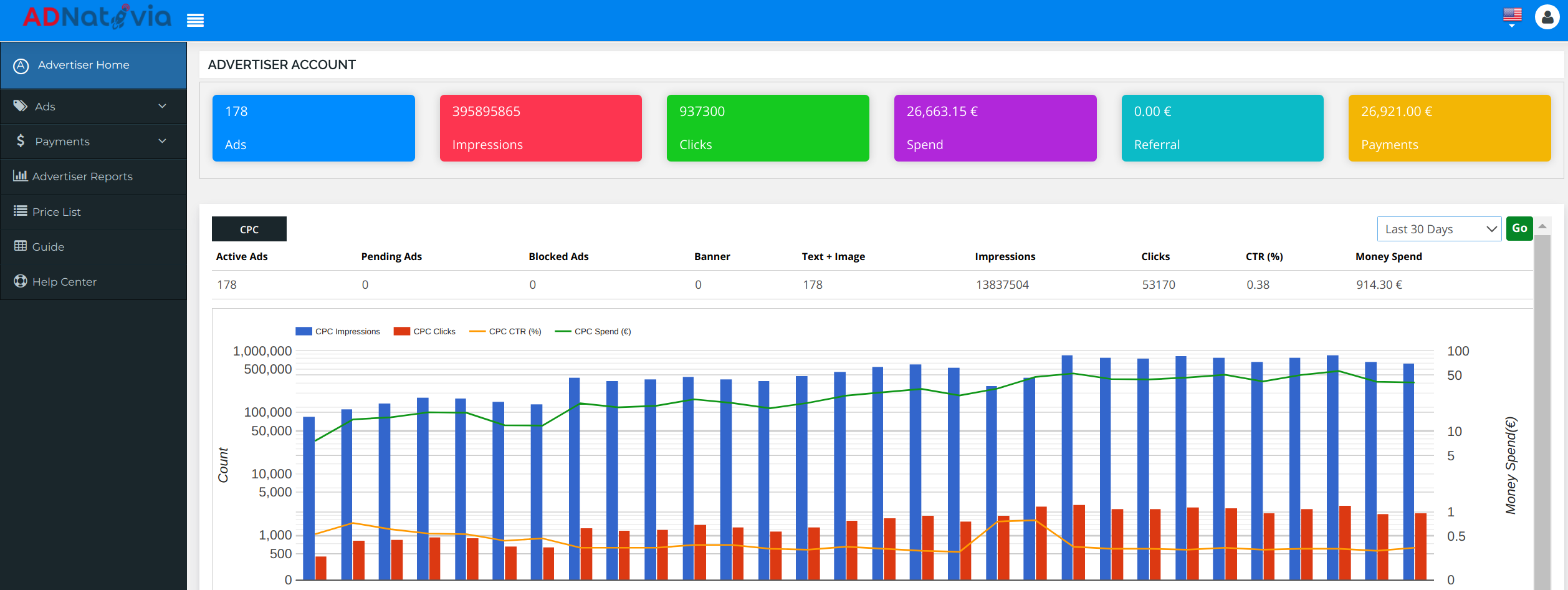
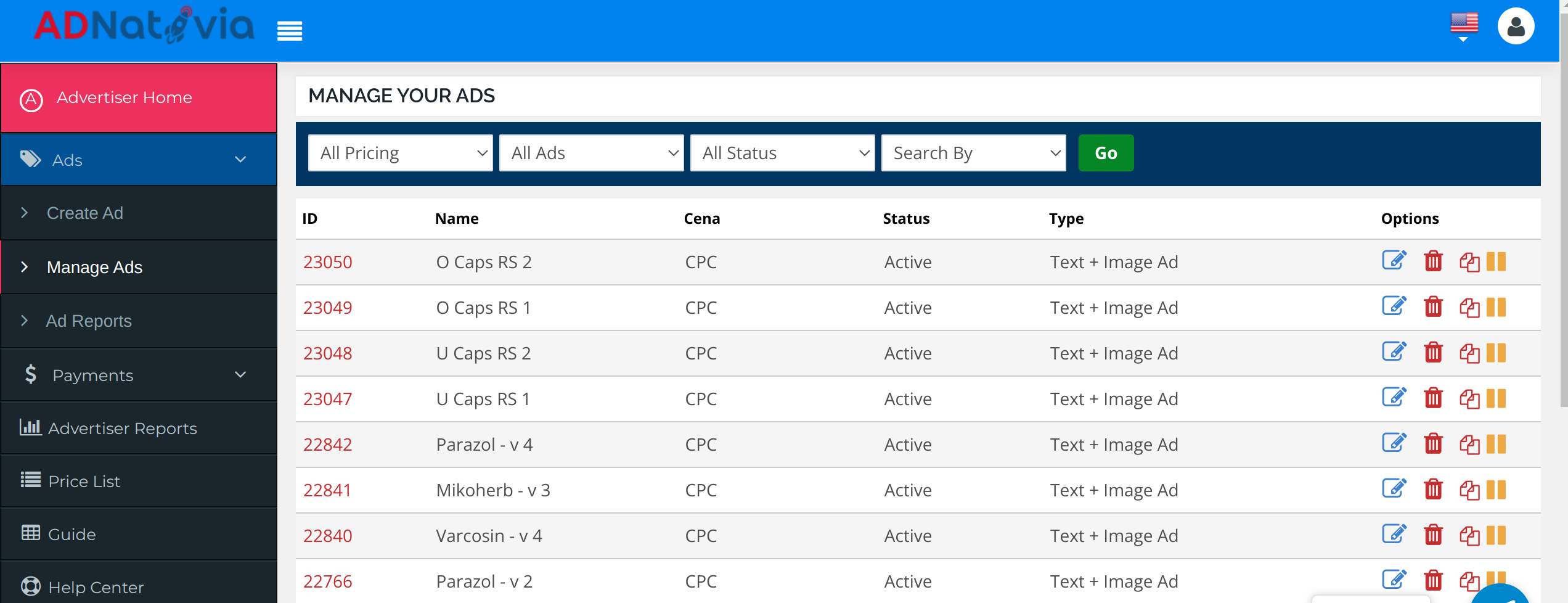
Screenshot of a dashboard screenshot from AdNativia that provides an overview of an advertiser’s account performance. The interface displays key metrics such as the total number of ads running, impressions, clicks, and overall spend, allowing for tracking and analysis of advertising campaigns. With a glance, one can appreciate the volume of traffic generated and the efficacy of the ads, highlighted by the number of clicks versus impressions. The graph at the bottom illustrates the trends over the last 30 days, presenting a comparative view of CPC impressions, clicks, and click-through rate (CTR) against the budget spent. This visual representation is an example of AdNativia’s approach to data transparency and its commitment to enabling advertisers to monitor and optimize their campaigns.Screenshot of a screenshot from the AdNativia platform that showcases the 'Manage Your Ads' section, which provides a user-friendly and efficient management system for advertisers' campaigns. The interface reveals various options for each ad campaign, such as the ability to edit, pause, or even clone an ad, giving advertisers the flexibility to quickly duplicate successful campaigns without starting from scratch. Each ad is listed with an ID, name, pricing model (CPC - Cost Per Click), current status (e.g., Active), and type (Text + Image Ad).Screenshot of a screenshot that displays the 'Create Ad' interface of the AdNativia platform, highlighting the initial step in crafting an advertisement. Here, advertisers can begin the ad creation process by entering essential details such as the ad's name, title, and the click-through URL that leads potential customers to their designated webpage. 

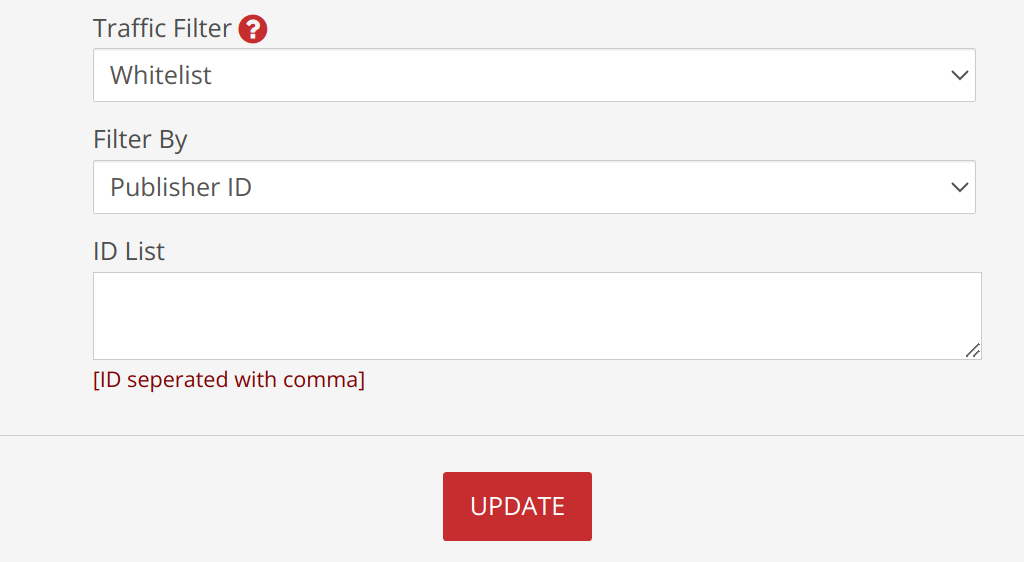
The process's step-by-step progression marked at the top, guides users from ad information to pricing, to ensure a seamless creation experience.Screenshot of a screenshot that presents the 'Traffic Filter' feature within the AdNativia platform, a tool that enables advertisers to curate the flow of traffic towards their ads. With options such as "Whitelist" or "Blacklist," advertisers can specify whether to exclusively allow or block traffic from certain sources. The "Filter By" dropdown menu is set to "Publisher ID," suggesting that advertisers can target or exclude specific publishers from displaying their ads.

Below this, the "ID List" textbox awaits a list of Publisher IDs, separated by commas, which provides a straightforward method for advertisers to fine-tune where their ads will appear. This specificity allows for greater control over the ad spend and enhances the ability to target ads more effectively to the desired audience.

The addition of macro commands offers advanced customization for tracking and optimizing ad performance. Macros like `{CAMPAIGN_ID}`, `{USER_IP}`, `{COUNTRY}`, `{DOMAIN_ID}`, `{DOMAIN_ENC}`, `{PUBLISHER_ID}`, `{PLACEMENT_ID}`, `{CLICK_ID}`, and `{CLICK_COST}` can dynamically insert relevant data points into the ad URLs, allowing for granular tracking of user interaction with the ads. These tools are essential for advertisers who want to analyze data and optimize their campaigns based on user behavior and ad placement performance.Screenshot of The screenshot highlights the 'Budget Settings' section of the AdNativia platform, where advertisers can fine-tune their campaign costs according to the quality of traffic they desire. With options to select from Top Level, Middle, and Low traffic quality, each with corresponding Cost Per Click (CPC) rates, advertisers have the flexibility to allocate their budget efficiently. 

For precise budget management, the platform allows setting different CPC rates for each traffic quality tier—Top Level CPC, Middle Level CPC, and Low Level CPC—with minimum rate thresholds to maintain competitive pricing.