Active Query Builder vs. Looker

Overview
ProductRatingMost Used ByProduct SummaryStarting Price
Active Query Builder
Score 9.8 out of 10
Small Businesses (1-50 employees)
Active Query Builder is a component for business applications which helps users without any SQL experience to work with SQL queries and get data fast. Users can get a clear view of database schema and design SQL queries with natural point-and-click actions rather than tedious typing. Active Query Builder assists novice users learning SQL and allows experienced users to analyze and understand their queries better by parsing them and building the visual diagram. With…
$199
per developer
Looker
Score 8.5 out of 10
N/A
Looker is a BI application with an analytics-oriented application server that sits on top of relational data stores. It includes an end-user interface for exploring data, a reusable development paradigm for data discovery, and an API for supporting data in other systems.N/A
Pricing
Active Query BuilderLooker
Editions & Modules
VCL Edition (Delphi, C++Builder)
$199.00
per developer
Core .NET Edition (non-visual)
$199.00
per developer
ActiveX Edition
$299.00
per developer
WinForms Edition
$399.00
per developer
WPF Edition
$399.00
per developer
ASP.NET Edition
$399.00
per developer
Java Edition
$450.00
per developer
.NET All-in-One Edition
$899.00
per developer
No answers on this topic
Offerings
Pricing Offerings
Active Query BuilderLooker
Free Trial
YesYes
Free/Freemium Version
NoNo
Premium Consulting/Integration Services
NoNo
Entry-level Setup FeeNo setup feeRequired
Additional DetailsMust contact sales team for pricing.
More Pricing Information
Community Pulse
Active Query BuilderLooker
Features
Active Query BuilderLooker
BI Standard Reporting
Comparison of BI Standard Reporting features of Product A and Product B
Active Query Builder
-
Ratings
Looker
8.3
Ratings
2% above category average
Pixel Perfect reports00 Ratings7.90 Ratings
Customizable dashboards00 Ratings8.90 Ratings
Report Formatting Templates00 Ratings8.30 Ratings
Ad-hoc Reporting
Comparison of Ad-hoc Reporting features of Product A and Product B
Active Query Builder
-
Ratings
Looker
8.4
Ratings
4% above category average
Drill-down analysis00 Ratings8.10 Ratings
Formatting capabilities00 Ratings7.80 Ratings
Integration with R or other statistical packages00 Ratings8.70 Ratings
Report sharing and collaboration00 Ratings9.10 Ratings
Report Output and Scheduling
Comparison of Report Output and Scheduling features of Product A and Product B
Active Query Builder
-
Ratings
Looker
8.7
Ratings
5% above category average
Publish to Web00 Ratings8.30 Ratings
Publish to PDF00 Ratings9.00 Ratings
Report Versioning00 Ratings8.50 Ratings
Report Delivery Scheduling00 Ratings9.10 Ratings
Data Discovery and Visualization
Comparison of Data Discovery and Visualization features of Product A and Product B
Active Query Builder
-
Ratings
Looker
6.9
Ratings
14% below category average
Pre-built visualization formats (heatmaps, scatter plots etc.)00 Ratings8.00 Ratings
Location Analytics / Geographic Visualization00 Ratings8.00 Ratings
Predictive Analytics00 Ratings4.60 Ratings
Access Control and Security
Comparison of Access Control and Security features of Product A and Product B
Active Query Builder
-
Ratings
Looker
8.2
Ratings
3% below category average
Multi-User Support (named login)00 Ratings8.70 Ratings
Role-Based Security Model00 Ratings8.10 Ratings
Multiple Access Permission Levels (Create, Read, Delete)00 Ratings8.00 Ratings
Report-Level Access Control00 Ratings8.10 Ratings
Mobile Capabilities
Comparison of Mobile Capabilities features of Product A and Product B
Active Query Builder
-
Ratings
Looker
6.1
Ratings
25% below category average
Responsive Design for Web Access00 Ratings7.40 Ratings
Mobile Application00 Ratings5.00 Ratings
Dashboard / Report / Visualization Interactivity on Mobile00 Ratings7.20 Ratings
Best Alternatives
Active Query BuilderLooker
Small Businesses
Syncfusion® Essential Studio®
Score 6.1 out of 10
BrightGauge
BrightGauge
Score 9.0 out of 10
Medium-sized Companies
React
React
Score 9.3 out of 10
Reveal
Reveal
Score 10.0 out of 10
Enterprises
React
React
Score 9.3 out of 10
Kyvos Semantic Intelligence Layer
Score 9.9 out of 10
All AlternativesView all alternativesView all alternatives
User Ratings
Active Query BuilderLooker
Likelihood to Recommend
8.6
(0 ratings)
8.7
(0 ratings)
Likelihood to Renew
-
(0 ratings)
9.5
(0 ratings)
Usability
-
(0 ratings)
8.8
(0 ratings)
Availability
-
(0 ratings)
10.0
(0 ratings)
Performance
-
(0 ratings)
6.0
(0 ratings)
Support Rating
-
(0 ratings)
8.8
(0 ratings)
Implementation Rating
-
(0 ratings)
10.0
(0 ratings)
Configurability
-
(0 ratings)
10.0
(0 ratings)
Ease of integration
-
(0 ratings)
10.0
(0 ratings)
Product Scalability
-
(0 ratings)
10.0
(0 ratings)
Vendor post-sale
-
(0 ratings)
10.0
(0 ratings)
Vendor pre-sale
-
(0 ratings)
10.0
(0 ratings)
User Testimonials
Active Query BuilderLooker
Likelihood to Recommend
It is a good one for business users who are in no way technical and do not have any insights about the backend databases and do not have any SQL experience. They can simply go in and create queries without any SQL knowledge by just using a drag and drop way..now tell me how cool is that? :)
Read full review
When you need to create a centralised dashboard for multiple stakeholders that blends cross-channel reporting. As an SEO agency reporting for clients - Looker is a great solution. It's less appropriate depending on the intended users. For instance, in my experience Looker reports have been under-utilised because they're not accessed regularly, provide too much noise or often simple PDF reports are preferred
Read full review
Pros
  • Safer way of extracting data without creation of user or providing access on the Sql server
  • Using query builder to allow wide spectrum users to create dashboards
  • Review the risk of data corruption
Read full review
  • It is very easy to start a new dashboard and configure what you want to display by just selecting/dragging from the list of available columns.
  • It is intuitive, mainly if you use other Google services like Google Sheets.
  • The look and feel is modern and nice.
  • It it very useful to have an immediate visual overview of the data in a spreadsheet.
Read full review
Cons
  • Improved query customization options.
  • Aside from some missing documentation, the features are solid.
  • Access control using either tokens or Jwt is a feature that may be enabled.
Read full review
  • I wish I could get more granular in the Google ad data, such as down to the campaign type, instead of having to see only all campaigns.
  • The setup can be time-consuming if you're not using the product regularly.
  • Editing the dashboard requires a few logins; I wish it was more seamless.
Read full review
Likelihood to Renew
No answers on this topic
We are very haooy with Looker, it provides us with all the funciomalities we need for both the day to day oerformance tracking and longer periods reporting. It is easy to use for account managers, configurable and customizable for soecialists and what is most imoortant, our clinets generally really love it
Read full review
Usability
No answers on this topic
Looker is relatively easy to use, even as it is set up. The customers for the front-end only have issues with the initial setup for looker ml creations. Other "looks" are relatively easy to set up, depending on the ETL and the data which is coming into Looker on a regular basis.
Read full review
Reliability and Availability
No answers on this topic
No objections
Read full review
Performance
No answers on this topic
Somehow resources heavy, both on server and client. I recommned at least 50Mbs data rate and high performance desktop comouter to be abke to run comolex tasks and configure larger amount of data. On the other hand, the client does not need to worry when viewing, the performance is usually ok
Read full review
Support Rating
No answers on this topic
Never had to work with support for issues. Any questions we had, they would respond promptly and clearly. The one-time setup was easy, by reading documentation. If the feature is not supported, they will add a feature request. In this case, LDAP support was requested over OKTA. They are looking into it.
Read full review
Implementation Rating
No answers on this topic
Very satisfied, easy to implement
Read full review
Alternatives Considered
In contrast, Active Query Builder was less expensive, more rapidly implemented, and received universally positive feedback from consumers. I have found that it is hard to anticipate all of the different ways that end users would want to query their data, and although I am not opposed to designing new views for end-users, it is important to keep in mind that the preferences of a single user will not be shared by all. Due to its complete visual access, Active Query Builder is the optimal choice.
Read full review
In my opinion, Looker is no Power BI. It is good, but I think Power BI is amazing. That said, in my experience, Power BI is nowhere near as easy to setup and report on Google services as Looker is. We plan to continue using Power BI for c-suite and corporate reporting, especially for internal databases, but will gladly use Looker for our marketing information for AdWords, Analytics, Search Console, and YouTube.
Read full review
Return on Investment
  • The tech depts were cleared faster and had high impact on quality
  • Active Query Builder is the perfect solution, providing comprehensive visual access to data in a safe and controlled environment.
Read full review
  • Other than some people not liking the numbers, I don't see any negative impacts; we haven't experienced that.
  • The reports help us unravel the story of our users and how they are sifting through our pages.
  • Our clients enjoy seeing the numbers to understand better what stands out on their sites.
  • The reports have helped us see what campaigns are working and where we need to tweak things.
  • The reports have enabled us to have better conversations with stakeholders about how their web pages should be modified, edited, etc., to reflect the data.
Read full review
ScreenShots

Looker Screenshots

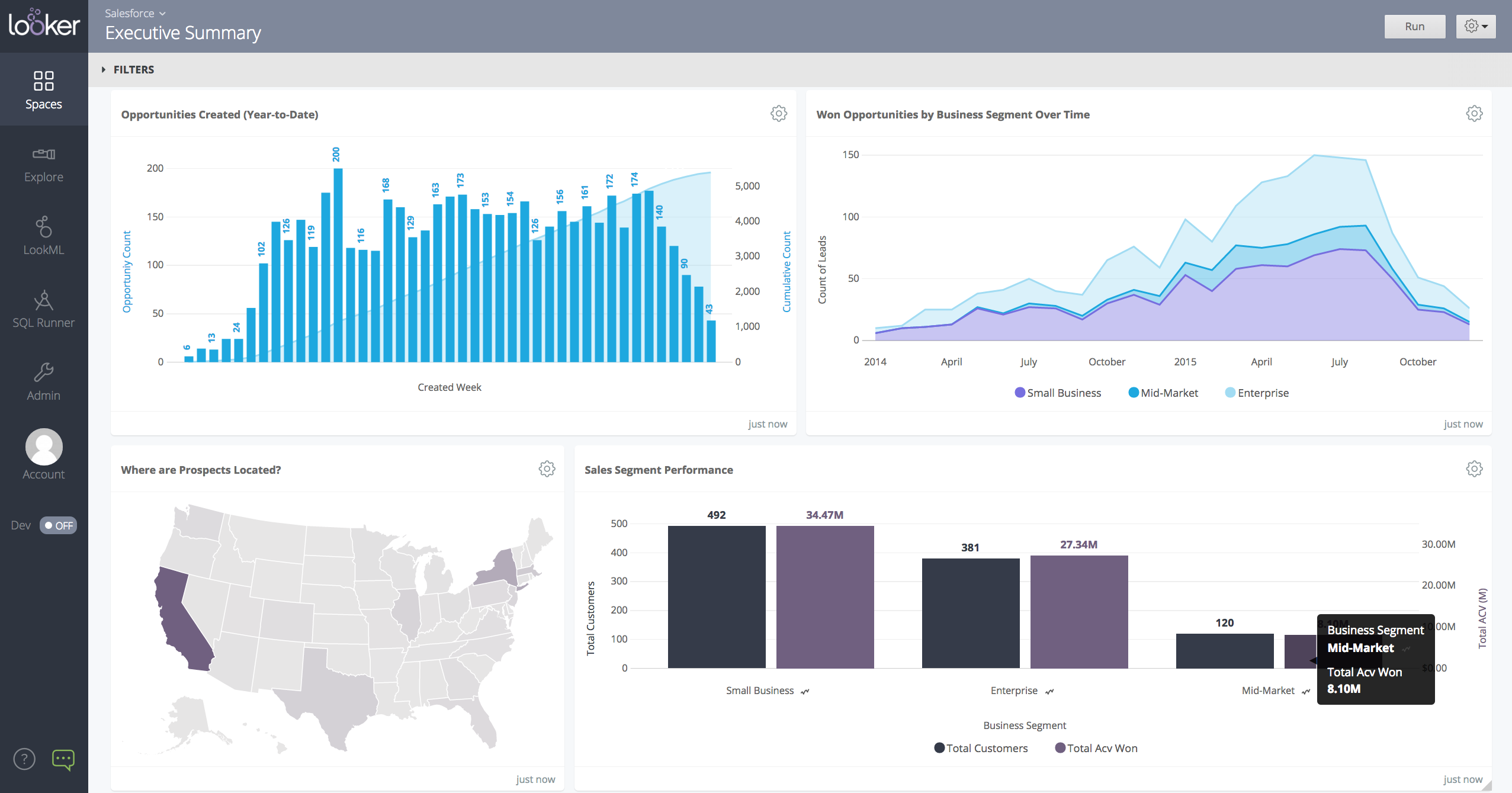
Screenshot of a Looker dashboard with a geo chart.