Action1 vs. Avast Business Hub

Overview
ProductRatingMost Used ByProduct SummaryStarting Price
Action1
Score 9.5 out of 10
N/A
Action1 is an autonomous endpoint management platform that is cloud-native, scalable, and configurable in 5 minutes. It is free for the first 200 endpoints, with no functional limits. By pioneering autonomous OS and third-party patching - AEM’s foundational use case - through peer-to-peer patch distribution and real-time vulnerability assessment without needing a VPN, it eliminates costly, time-consuming routine labor, preempts ransomware and security risks, and protects the digital…N/A
Avast Business Hub
Score 8.5 out of 10
N/A
The Avast Business Hub is a remote management and security platform for MSPs, a multi-tenant, cloud-based platform that allows MSPs and IT Service Providers to deliver layered security services to customers, protecting all aspects of their networks.N/A
Pricing
Action1Avast Business Hub
Editions & Modules
No answers on this topic
Offerings
Pricing Offerings
Action1Avast Business Hub
Free Trial
NoNo
Free/Freemium Version
YesNo
Premium Consulting/Integration Services
NoNo
Entry-level Setup FeeOptionalNo setup fee
Additional Details
More Pricing Information
Community Pulse
Action1Avast Business Hub
Best Alternatives
Action1Avast Business Hub
Small Businesses
Avast CloudCare
Avast CloudCare
Score 10.0 out of 10
Avast CloudCare
Avast CloudCare
Score 10.0 out of 10
Medium-sized Companies
KACE Systems Management Appliance
Score 10.0 out of 10
KACE Systems Management Appliance
Score 10.0 out of 10
Enterprises
KACE Systems Management Appliance
Score 10.0 out of 10
KACE Systems Management Appliance
Score 10.0 out of 10
All AlternativesView all alternativesView all alternatives
User Ratings
Action1Avast Business Hub
Likelihood to Recommend
9.4
(0 ratings)
10.0
(0 ratings)
Likelihood to Renew
9.4
(0 ratings)
-
(0 ratings)
Usability
9.1
(0 ratings)
-
(0 ratings)
Support Rating
5.0
(0 ratings)
-
(0 ratings)
Implementation Rating
10.0
(0 ratings)
-
(0 ratings)
User Testimonials
Action1Avast Business Hub
Likelihood to Recommend
For small teams having to deal with significant ammount of devices, I can't express how useful Action1 is. With very small effort, you can easily keep track of your devices, keep them up to date, deploy new software to your users, create recurring reports/alerts and so on. Initially, the 100 endpoints for free was also a nice touch. Now, even better since they increased to 200. For the forseeable future, I have not to worry about costs and still can't believe it's a full solution for free, not those freeware stuff where what you really desire is behind a cost.
Read full review
It is mostly good in any area, since it allows you to have all your computers under supervision, displaying their status, the operating system they have, the status of their antivirus, when it was last reviewed, among more very complete functions for work teams in which there are several existing equipment in use
Read full review
Pros
  • Provide a friendly and easy-to-use interface to manage all my endpoints
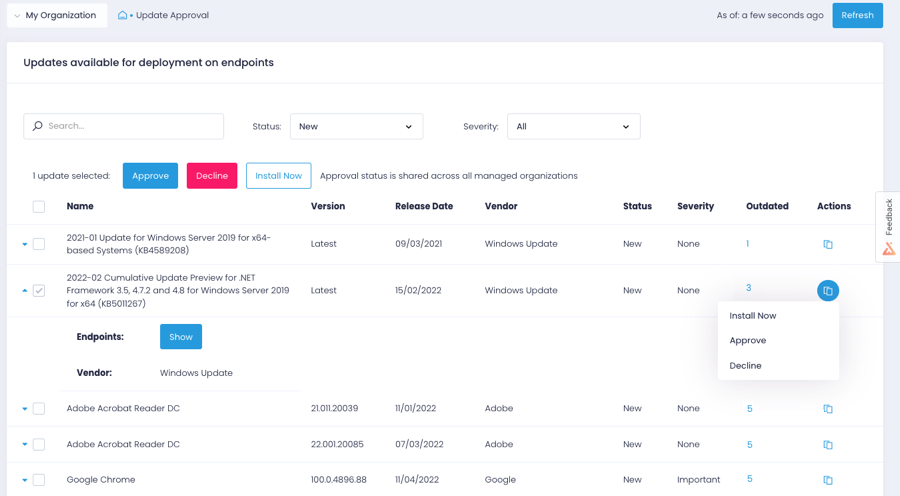
  • Provide automated patch management that can be placed on a schedule. Patch approval is easy and intuitive
  • Scan for available software updates and readily report critical updates
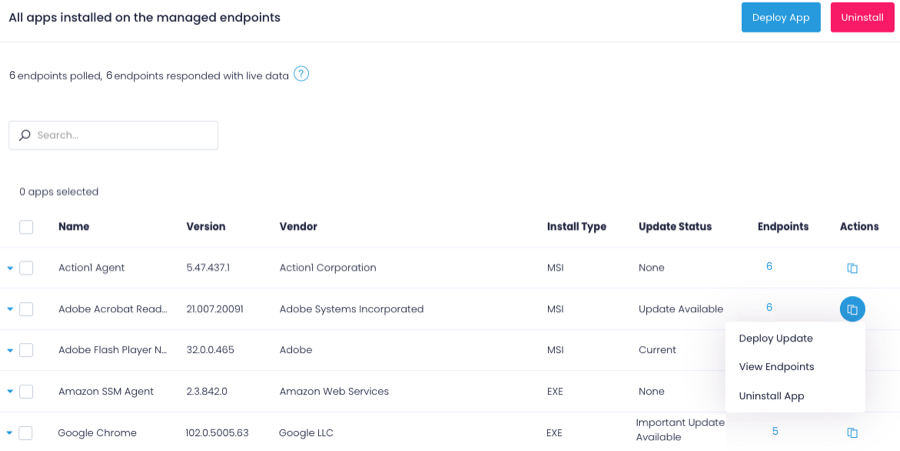
  • Uploading and installing software via the Action1 console is very easy to use
  • The app deployment works very well and fast
Read full review
  • Keep all your devices close at hand
  • Notify in real time when a virus is detected when I want to enter a website
  • Notify in real time when a virus is detected when checking an email and it is suspicious
  • Helps to increase the performance of the equipment, eliminating junk files and/or applications that have not been used for a long time
  • You can schedule a complete analysis of your computer to find out what state it is in and if any of the software files have a virus
  • Show scan reports
Read full review
Cons
  • Lots of times Action1 will identify a program that needs to be patched, but then not really have a path laid out to get that done...so they just remain as they are, but are tagged as such.
  • Really wants to replace the windows update mechanism. Resists (or did at least) you if you try to keep updates as they are and update occasionally from Action1
  • Could develop the scripts section a bit more, looked pretty sparse last time I checked it out.
Read full review
  • Show all the services that can be paid for and list them right there within the software to decide to add them and pay for them, instead of appearing from time to time or when an action is performed and saying that for better optimization pay for a service extra
Read full review
Likelihood to Renew
Price, functionality, and continuous improvement of the product.
Read full review
No answers on this topic
Usability
Agent deployment is simple (and silent) - once that is done, you're good to go. Everything is simple, centralized and very easy to work with. There isn't one aspect of this platform that requires crawling over forums and Google, it just works!
Read full review
No answers on this topic
Support Rating
I never contacted support services
Read full review
No answers on this topic
Implementation Rating
very easy to start using it.
Read full review
No answers on this topic
Alternatives Considered
After looking at different solutions, Action1 [Cloud Remote Monitoring and Management Solution] was the perfect fit for us that delivered all of the features we wanted without being as costly as some of the others alternatives we've looked at. There was no minimum endpoint count and they even offer up to 50 endpoints for free, which is really great for a small organization like us to help us lower our starting costs and still allows us to grow at our pace without having to commit to a defined amount of endpoints to start.
Read full review
This to be able to keep everything safe and secure, so that the information is well, and thus it is easier to counteract against viruses that could be presented at the software level
Read full review
Return on Investment
  • Saved hours per week on patching and able to ensure a 100% patching success rate.
  • Able to create custom alerting on potential problems as well as able to create some automation to automatically address problems.
  • Improved support to our remote locations and users.
  • Custom deployments allow us to have a mechanism to deploy custom applications we build as well as other third party applications we need to distribute.
Read full review
  • Help reduce the vulnerabilities of computers and keep them safe from the different viruses that could catch emails, websites, memories and other activities for which the organization uses computers
Read full review
ScreenShots

Action1 Screenshots

Screenshot of the Action1 dashboardScreenshot of Action1 patch managementScreenshot of Action1 software deploymentScreenshot of Action1 endpoint managementScreenshot of an Action1 vulnerabilities viewScreenshot of Action1 vulnerabilities remediation