TrustRadius: an HG Insights company

AccessPatrol by CurrentWare vs. Microsoft Purview Data Loss Prevention

Save this comparison

Save this comparison

Add Product

Recommended Comparisons

    Overview
    ProductRatingMost Used ByProduct SummaryStarting Price

    AccessPatrol by CurrentWare

    Score6 out of 10
    N/AAccessPatrol by CurrentWare provides a solution for securing company endpoints against data breaches caused by illicit data transfers and rogue USB devices. AccessPatrol can be used to block flash drives, cell phones, tablets, Bluetooth, and more. File operations alerts and permissions can be configured to alert IT administrators to suspicious file operations and proactively prevent data transfers by unauthorized users.

    $72

    per year per user

    Microsoft Purview Data Loss Prevention

    Score7.1 out of 10
    N/AMicrosoft Purview Data Loss Prevention is used to provide intelligent detection and control of sensitive information across Office 365, OneDrive, SharePoint, Microsoft Teams, and on the endpoint. It also helps prevent data loss through identifying and preventing risky or inappropriate sharing, transfer, or use of sensitive data on endpoints, apps, and services.N/A
    Pricing
    AccessPatrol by CurrentWareMicrosoft Purview Data Loss Prevention
    Editions & Modules
    10-99 Users
    $6
    per month (billed annually) per user
    100+ Users
    Volume & prepurchase discounts available. Please contact sales for info.
    Per User Per Month
    No answers on this topic
    Offerings
    Pricing Offerings
    AccessPatrol by CurrentWareMicrosoft Purview Data Loss Prevention
    Free Trial
    YesYes
    Free/Freemium Version
    NoNo
    Premium Consulting/Integration Services
    NoNo
    Entry-level Setup FeeNo setup feeNo setup fee
    Additional DetailsPricing is based on the volume of licenses purchased. There are additional discounts available for educational organizations, non-profits, managed services providers, and businesses that pre-purchase multiple-year plans.
    More Pricing Information
    Community Pulse
    AccessPatrol by CurrentWareMicrosoft Purview Data Loss Prevention
    Considered Both Products
    CurrentWare Inc.
    No answer on this topic
    Microsoft
    No answer on this topic
    Key User Insights
    Would buy again
    No answers on this topic
    93%
    Would buy again
    13 Answers
    Delivers good value for the price
    No answers on this topic
    100%
    Delivers good value for the price
    12 Answers
    Happy with the feature set
    No answers on this topic
    93%
    Happy with the feature set
    13 Answers
    Lived up to sales and marketing promises
    No answers on this topic
    82%
    Lived up to sales and marketing promises
    9 Answers
    Implementation went as expected
    No answers on this topic
    100%
    Implementation went as expected
    13 Answers
    Features
    AccessPatrol by CurrentWareMicrosoft Purview Data Loss Prevention
    Data Preparation
    Comparison of Data Preparation features of AccessPatrol by CurrentWare and Microsoft Purview Data Loss Prevention
    Feature
    AccessPatrol by CurrentWare
    -
    Ratings
    Microsoft Purview Data Loss Prevention
    8.5
    7 Ratings
    32% above category average
    Data Encryption00 Ratings8.57 Ratings
    Best Alternatives
    AccessPatrol by CurrentWareMicrosoft Purview Data Loss Prevention
    Small Businesses
    No answers on this topic
    No answers on this topic
    Medium-sized Companies
    Forcepoint DLP
    Score6.2 out of 10
    Forcepoint DLP
    Score6.2 out of 10
    Enterprises
    Forcepoint DLP
    Score6.2 out of 10
    Forcepoint DLP
    Score6.2 out of 10
    All AlternativesView all alternativesView all alternatives
    User Ratings
    AccessPatrol by CurrentWareMicrosoft Purview Data Loss Prevention
    Likelihood to Recommend
    -
    (0 ratings)
    7.8
    (13 ratings)
    Usability
    -
    (0 ratings)
    1.0
    (1 ratings)
    User Testimonials
    AccessPatrol by CurrentWareMicrosoft Purview Data Loss Prevention
    Likelihood to Recommend
    CurrentWare Inc.
    No answers on this topic
    Microsoft
    I would highly recommend Microsoft Purview Data Loss Prevention for companies that are utilizing Microsoft technologies based on the strong integrations. If a company is using other technologies (e.g Google Workspace), then Microsoft Purview Data Loss Prevention would not be a good fit and would be difficult to implement/manage.
    Incentivized
    Read full review
    Pros
    CurrentWare Inc.
    No answers on this topic
    Microsoft
    • Automatic labeling, once we've trained the naming conventions and things like that and we get the labels placed on things. One of the biggest problems that our clients face is the fact that they don't particularly know every single time exactly the data that they're trying to protect, how to identify it when it comes into the system or when they create it, right? So we're using Purview and we're using the abilities that Purview has to auto-label things based off of either taxonomy that you have produced or created or that have been automatically populated through AI. That makes it a lot easier and kind of thwarts possible user error that causes problems for organizations.
    Incentivized
    Read full review
    Cons
    CurrentWare Inc.
    No answers on this topic
    Microsoft
    • Overall, Microsoft DLP is not my number one choice because there's not much flexibility. There's a lot of restrictions and the way they set up rules a lot really restrictive. Thus it takes a lot more time for my team to build the rules and establish the controls as needed. So it's very clunky in that way and they have not improved it over the years, but I know they're trying to get a better, however it takes time because Microsoft, as we all knows, not a really security centric company.
    Incentivized
    Read full review
    Usability
    CurrentWare Inc.
    No answers on this topic
    Microsoft
    Microsoft Purview Data Loss Prevention is super difficult.
    Incentivized
    Read full review
    Alternatives Considered
    CurrentWare Inc.
    No answers on this topic
    Microsoft
    There are much more comprehensive and granular DLP solutions out there like Trellix and Sophos but ultimately they are expensive and require significant administrative oversight for implementation and deployment. For a company of our size, they are just not economically feasible. We purchased out 365 E5 tenant with Purview DLP integration from a reseller at a price that we couldn't compete with vs a standalone enterprise product.
    Incentivized
    Read full review
    Return on Investment
    CurrentWare Inc.
    No answers on this topic
    Microsoft
    • It has helped us to prevent data breaches and protect them from data loss.
    • It has strong visibility on the activities related to data copy to and from removable devices.
    • It can easily enforce the policies on group of users and also exclude some in the exclusions
    Incentivized
    Read full review
    ScreenShots

    AccessPatrol by CurrentWare Screenshots
    Screenshot of AccessPatrol's web console. This password-protected console is accessible to designated operators using a desktop or laptop that is connected to the LAN that the CurrentWare console is installed on.

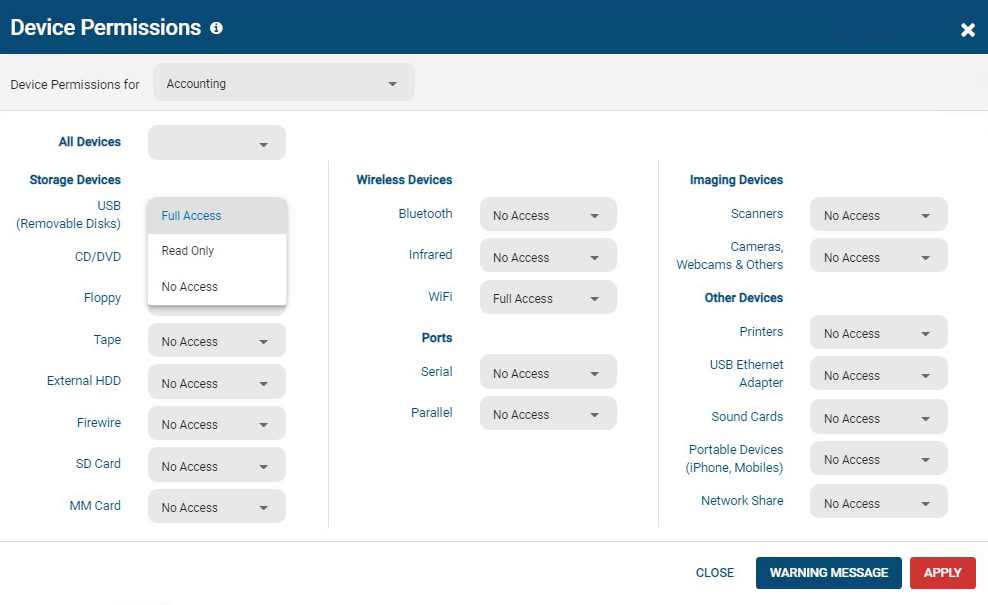
All users and computers with CurrentWare Clients installed can be managed from the console, including offsite/remote workers.Screenshot of AccessPatrol's device permissions window. This is the list of devices that can be blocked with AccessPatrol, including removable storage devices such as USB flash drives, optical media, and floppy disks. AccessPatrol can also block WiFi, Printers/Scanners, and other peripheral devices.

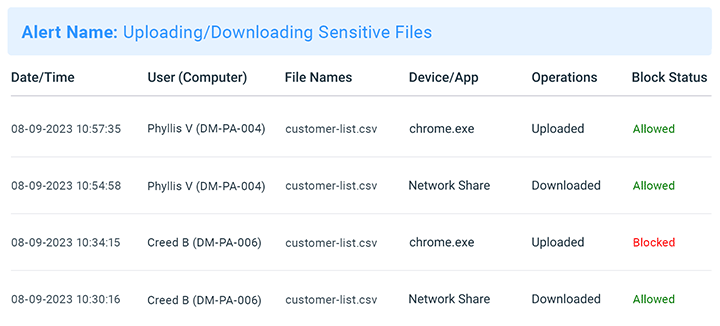
If specific USB devices need to be allowed that can be whitelisted using the Allowed List. By design AccessPatrol does not block USB-based HID devices such as keyboards and mice; blocking USBs will still allow these devices to function as normal.Screenshot of AccessPatrol's USB activity dashboards provide aggregated and granular USB activity data at a glance including file operations and blocked vs allowed devicesScreenshot of AccessPatrol's Block File Transfers window.  File transfers can be blocked based on extensions or specific file names.Product screenshotProduct screenshot

    Microsoft Purview Data Loss Prevention Screenshots

    Screenshot of pre-built policy templates to easily get startedScreenshot of DLP analytics to help recommend new policies and fine tune existing onesScreenshot of the step that enables one policy to be applied to several locationsScreenshot of then next step, that enables policies to be scoped to specific users and user groupsScreenshot of composite conditions using groups of AND /OR and exceptions with NOTScreenshot of granular restrictions for different actions