AccessPatrol by CurrentWare vs. Forcepoint Data Loss Prevention

Overview
ProductRatingMost Used ByProduct SummaryStarting Price
AccessPatrol by CurrentWare
Score 6.0 out of 10
N/A
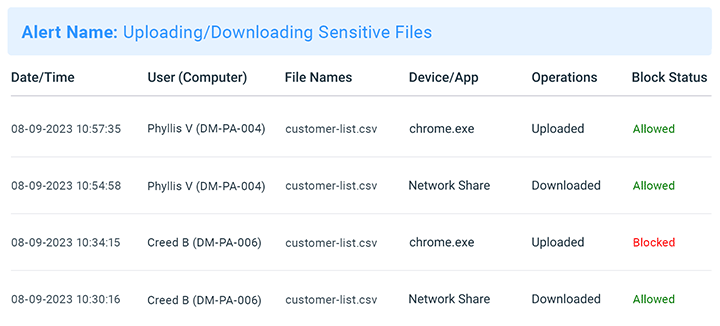
AccessPatrol by CurrentWare provides a solution for securing company endpoints against data breaches caused by illicit data transfers and rogue USB devices. AccessPatrol can be used to block flash drives, cell phones, tablets, Bluetooth, and more. File operations alerts and permissions can be configured to alert IT administrators to suspicious file operations and proactively prevent data transfers by unauthorized users.
$6
per month (billed annually) per user
Forcepoint DLP
Score 6.2 out of 10
N/A
Forcepoint DLP promises to address human-centric risk by providing visibility and control everywhere your people work and everywhere your data resides. Security teams apply user-risk scoring to focus on the events that matter most and to accelerate compliance with global data regulations. The vendor promises these benefits: Accelerate compliance Empower people to protect data Advanced detection and controls that follow the data RESPOND…N/A
Pricing
AccessPatrol by CurrentWareForcepoint Data Loss Prevention
Editions & Modules
10-99 Users
$6
per month (billed annually) per user
100+ Users
Volume & prepurchase discounts available. Please contact sales for info.
Per User Per Month
No answers on this topic
Offerings
Pricing Offerings
AccessPatrol by CurrentWareForcepoint DLP
Free Trial
YesNo
Free/Freemium Version
NoNo
Premium Consulting/Integration Services
NoNo
Entry-level Setup FeeNo setup feeNo setup fee
Additional DetailsPricing is based on the volume of licenses purchased. There are additional discounts available for educational organizations, non-profits, managed services providers, and businesses that pre-purchase multiple-year plans.
More Pricing Information
Community Pulse
AccessPatrol by CurrentWareForcepoint Data Loss Prevention
Features
AccessPatrol by CurrentWareForcepoint Data Loss Prevention
Data Preparation
Comparison of Data Preparation features of Product A and Product B
AccessPatrol by CurrentWare
-
Ratings
Forcepoint Data Loss Prevention
2.0
Ratings
102% below category average
Data Encryption00 Ratings2.00 Ratings
Best Alternatives
AccessPatrol by CurrentWareForcepoint Data Loss Prevention
Small Businesses
Paubox Email Suite
Paubox Email Suite
Score 10.0 out of 10
Paubox Email Suite
Paubox Email Suite
Score 10.0 out of 10
Medium-sized Companies
Druva Security Cloud
Score 9.7 out of 10
Druva Security Cloud
Score 9.7 out of 10
Enterprises
Druva Security Cloud
Score 9.7 out of 10
Druva Security Cloud
Score 9.7 out of 10
All AlternativesView all alternativesView all alternatives
User Ratings
AccessPatrol by CurrentWareForcepoint Data Loss Prevention
Likelihood to Recommend
-
(0 ratings)
2.1
(0 ratings)
Likelihood to Renew
-
(0 ratings)
7.6
(0 ratings)
Usability
-
(0 ratings)
2.0
(0 ratings)
Support Rating
-
(0 ratings)
5.3
(0 ratings)
User Testimonials
AccessPatrol by CurrentWareForcepoint Data Loss Prevention
Likelihood to Recommend
No answers on this topic
-Where companies need to secure their attachment, which goes outside, means from their company to outside -Where companies need to ensure their client's personal information -Where companies need DLP. They need to look for Forcepoint only, as they have the upper hand over the rest of their competitors.
Read full review
Pros
No answers on this topic
  • The Forcepoint Endpoint Data Loss Prevention Endpoint module is applied to secure data being used at endpoints, like from Microsoft Excel and other Microsoft capabilities, also other functions like email and FTP, Active Sync, etc. It secures the data in use at the endpoint.
  • The Forcepoint Endpoint Data Loss Prevention Network Module is applied for the traffic being used in network capabilities like email, FTP, and web. It also secures the data on the move in the network.
  • Forcepoint Data Discover--the capability to discover the data which is sensitive for the organization and lies across the network; with the discovery tool, we can define the data, which is important based on regulatory and compliance risk.
  • OCR (optical character recognition) capabilities also come with the Data Discover Module, by which we can see the embedded text inside the image and that helps to prevent sensitive data theft.
Read full review
Cons
No answers on this topic
  • Remote filtering is not as advanced as we would like.
  • Support time is not as quick as needed in most cases.
  • Upgrades of appliances and software is not as easy as other solutions.
  • HTTPS inspection needs to hand a valid cert and doesnt work correctly with all vendors.
Read full review
Likelihood to Renew
No answers on this topic
We have been fairly happy with the product and how it has worked. We have looked at other vendors for url filter and such and have not found one that meets our needs or does what we have been doing with Websense. The product has been fairly stable and we have only had a few issues in the past. We have all seen that it was one of the highest leaders from the Gartner Group Magic Quadrant for Web Gateways.
Read full review
Usability
No answers on this topic
For us, Forcepoint Data Loss Prevention was difficult to administer, did not work well when it did work, was incredibly expensive for the feature set you get, and was difficult to uninstall when we moved on from the software. Once it was fully set up, it worked occasionally for us.
Read full review
Support Rating
No answers on this topic
Support from Forcepoint has been lacking. When calling in with a high priority issue we rarely are able to work with a technician immediately. The queue waits are very long and when you get through there are no support engineers available and we need to wait for a call back for hours it seems.
Read full review
Alternatives Considered
No answers on this topic
User friendly solution that makes it easy to deploy and manage. Forcepoint Data Loss Prevention very effective to protecting our valuable data on endpoints and where data lives like in the Cloud, server and on-premises disk drives and its valuable to just set policies once and start utilizing Forcepoint Data Loss Prevention solution.
Read full review
Return on Investment
No answers on this topic
  • The capability of this tool to update in real time has saved a lot of time and even saved a lot of energy for researching.
  • The exchange of financial information related to customers builds up an extreme risk of data loss, which can be damaging to the customer.
Read full review
ScreenShots

AccessPatrol by CurrentWare Screenshots
Screenshot of AccessPatrol's web console. This password-protected console is accessible to designated operators using a desktop or laptop that is connected to the LAN that the CurrentWare console is installed on.

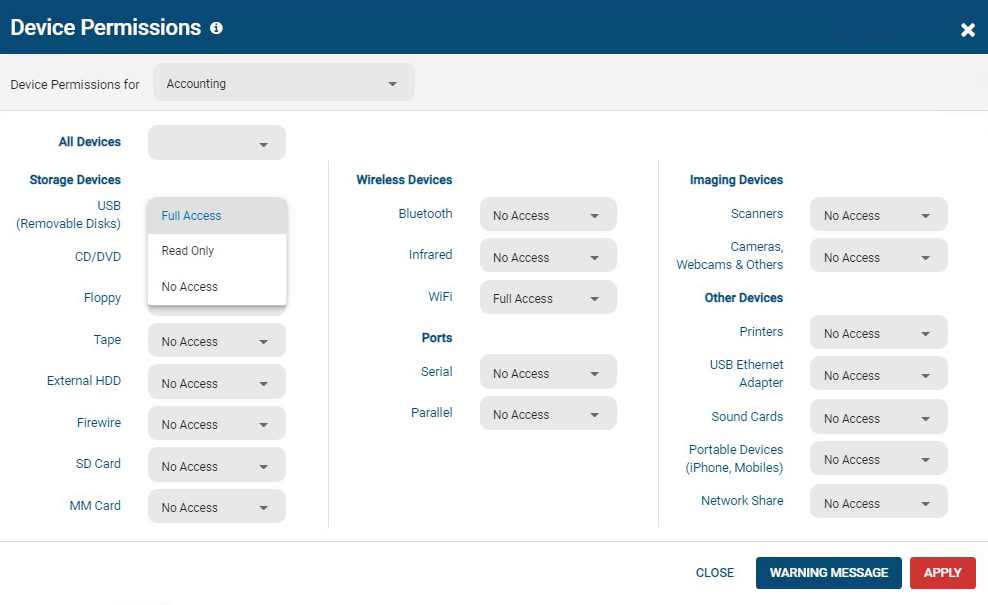
All users and computers with CurrentWare Clients installed can be managed from the console, including offsite/remote workers.Screenshot of AccessPatrol's device permissions window. This is the list of devices that can be blocked with AccessPatrol, including removable storage devices such as USB flash drives, optical media, and floppy disks. AccessPatrol can also block WiFi, Printers/Scanners, and other peripheral devices.

If specific USB devices need to be allowed that can be whitelisted using the Allowed List. By design AccessPatrol does not block USB-based HID devices such as keyboards and mice; blocking USBs will still allow these devices to function as normal.Screenshot of AccessPatrol's USB activity dashboards provide aggregated and granular USB activity data at a glance including file operations and blocked vs allowed devicesScreenshot of AccessPatrol's Block File Transfers window.  File transfers can be blocked based on extensions or specific file names.Screenshot of Screenshot of