11:11 Public Cloud vs. AWS CloudFormation

Overview
ProductRatingMost Used ByProduct SummaryStarting Price
11:11 Public Cloud
Score 6.2 out of 10
N/A
11:11 Public Cloud provides the flexibility and scalability of traditional Infrastructure as a Service (IaaS). The solution includes VMware-based public cloud and managed hyperscale cloud offerings.N/A
AWS CloudFormation
Score 8.8 out of 10
N/A
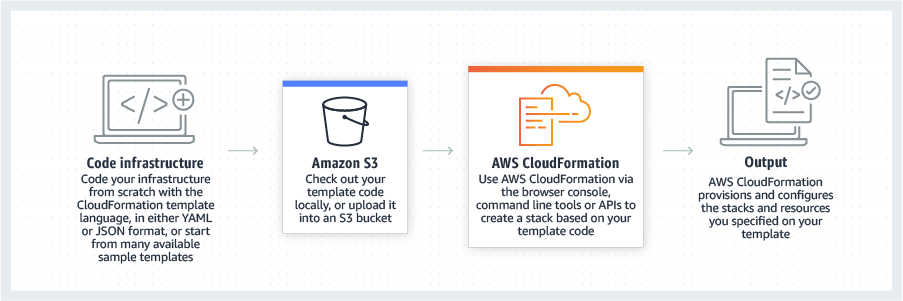
AWS CloudFormation gives developers and systems administrators a way to create and manage a collection of related AWS resources, provisioning and updating them in a predictable fashion. Use AWS CloudFormation’s sample templates or create templates to describe the AWS resources, and any associated dependencies or runtime parameters, required to run an application. Users don’t need to figure out the order for provisioning AWS services or the subtleties of making those dependencies work.…
$0
Pricing
11:11 Public CloudAWS CloudFormation
Editions & Modules
No answers on this topic
Free Tier - 1,000 Handler Operations per Month per Account
$0.00
Handler Operation
$0.0009
per handler operation
Offerings
Pricing Offerings
11:11 Public CloudAWS CloudFormation
Free Trial
NoYes
Free/Freemium Version
NoYes
Premium Consulting/Integration Services
NoNo
Entry-level Setup FeeNo setup feeNo setup fee
Additional DetailsThere is no additional charge for using AWS CloudFormation with resource providers in the following namespaces: AWS::*, Alexa::*, and Custom::*. In this case you pay for AWS resources (such as Amazon EC2 instances, Elastic Load Balancing load balancers, etc.) created using AWS CloudFormation as if you created them manually. You only pay for what you use, as you use it; there are no minimum fees and no required upfront commitments. When you use resource providers with AWS CloudFormation outside the namespaces mentioned above, you incur charges per handler operation. Handler operations are create, update, delete, read, or list actions on a resource.
More Pricing Information
Community Pulse
11:11 Public CloudAWS CloudFormation
Features
11:11 Public CloudAWS CloudFormation
Infrastructure-as-a-Service (IaaS)
Comparison of Infrastructure-as-a-Service (IaaS) features of Product A and Product B
11:11 Public Cloud
5.9
Ratings
31% below category average
AWS CloudFormation
-
Ratings
Service-level Agreement (SLA) uptime8.00 Ratings00 Ratings
Dynamic scaling7.00 Ratings00 Ratings
Elastic load balancing5.00 Ratings00 Ratings
Pre-configured templates4.50 Ratings00 Ratings
Monitoring tools5.50 Ratings00 Ratings
Pre-defined machine images6.00 Ratings00 Ratings
Operating system support5.00 Ratings00 Ratings
Security controls6.50 Ratings00 Ratings
Best Alternatives
11:11 Public CloudAWS CloudFormation
Small Businesses
DigitalOcean Droplets
Score 8.7 out of 10
HashiCorp Terraform
HashiCorp Terraform
Score 8.5 out of 10
Medium-sized Companies
SAP on IBM Cloud
SAP on IBM Cloud
Score 9.5 out of 10
Ansible
Ansible
Score 9.2 out of 10
Enterprises
SAP on IBM Cloud
SAP on IBM Cloud
Score 9.5 out of 10
Ansible
Ansible
Score 9.2 out of 10
All AlternativesView all alternativesView all alternatives
User Ratings
11:11 Public CloudAWS CloudFormation
Likelihood to Recommend
1.0
(0 ratings)
7.6
(0 ratings)
Support Rating
1.0
(0 ratings)
-
(0 ratings)
User Testimonials
11:11 Public CloudAWS CloudFormation
Likelihood to Recommend
I honestly can't think of any that couldn't be better served by Azure.
Read full review
Cloning a virtual machine creates a virtual machine that is a copy of the original. The new virtual machine is configured with the Cloning Cloning a virtual machine creates a virtual machine that is a copy of the original. The new virtual machine is configured with the same virtual hardware, installed software, and other properties that were configured for the original virtual machine. For information about persistent memory and PMem storage, see the vSphere Resource Management Guide. For information virtual machine creates a virtual machine that is a copy of the original. The new virtual machine is configured with the same virtual hardware, installed software, and other properties that were configured for the original virtual machine. For information about persistent memory and PMem storage, see the vSphere Resource. Management guide. For information virtual hardware, installed software cloning a virtual machine creates a virtual machine that is a copy of the original. The new virtual machine is configured with the same virtual hardware, installed software, and other properties that were configured for the original virtual machine. For information about persistent memory and PMem storage, see the vSphere Resource Management Guide. For information and other properties that were configured for the original virtual machine. For information about persistent memory and PMem storage, see the vSphere Resource Management Guide. For information.
Read full review
Pros
  • It has a great advantage for inter-team sharing
  • For large data, I found it convenient.
  • I have seen great structure in reports followed
Read full review
  • IaC, transactional on top of that
  • Support for "mainstream" general programming languages
  • Sharable IaC "snippets" that can setup standardized environments for individuals quickly
  • OOP techniques are available thanks to OOP languages
Read full review
Cons
  • Convoluted support systems.
  • Obstructive bureaucracy.
  • Inflexible support personnel/policies unable to do what it takes to get the job done.
Read full review
  • Error Description upon Failure Needs to be Improved.
  • Slow to create, delete or update.
  • Need to delete resources manually. It can ask before starting deletion whether to skip those resources or delete them.
Read full review
Usability
No answers on this topic
It's easy enough to get a shared template & apply it. You don't even have to download-then-upload or copy-and-paste, a publicly-accessible url works.
Diving deeper, it has enough powerful capabilities to make the life of a platform / DevOps engineer bearable.
However, you need equally deep knowledge to troubleshoot issues, when they inevitably pop up. This is the same for all IaC technologies, as they are additional abstraction layers on top of the native API provided by the cloud providers.
Read full review
Support Rating
Support is completely inflexible in their policies and procedures, turning even the simplest request into a months-long ordeal.
Read full review
No answers on this topic
Alternatives Considered
I would select Sungard on the basis of technology foundation and functionality. It gave me an ample amount of features which I could use in a better way. The inter-team communication gets a better structure than the other products. I would use it on the basis of the above mentioned points. This has proven to be a good support for my team.
Read full review
Since the product I'm involved is primarily hosted on AWS we use CloudFormation but in some other products where we have hybrid cloud deployments we prefer Terraform which is opensource.
Read full review
Return on Investment
  • Positive - Inter-department report flow was quick.
  • Positive - Defined process gave us a defined to finish our goals.
  • Negative - Detailing on each module is less.
Read full review
  • + We can standup a VPC in minutes
  • - It took a lot of inital time to set up
  • + With logging/rollback, made testing much easier.
Read full review
ScreenShots

AWS CloudFormation Screenshots

Screenshot of CloudFormation - How it works overviewScreenshot of CloudFormation - High level how it worksScreenshot of CloudFormation - Template exampleScreenshot of CloudFormation - Template inputs overview