10,000ft is a high-level resource planning and insights tool for project management that serves as visual resource planning software.
$9
per month per user
Planview AgilePlace
Score9.9 out of 10
N/A
AgilePlace is a project management solution built around flexibility, data-driven analytics, and workflow automation. The software was acquired by Planview in December 2017 to expand that company's capabilities.
$19
per user, per month
Pricing
10000ft
Planview AgilePlace
Editions & Modules
Pro
$9
per month per user
Business
$32
per month per user
Enterprise
Contact Sales
per month per user
Teams
$19
per user, per month
Scaled Teams
$29
per user, per month
Custom
Contact Sales for Quote
per user, per month
Offerings
Pricing Offerings
10000ft
Planview AgilePlace
Free Trial
Yes
Yes
Free/Freemium Version
No
No
Premium Consulting/Integration Services
No
No
Entry-level Setup Fee
No setup fee
No setup fee
Additional Details
If billed yearly, Pro version is offered at a discounted rate of $7/user/month and Business is offered at $25/user/month.
I think 10000ft is good for bare minimum project monitoring, we used it a large company because we didn't need to have exact numbers - it was just a rough idea to see where freelance resources were over burning. If, however you work a much smaller company and really need to know detailed information it's not as effective, there are many other software options that really allow for much closer and precise tracking. I would recommend 10000ft for companies that just need to monitor large freelance teams, track hours and higher level projects that are also monitored on other project management tools. It's a tool I would only use in conjunction with something else.
A de minimis incentive was given to thank the reviewer for their time. The incentive was not used to bias or drive a particular response, nor was the incentive contingent on a positive endorsement. More Info
This tool enables the visual management needed in many offshore teams to easily and quickly see the pending work, work in progress and completed work.For teams that work with a waterfall methodology and do not have AGILE internalized, I believe there are other solutions from Planview or other providers.
A de minimis incentive was given to thank the reviewer for their time. The incentive was not used to bias or drive a particular response, nor was the incentive contingent on a positive endorsement. More Info
A de minimis incentive was given to thank the reviewer for their time. The incentive was not used to bias or drive a particular response, nor was the incentive contingent on a positive endorsement. More Info
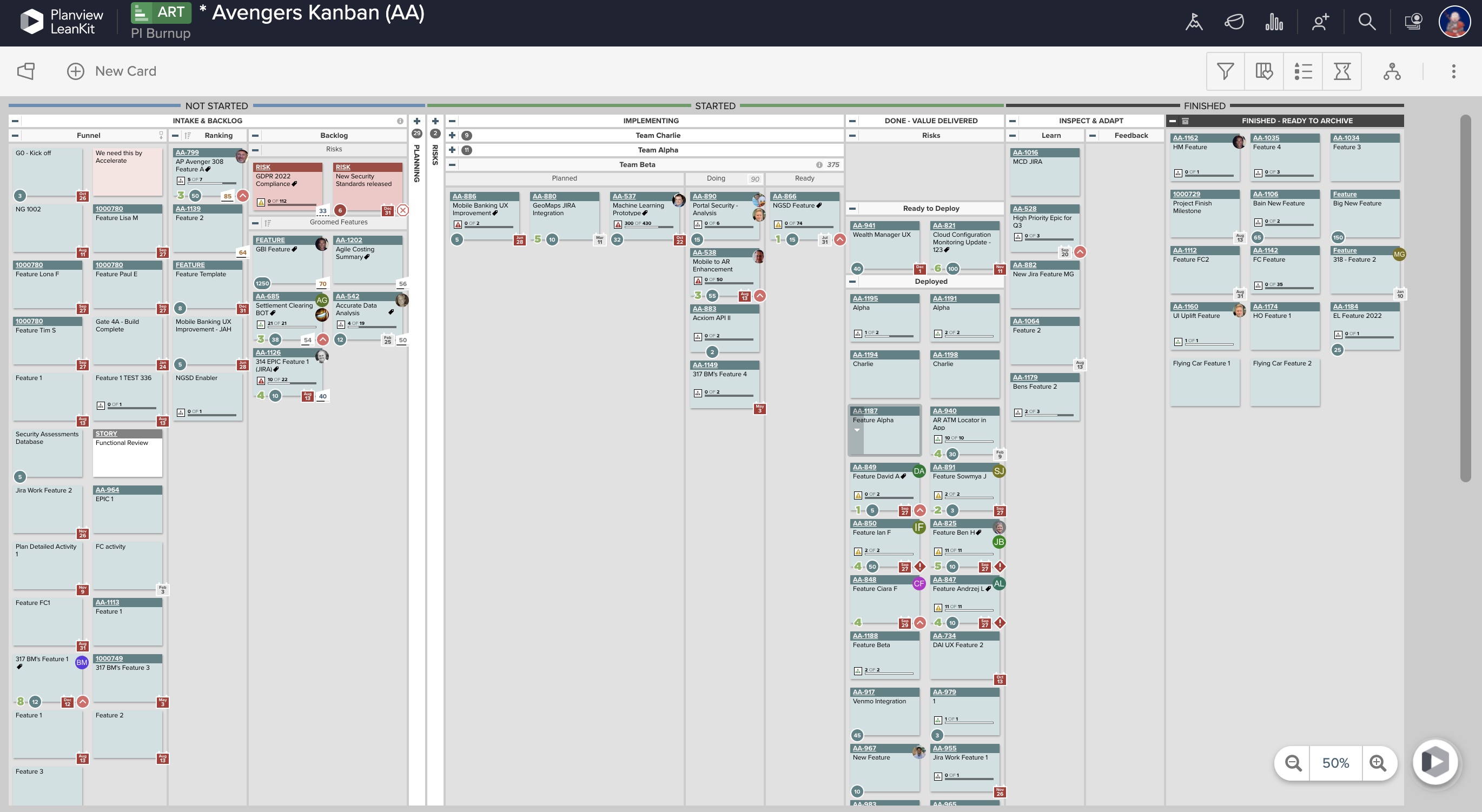
Ability to add more than 1 visual cue to the card. We use custom icons and sometimes more than 1 is appropriate but you have to choose which is most important since only 1 can be applied.
Better visibility to board access from the user administration screens. Currently have to run 1-2 reports to see this information. Would like to be able to click on a user within Configure Users and see what boards they have access to quickly.
I think there's limited uses for the tool and much more comprehensive options out there for multiple tools in one. With more people working remotely, it's hard to just use email and face to face, in some ways you need to have a tool that's a fall back and a record of where you are + where you're going
A de minimis incentive was given to thank the reviewer for their time. The incentive was not used to bias or drive a particular response, nor was the incentive contingent on a positive endorsement. More Info
LeanKit isn't the best designed Kanban system I've seen, but overall it's pretty usable. The boards I've used are pretty complex, so it can be difficult to find things. I found that searching and filtering for specific cards was somewhat of a challenge. Dragging a card from one lane to another is kind of a fun way to get things done though.
A de minimis incentive was given to thank the reviewer for their time. The incentive was not used to bias or drive a particular response, nor was the incentive contingent on a positive endorsement. More Info
A de minimis incentive was given to thank the reviewer for their time. The incentive was not used to bias or drive a particular response, nor was the incentive contingent on a positive endorsement. More Info
A de minimis incentive was given to thank the reviewer for their time. The incentive was not used to bias or drive a particular response, nor was the incentive contingent on a positive endorsement. More Info
They have been super responsive every time we need them. We built ourselves some integrations with other internal systems, and whenever we needed clarification or help to complete said integrations, they were super responsive. They have a very technical background which makes it super easy to work with when you present to them technical challenges regarding integrations or the use of their API.
A de minimis incentive was given to thank the reviewer for their time. The incentive was not used to bias or drive a particular response, nor was the incentive contingent on a positive endorsement. More Info
Every time I have reached out to the AgilePlace support team I have received a timely response in addition to professional & personal feedback. Their consultants are knowledgeable and the management team is happy to jump in and help when needed.
A de minimis incentive was given to thank the reviewer for their time. The incentive was not used to bias or drive a particular response, nor was the incentive contingent on a positive endorsement. More Info
A de minimis incentive was given to thank the reviewer for their time. The incentive was not used to bias or drive a particular response, nor was the incentive contingent on a positive endorsement. More Info
Originally, we had evaluated two other tools next to Planview LeanKit: Kanbantool and Kanbanflow. The latter was a close contestant for productive use, as it was also very customizable and a joy to work with and look at. It also had lower user fees and a mobile integration. In the end, we picked Planview LeanKit because of several reasons: Aesthetics: The look was much more clean and professional. Reporting: It was obvious from the start that we could use Planview LeanKit as a tool for improvement. API: We needed to integrate the Kanban into our central systems and Planview LeanKit API was (and still is) a way to do it. Card Headers: This sounds like a simple thing, but the headers above the titles fit our work perfectly and looked perfect, which helped the decision.
A de minimis incentive was given to thank the reviewer for their time. The incentive was not used to bias or drive a particular response, nor was the incentive contingent on a positive endorsement. More Info
A de minimis incentive was given to thank the reviewer for their time. The incentive was not used to bias or drive a particular response, nor was the incentive contingent on a positive endorsement. More Info
A de minimis incentive was given to thank the reviewer for their time. The incentive was not used to bias or drive a particular response, nor was the incentive contingent on a positive endorsement. More Info
A de minimis incentive was given to thank the reviewer for their time. The incentive was not used to bias or drive a particular response, nor was the incentive contingent on a positive endorsement. More Info